Showing posts with label amazon. Show all posts

Monday, August 21, 2017

Container Trends – Bitnami User Survey 2017 (Part 2)

Survey Says: Kubernetes

Name the top 5 container orchestration solutions.

Top answer on the board: Kubernetes


The rise of Kubernetes as the leading container orchestration tool should come as no surprise. It’s the topic of the day with Amazon and Microsoft recently joining the CNCF. In a few short years, we’ve seen hundreds of companies join the ecosystem building or modifying solutions to support kubernetes (check out the recently updated CNCF Landscape) and we’ve even seen the early days of acquisitions beginning to happen. With all that is being said and written, it’s still good to back up a trend with some good old-fashioned data.

As promised (see Container Trend Part 1), in our second post covering our recent user survey we’re taking a look at container orchestration trends. In our last blog post, we showed the increase in interest, highlighting a more than 2x increase in production container usage from 2016 to 2017. As that increase in container usage was happening, what impact did that have on how containers were being managed? Of course, we’d expect some increase in usage of container orchestration to match that growth.

We asked our users “What Container Orchestration System(s) does your company use?” and the results were surprising in a few ways. First and foremost was the enormous growth of Kubernetes. And while Mesos usage doubled, it still pales in comparison to new entrant offerings like AWS Elastic Container Service and Azure Container Service. Docker Swarm showed significant growth over that period as well, perhaps due to Swarm being included in the Docker 1.12 release. The least surprising bit of data was the sharp decline in users with no container orchestration, which is supportive of the shift from dev/test to production.

Figure 1. Container Orchestration Adoption - 2016 vs 2017


Key Stats:
  • 115% growth in businesses using Kubernetes
  • 100% growth in Mesos
  • AWS Container Service overtaking Docker Swarm in less than 1 year
Digging deeper into container orchestration, we wanted to understand the scenarios in which the various platforms are being used. Knowing there was such a huge shift to production environments in the past year and seeing the impact that had on orchestration adoption above, we wanted to understand if there was preference for one platform over another as users make that move. For the most part, platform selection for dev/test is aligned with production. Focusing specifically on 2017 in this data set, we can see that Kubernetes, AWS and Azure usage all increased a few percentage points over their general adoption numbers when users were focused on production usage, with the largest number of users selecting Kubernetes.

Figure 2 – Container Orchestration Adoption 2017 – Dev/Test vs. Production


Key stats:
  • Kubernetes is platform choice for over 50% of existing production container deployments
If you are making a decision on where to invest as you build out a container strategy or you’re looking for tools that can help you manage your Kubernetes environment, you’ve come to the right place. Bitnami can get you started on your journey with pre-packaged container images from our vast catalog of ready-to-run applications and we’re actively developing a contributing to a number of leading edge kubernetes projects.

Stay tuned for more from our 2017 Bitnami user survey. Next time we’ll break down container orchestration a little further and look at mixed usage …we’re just getting started.


Tuesday, November 29, 2016

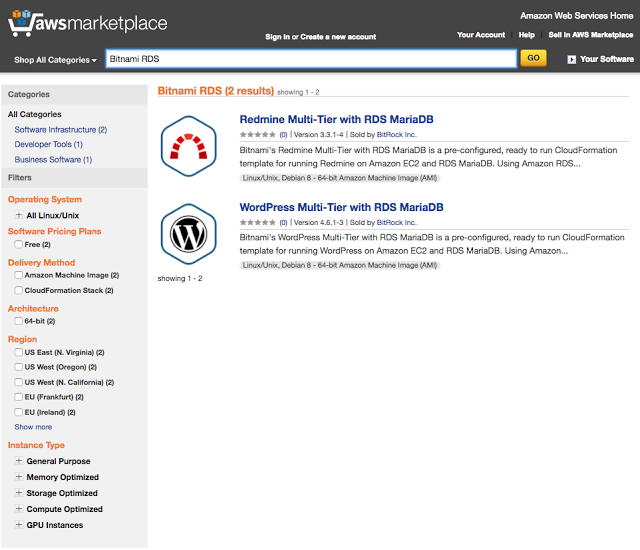
Bitnami Releases Two Amazon RDS Offerings!

Bitnami, one of the leading providers of open source software in the AWS Marketplace, is excited to announce two new offerings using Amazon Relational Database Service (RDS), Wordpress Multi-Tier with Amazon RDS for MariaDB and Redmine Multi-Tier with Amazon RDS for MariaDB. Wordpress, a popular Content Management System (CMS) and Redmine, a flexible and richly configurable project management platform, are excellent additions to any business’ needs in the cloud. 

Amazon Relational Database Service (Amazon RDS) makes it easy to set up, operate, and scale a relational database in the cloud. It provides cost-efficient and resizable capacity while managing time-consuming database administration tasks, freeing you up to focus on your applications and business.  With Amazon RDS, you can deploy a scalable MariaDB database, a popular open source relational database created by the original developers of MySQL.


Tighter integration with Amazon’s managed database offering in the cloud allows customers to take advantage of that same value with the expertise of Amazon Web Services managing the infrastructure for critical data in the cloud. These two new offerings use Amazon CloudFormation Templates created by Bitnami to orchestrate the application’s resources for the deployment. Users will be able to configure architecture suited to their needs and launch an environment into their AWS Account. All of the data required to get up and running will be pre-populated and ready for use upon deployment. 

Bitnami’s applications are trusted for their ability to provide the most up-to-date and patched versions of popular open source applications, consistently and expediently after release.  Using Bitnami’s Cloud Formation Templates allows customers to receive all of these Bitnami benefits while also being able to have an environment that incorporates the scalability and ease of use of Cloud Formation Templates.

Bitnami is excited to deepen our partnership with Amazon Web Services and our customers through the AWS Marketplace. We look forward to continuing to provide more value for our users and receiving your feedback on these applications. Please reach out to us directly if you have any requests or would like to see your applications available with Amazon RDS. You can reach out to us at enterprise@bitnami.com.

Tuesday, December 15, 2015

New Amazon T2.Nano Instances Now Supported

Amazon recently announced their new T2.Nano instances. Bitnami has been working behind the scenes with Amazon on the technical preparations and is happy to now announce our support for T2.Nano instances, effective immediately.

T2.Nano instances come with 1 vCPU and 512 MB of memory and are especially well-suited for PHP or other applications that can take benefit from burstable performance via CPU credits. In addition we’ve made a number of configuration tweaks to the images to improve their performance.

The first set of images includes Wordpress, Drupal, and Joomla. We expect more images to follow in the weeks ahead.

Take them for a test drive and let us know what you think.

Thursday, May 21, 2015

Try YouTrack by JetBrains - for free


YouTrack by JetBrains gives you the ability to manage everything related to your team’s projects, and it is now easily accessible from the Bitnami Library! From project releases to bug tracking, YouTrack can do it all. Each of YouTrack’s features will allow your team to be as productive as possible while having as much fun as possible. And we can’t forget to mention that it comes with Scrum and Kanban, right out of the box. Some other features include:
  • Powerful query language with completion and highlighting for smarter issue search
  • Agile board with Scrum and Kanban support
  • A live Dashboard with widgets for reports, issues, and notes
  • Multiple report types for more effective project management and analysis 
  • Built-in image editor to quickly crop, highlight, and annotate screenshots 
  • Flexible customization with powerful workflows and custom fields
  • REST API for automated operations and integration with third-party applications
With Bitnami YouTrack, your team can use all the features that YouTrack has to offer for free! The free version provides a full set of features for up to 10 users, including custom logos, and can be used for business purposes as well.

Get YouTrack now in just a few clicks with the Bitnami YouTrack installersVirtual Machine images, and cloud images for Amazon EC2 and Google Cloud Platform.

If you want to check out YouTrack, you can launch a free cloud demo server. By clicking the button below, you will have your own YouTrack instance running for 1 hour, for free!


Don't forget to visit our wiki to learn how to manage your installation. Still have questions? Head over to our community forum for answers.

Thursday, October 23, 2014

Bitnami Supports New Amazon Cloud Region in Germany


Amazon just announced the addition of another region for the Amazon Cloud. This new region, eu-central-1, is located in Germany! We have been working closely with Amazon previous to the launch and we are excited to announce that all of the applications on the Bitnami Library are available immediately for this new region. You can find the new AMIs in the Amazon catalog as well as in the cloud tab for each one of the apps in the Bitnami web site.

Support for the eu-central-1 region is also in the works for Bitnami Cloud Hosting and will be released shortly. Bitnami Cloud Hosting is a service that simplifies the process of deploying and managing the Bitnami library of applications and development environments in the cloud. It offers dynamic deployments, automatic backups, monitoring and other features that make it easier to run applications in the cloud. Check it out!

Friday, June 20, 2014

New “Education & Research” category within the AWS Marketplace

Amazon Web  Services has just launched a new "Education & Research" category in the AWS Marketplace. With this new category of applications, educational institutions will be able to easily browse and select software focused on teaching and research. Among others, you can find the Bitnami Moodle cloud image which provides a one click deployment for Moodle, one of the most popular open source e-learning platforms.

The University of San Francisco, University of California at Berkeley and Harvard Medical School are just a few of the AWS users who are benefitting from these educational applications. AWS also provides education programs that enable the academic community around the world to easily leverage the benefits of Amazon Web Services for education and research. 


Thursday, December 5, 2013

New Bitnami logo from 99 Designs

It’s been a long time in coming, but we have a brand new, something-we-can-be-proud-of logo. As a small and fast-growing startup, there are scores of well-deserving, high priority projects, but designing a spiffy new company logo wasn’t one of them. Until it was.  
Last month, Amazon RE:Invent 2013 was right around the corner and, given the over 100 MM hours of AWS usage we drove this year, we decided to have a booth at the show. It was now or never to have a spanking new look for the 8000+ attendees who would be there. The old logo had its time in the sun, but we wanted something that was modern and could work anywhere (website, tshirt, dog collar, tattoo, etc.).
We did what any self-respecting startup does: waited until the last minute then signed up for 99 Designs. And it was flawless. We received an overwhelming 338 designs to choose from. It wasn’t an easy choice, but we finally selected a winner from GEEDSIGN. After a few more mods, voila! Let us know what you think of the new design! (In case you forget what the old logo looked like, you can see it here)


After the logo was selected, we produced a tradeshow booth, brochure, and lots and lots of t-shirts all with less than two weeks before the event. A big thanks to our own Fred Kelly for churning out the tradeshow collateral lickety-split. 
The logo is part of a larger focus on marketing, which is apropos because I'm happy to announce that I've just joined Bitnami as their first full-time marketing director. Before Bitnami, I worked at Atlassian where I was their first full-time marketing director hired back in 2005. And now I am absolutely stoked to be part of the coolest cloud company around – and I'm secretly in love with the office location in the heart of everything San Francisco. (Ready for your own change of scene or know someone who is? We're hiring, both in San Francisco and Sevilla.)


Made it this far? Lucky you, because the first 10 people to comment on this form or below in the Comments on which Bitnami apps/stacks they're using get a free shirt. :)

Thursday, January 24, 2013

First Release Candidate for Ruby 2.0 Available in BitNami

With the release of Ruby 2.0.0 planned for February 24th, you may want to test out Ruby 2.0.0rc1, the first release candidate for this version, and test if your projects are ready for it. In order to simplify this task for you, we have just released BitNami Ruby Stack with ruby 2.0.0rc1. It is completely self-contained and will not conflict with your current development environment. You can download it, give it a try and safely remove it when you are done.

This version includes new features and improvements but it includes a few compatibility issues as well. You can find a list of changes in the Ruby repository.

If you are not familiar with BitNami Ruby Stack, it is a free package that simplifies the development and deployment of Ruby on Rails applications. This version includes ready-to-run versions of Apache 2.2.23, MySQL 5.5.29, Ruby 2.0.0rc1 and Rails 3.2.11. It also includes RVM 1.13.6, NGinx 1.2.4, Passenger 3.0.17, SQLite 3.7.10, Git 1.7.11.3 and all required dependencies.

BitNami RubyStack can be deployed using all-in-one free native installers (for Linux and Mac OS X), virtual machines and Amazon Cloud Images as always and we are happy to add Windows Azure as an additional Cloud platform. If you are not familitar with this platform yet, check our Getting Started guide to learn how easy it is to run BitNami applications through the Windows Azure management console.


Wednesday, January 2, 2013

Announcing the Latest BitNami Contest Winner - ResourceSpace!


Congratulations to the latest winner of the BitNami packaging contest, ResourceSpace! ResourceSpace is a web-based, open source digital asset management system which has been designed to give content creators easy and fast access to print and web ready assets.

Completely web based
Quick and easy search
Automatic resource preview and conversion

After a hard fight with other applications, ResourceSpace finally won the BitNami packaging contest and it will become the next application to join the BitNami family. As with all BitNami-packaged applications, it will soon be available in a complete, ready-to-run package that you can download as a free native installer, virtual appliance or cloud template for the Amazon cloud.

Would you like your favorite app to be part of BitNami? Be sure to vote for it in our online contest! Every two weeks the content is restarted and one app is selected. Previous winners were the TestLink and PhpCompta applications. Your vote can make a difference!


Thursday, November 15, 2012

BitNami Support for AWS Sydney Region

Earlier this week Amazon announced a new cloud region for Asia Pacific, located in beautiful Sydney. This means Australian customers will be able to have local access to high-performance, low latency Amazon Cloud services, instead of having to resort to the Tokyo or Singapore regions. I took us a couple of days longer than usual, but we are happy to announce that since yesterday all BitNami applications are available for deployment in the Sydney region. This includes ready-to-run AMIs in both EBS and instance-store flavors for 50+ of the leading open source web applications and development frameworks.

In addition to supporting the library of BitNami applications, we have added support for this new region to BitNami Cloud Hosting, a self-service application portal that allows you build and launch servers in the AWS cloud. With BitNami Cloud Hosting, each server can be automatically backed up periodically, monitored and resized as needed, all with the click of a button, making it the perfect complement to the regular AWS Console. Now that's what we call a real cloud :)

Monday, November 12, 2012

Learn How to Run Liferay in the Cloud

Last week, we put on a joint webcast with Liferay on running Liferay in the cloud, which is now available online. During the presentation, we cover the benefits of running Liferay in the cloud as well as some of the pitfalls to watch out for. We then discuss cloud deployment options and show you how to deploy Liferay to the cloud with BitNami Cloud Hosting.

Learn more and sign up for BitNami Cloud Hosting on our Liferay in the cloud page.


Friday, November 2, 2012

Free Webcast: Running Liferay in the Cloud with BitNami

Last week, we announced that Liferay Enterprise Edition is now available in BitNami Cloud Hosting. Liferay is a complete, Java-based portal platform. It can be used as a web content management system, an integration platform, a collaboration platform, a social application platform or any combination thereof. 

Next week, we will be presenting a joint webcast with Liferay to discuss the benefits of running Liferay in the cloud and show you how to deploy your own Liferay server with BitNami. Here are the details:

Running Liferay in the Cloud

Summary:   Everyone is talking about the cloud, but does running Liferay in the cloud make sense for your business? In this webinar, we will cover the benefits of running Liferay in the cloud as well as some of the pitfalls to watch out for. We will then discuss your options for cloud deployments and show you how to deploy Liferay to the cloud with BitNami Cloud Hosting. While this presentation will aim to provide you with the knowledge you need to decide whether or not running in Liferay in the cloud is the best option for you, we will also discuss some of the more technical aspects of deploying Liferay, as well as some sizing recommendations in terms of what setup will work best for your needs.

When: Wednesday, November 7, 2012 10:00 AM Pacific

Even if you aren't available to attend at that time, sign up! We will send you a link to view the recorded webcast at your convenience.

If you are interested in learning more about running Liferay in the cloud, you may also want to download our free whitepaper.

Wednesday, October 24, 2012

Run Liferay Enterprise Edition in the Cloud with BitNami


We are happy to announce that you can now run Liferay Enterprise Edition in the cloud with BitNami! We have partnered with Liferay to provide one click deployment and simplified management of the enterprise portal on the Amazon Cloud with BitNami Cloud Hosting.


If you are not familiar with it, Liferay is a complete, Java-based portal platform. It can be used as a web content management system, an integration platform, a collaboration platform, a social application platform or any combination thereof. Liferay customers range from federal agencies and major investment banks to media and branding-rich organizations like Sesame Street.

BitNami Cloud Hosting is a platform that simplifies the deployment and management of web applications in the cloud. It provides one-click application deployment, automatic incremental backups, resizing, server scheduling, monitoring, cloning and other features that enable businesses to deploy and manage applications in the cloud. Now that Liferay is included in the BitNami Cloud Hosting library, you can have a complete Liferay platform up and running in the cloud in minutes. Snapshot functionality makes it easy to make copies of production servers to test upgrades before deploying them or to develop new features separate from the production environment. 

To learn more, download our free joint whitepaper, "Running Liferay in the Cloud with BitNami".

You can sign up for BitNami Cloud Hosting at: http://bitnami.org/cloud and for a free trial of Liferay Enterprise at: http://www.liferay.com/bitnami-trial

Updated BitNami Django Stack


We have just released a new version of BitNami Django Stack. BitNami DjangoStack greatly simplifies the development and deployment of Django applications. It includes ready-to-run versions of Apache, MySQL, PostgreSQL, SQLite, Python and required dependencies, as well as the boto Python package that provides interfaces to Amazon Web Services. It can be deployed all-in-one free native installers, virtual machines and Amazon Cloud Images.

This version includes Django 1.4.2 which includes security fixes. For more details please visit https://www.djangoproject.com/weblog/2012/oct/17/security/.

We have also updated boto to 2.6.0 which adds support for Amazon Glacier, support for AWS Elastic Beanstalk, CORS support for Amazon S3, support for Reserved Instances Resale in Amazon EC2 and support for IAM Roles.

Enjoy!


Friday, October 19, 2012

Get started with Laravel in the Amazon Cloud


We recently released BitNami LAMP WAMP and MAMP Stacks with Laravel 3.2.10, a popular development framework (the *AMP Stacks also bundle other frameworks like ZendFramework, CodeIgniter, Symfony or CakePHP). According to its website, Laravel is "A clean and classy framework for PHP web development. Freeing you from spaghetti code, Laravel helps you create wonderful applications using simple, expressive syntax.". In this post, we will walk you step by step through how to start a project with Laravel in the Amazon Cloud using a BitNami LAMP Stack AMI.


First, you will need an Amazon account to access the Amazon Web Services (AWS) Console. Instructions on how to create your account can be found here (note that Amazon offers a free tier which provides you with a free micro instance for a year). Once you login to the AWS Console, go to the EC2 tab and launch a new Instance. You can locate the BitNami LAMP Stack image by searching in the Community AMIs tab for "lampstack-5.3.17-1", which is the latest version at the time of this writing.


Community AMIs in AWS console


Another option is to launch your AMI directly from the BitNami website (click on the button for either the LAMP or LAPP Stack towards the bottom of the page). You can select your preferred region (United States, Europe or Asia) from the drop down menu and the architecture (32 or 64 bits) and click on the appropriate link. Then, you can set different parameters from the AWS Console: availability zone, ssh key, the image type (micro, small, medium) and the security group. Once the machine is started, access it by typing the public DNS name in a browser. You should see something similar to the screenshot below.


LAMP welcome page

The next step involves connecting to the machine. You can download the private SSH key from your Amazon account. If you want to connect to the machine from Windows using the popular tool Putty, you will need to convert your private key to the .PPK format. Take a look at this tutorial if you are not sure how to perform this conversion.

On Linux or OS X, you can open a Terminal and run the following command:

$ ssh -i /path/to/your/private/key.pem bitnami@ec2-xx-xx-xx-amazonaws.com

You will see a welcome message similar to:

BitNami welcome message


All of the required files for the Laravel framework are in the "/opt/bitnami" folder:

ctlscript.sh: It is the main script to start and stop the servers.
frameworks/laravel: The Laravel framework files.
apache2: The Apache server files.
php: The PHP language files.
mysql: The MySQL database files.

One of the advantages of this structure is that you can install the BitNami LAMP Stack on your desktop machine using either the BitNami installers for virtual appliances and develop your application locally, then migrate the full directory directly to the cloud when you are ready to put it into production.

You can edit the files online with a command line editor (nano, vim, emacs) but many people prefer to edit files with a graphical editor locally. Using an SFTP client like FileZilla, you can edit the files from your computer. If you need help, see our how-to for configuration instructions.

A simple way to start learning Laravel is via the Quick Tour that you can access via web. To enable it, you should uncomment the following line that you can find in the Apache configuration file /opt/bitnami/apache2/conf/httpd.conf:

Include "/opt/bitnami/frameworks/laravel/conf/laravel.conf"

and restart the Apache server:

$ ./ctlscript.sh restart apache

Laravel framework welcome page

That's all! You can configure the database settings in the "application/config/database.php" file. You can find more info about the Laravel configuration here.

Thursday, August 23, 2012

BitNami Customer Spotlight: Nimble Books


We are often asked about how people use BitNami Cloud Hosting. As with the cloud in general, there are a huge variety of use cases and our customer base is incredibly diverse - ranging from Fortune 500s to universities to solutions providers who rely on BitNami Cloud Hosting to host applications for their clients. This is part of a series of posts that highlighting a few BitNami Cloud Hosting customers and explaining how they are using the platform to save time, money and do things that they couldn't do before they had BitNami and cloud computing.


BitNami Customer Spotlight: Nimble Books


Nimble Books provides an online platform, Nimble Combinatorial Publishing (NCP), for automatically building and publishing e-books based on content that is open access, public domain, user-contributed and other data. The NCP content repository can access more than 10 million documents, which can be selected, combined, and annotated in an almost inconceivably large number of combinations and permutations.
In order to develop the platform and launch the business, the company had to build out its infrastructure and the application itself. Nimble first used BitNami Cloud Hosting to evaluate various applications for this purpose, including WordPress, MediaWiki, Magento, Solr and Redmine, running up to ten separate servers for development and testing purposes. The ability to quickly launch instances with a wide variety of applications made it easy for Nimble to evaluate the apps that would be the best fit for its needs.
After determining that Magento, an e-commerce platform, Solr, an enterprise search platform, and Redmine, a bug-tracking system, were the best fit for the company, Nimble put them all into production. The company is currently running three separate servers for these apps: one for the production store, one for failover and another for research and development. One of the many benefits that Nimble receives from BitNami Cloud Hosting is that it can spin up duplicate machines at will for both development and scaling purposes.
For Nimble Books, BitNami Cloud Hosting provides the foundational technology upon which the product and the company itself was built. The service enabled Nimble to rapidly develop its application without losing precious development time setting up and configuring development environments and provides ongoing value with its one-click server cloning feature, monitoring and automatic backup capabilities. In addition to powering the product itself, BitNami Cloud Hosting is used to host the bug-tracking system for the development team and the Solr-based search engine. According to the company's founder, Fred Zimmerman, BitNami Cloud Hosting provided "obstacle removal and acceleration", speeding time to market while eliminating the need to purchase or configure any servers.
PDF of the complete case study is also available.

Wednesday, August 15, 2012

BitNami Customer Spotlight: Brescia University


We are often asked about how people use BitNami Cloud Hosting. As with the cloud in general, there are a huge variety of use cases and our customer base is incredibly diverse - ranging from Fortune 500s to universities to solutions providers who rely on BitNami Cloud Hosting to host applications for their clients. This is part of a series of posts that highlighting a few BitNami Cloud Hosting customers and explaining how they are using the platform to save time, money and do things that they couldn't do before they had BitNami and cloud computing.

BitNami Customer Spotlight: Brescia University College


The web development team at Brescia University College is responsible for developing and deploying new web applications for the university. Going through the process of requesting, ordering and setting up new servers could take weeks, slowing down new development projects. In addition to having to wait for new equipment, working with physical servers gave the team finite development resources, restricting their ability to experiment with new applications.
The Brescia University web development team turned to BitNami Cloud Hosting and Amazon Web Services to get fast, cost-effective access to servers for evaluation, development and testing projects, as well as for applications they only need for a short period of time. On-demand access to cloud resources allows the team to spin up new servers within minutes so that they can be productive almost instantly, while only paying for the compute resources they actually use. When a project is complete or an application is no longer needed, the team simply deletes the server instance.
The Brescia University College web development team counts BitNami as "a key component of [their] 'flexible cloud' strategy" due to the platform's ability to rapidly provision servers with popular open source applications, its one-click server cloning and automated backups. These features enable the team to deploy new servers with the apps they need in minutes, clone them to set up new development environments or test updates before putting them into production, and ensure that they always have complete copies of their servers available in the event they run into issues. As a result, the web development team gets access to the resources they need, when they need them, and is able to select, develop and deploy new applications more quickly. Because they only pay for the resources they use, they are able to achieve these benefits while staying within a limited budget. Dan Bashaw, a web developer for the university says that BitNami Cloud Hosting saves him a considerable amount of time, enabling him to "do [his] job without getting bogged down in server management and administration."
A PDF of the complete case study is also available.

Friday, August 3, 2012

Updated BitNami Django Stack Includes the Latest Security Fixes


While our focus at BitNami is on ease of use, we never want to sacrifice security and strive to always provide you with the latest stable and most secure versions of the applications that we package. Two days after the release of the latest Django version, v.1.4.1, which includes several several security fixes, we are happy to announce the release of an updated  BitNami Django Stack which includes the latest Django version. As always, the BitNami Django Stack is available free of charge as a native installer, VM and AMI for the Amazon Cloud. We are also working on updating our Django-based stacks (Review Board, OSQA and Pootle).

We have also taken this opportunity to update the Python interface to Amazon Web Services (boto) to the latest version (currently 2.5.2). Several important new features are included in this release, such as:

- Support for IAM Roles for EC2 Instances
- Added support for Capabilities in CloudFormation
- Spot instances in autoscaling groups
- Added tenancy option to run_instances
- Support for Amazon Cloudsearch Service.
- Support for Amazon's Marketplace Web Service.
- Latency-based routing for Route53
- Support for new domain verification features of SES.

A full list of recent improvements in the Python interface to Amazon Web Services is available on the project wiki.

Thursday, August 2, 2012

BitNami Cloud Tools with Amazon EC2 High I/O instance support


One of our goals at BitNami is to make it easier to develop and deploy applications in the cloud. As part of this effort, we are happy to announce a new release of the BitNami Cloud Tools stack. The BitNami Cloud Tools installer packages the Amazon Web Services command line tools together with pre-configured Java, Ruby and Perl language runtimes. It is a self-contained, easy to use distribution that simplifies the process of getting started using AWS services from the command line. In this latest release, we have updated the AWS SDK for Java, which now includes two great new features: Amazon EBS Provisioned IOPS support and Amazon EC2 High I/O Instances support.

Amazon EBS Provisioned IOPS is a new Elastic Block Store volume type for running high performance databases in the cloud. Provisioned IOPS are designed to deliver predictable, high performance for I/O intensive workloads, such as database applications, that rely on consistent and fast response times. With Provisioned IOPS, you can flexibly specify both volume size and volume performance, and Amazon EBS will consistently deliver the desired performance over the lifetime of the volume.

The AWS SDK for Java now provides a convenient enum value to use when launching the new Amazon EC2 High I/O instance type. High I/O instances provide tens of thousands of low-latency, random I/O operations per second (IOPS) to an application. They are well suited for NoSQL databases, clustered databases, and OLTP (online transaction processing) systems.

For more information, see the release notes.

For a complete list of components and versions included in the BitNami Cloud Tools Stack, visit the BitNami Cloud Tools Stack page.

Tuesday, May 29, 2012

New BitNami Apache Solr Stack


We are happy to announce a new member in the BitNami family: Apache Solr. It is an open source enterprise search platform from the Apache Lucene project. Major features include powerful full-text search, hit highlighting, faceted search, dynamic clustering, database integration, and rich document handling. Solr is written in Java and runs as a standalone full-text search server within a servlet container such as Jetty.

In this post, we walk you through configuring Drupal 7 with Solr in Amazon EC2. We will start with a BitNami Drupal image but these steps will also work for your own Drupal installation.

First, start two instances from the Amazon console, one with Drupal and one with Solr. You can search by name in the Community AMIs listings or you can start them directly from the BitNami Drupal and Solr pages. In this case, we will start an EBS image with Ubuntu 64 bit.


For the Solr instance, you must add a new rule to your security group. The default Solr port is 8983, so you should open it to connect the Drupal application with the Solr instance. If you know the IP address where the Drupal instance is running, you can enable connections only to that IP address.


Once the Solr and Drupal instances are running, you can check that both are running using the public domain names.

The BitNami Drupal Stack already has the Apache Solr Search Integration module installed, so you just need to enable the Solr Search and Access modules. If you do not have this module installed, you can install it from the Administration panel.

The BitNami Solr AMI ships an example already configured. To configure the Solr server properly for Drupal, copy the schema.xml and solrconfig.xml files from the Solr Search module. You can find these files in the "/opt/bitnami/apps/drupal/htdocs/sites/all/modules/apachesolr/solr-conf" folder in the Drupal instance. Copy these files into the "/opt/bitnami/apache-solr/solr/conf" directory and restart the Solr server.

$ sudo /opt/bitnami/ctlscript.sh restart solr

In the Solr admin panel, you should now see something like "drupal-3.0-beta16". If this is the case, everything is ready on the Solr side.


Now, we will configure the Drupal application. Click on the "Modules" -> "Solr Search Framework" configuration button and add a new connection:

URL: http://Solr_IP:8983/solr
Name: Remote Solr

Test the connection. If it is not able to contact the Solr server, check that the IP address is correct and the 8983 port is ready for connections. 


Now, configure the Drupal application to use Solr by default. Go to "Configuration" -> "Search settings" and enable Apache Solr search in the default search modules. If you have already content in your Drupal installation, you can re-index your site. This could take some time depending on your blog content. That's it! Test the setup by trying to use the search block in your site to see the results. 

You can find specific documentation for Drupal configuration with Solr here.