Showing posts with label stacksmith. Show all posts

Tuesday, January 15, 2019

Supporting Enterprise Architectures with Azure Database Services

Authored by Michael Murphy, Product Marketing Manager

Bitnami supports Microsoft enterprise customers in multi-tier environments in numerous ways, and actively works with the Azure Database Services team to provide enterprise solutions and promote best practices across our portfolio of products and projects. In light of the recent announcement regarding the availability of two new Bitnami packaged solutions pre-configured with Azure Database for MariaDB, I wanted to write this accompanying blog post to provide a bit more detail. Not only about the new offerings, but also about how Bitnami supports Azure Database Services across our product and project portfolio. Here’s how we make it easy for you to add Azure Database Services to your applications and projects.

Open source applications in the Azure Marketplace


As a long time Microsoft partner, Bitnami provides a wide range of pre-packaged, easy to deploy open-source applications and development stacks to the Azure Marketplace. ‘Bitnami Certified’ has become synonymous with ‘trusted, secure, and easy to deploy’. Many of these are multi-tier solutions.
What we just announced extends this support for enterprise architectures. We worked with the Azure Database Services team to further simplify the deployment of two of the most popular and widely deployed applications, WordPress and Drupal. While both of these applications have long been packaged and available from Bitnami in the Azure Marketplace, these new packages offer the applications pre-configured as a multi-tier solution that include Azure Database for MariaDB support.

These packages take the complexity out of configuring what would typically be a sophisticated configuration setup. Deploying one of these applications is now as easy as scrolling through the Azure Marketplace, selecting the offering, and clicking ‘launch’.

Launching one of these application packages lets you leverage the stability and security of Bitnami’s production grade application package while harnessing the power of a fully managed Azure Database, allowing you to scale quickly and reach global distribution without worrying about costly downtime.

Your applications with Stacksmith on Azure and AKS


Stacksmith, from Bitnami, is a product for packaging your own multi-tier applications. Stacksmith lets you enforce best practices during packaging, including your configuration requirements for the use of Azure Database Services, including CosmosDB and Azure Database for MariaDB.

Stacksmith provides reference architectures for Java Tomcat, .NET Core and other Linux applications that include Azure Database Service configuration with an ARM Template out-of-the-box. These architectures are customizable to your requirements, or you can define your own best practices and deployment policies. Stacksmith then codifies them into the packaging process, ensuring that your best practices for using Azure Database Services, including their settings for geo-redundancy, retention policies, tagging and networking configuration are included. Once defined, Stacksmith can apply and maintain these policies and best practices over time across your application portfolio, applying them every time the application is packaged or updated.

Doing so simplifies the process via automation, and enables you to implement and enforce database best practices for your applications. And since Stacksmith includes multi-format support, you can utilize a single packaging process to create artifacts and their database configurations for deployment to Azure and / or AKS / Kubernetes.

Check out the video below for a quick demo: 


Containers / Kubernetes applications on AKS


There are numerous ways Bitnami helps enterprise customers connect database services on AKS. As I mentioned above - Stacksmith can be used to package your applications for multi-tier deployments to your Kubernetes clusters.

You can also use Kubeapps with Open Service Broker for Azure and Stacksmith, in the following way. Kubeapps is an open source project with a web-based graphical user interface that helps you to discover Kubernetes applications and deploy them to your Kubernetes cluster on AKS. Microsoft has partnered with Bitnami to integrate Kubeapps with Open Service Broker for Azure, to allow you to create and present Helm charts that leverage Azure-native PaaS services as part of the architecture. For example, you can deploy your application tier on AKS and an Azure Database Services backend, getting the best of both worlds - a highly scalable application with a highly available database. To maintain your application with this database configuration to ensure it stays up to date and secure over time, you can use Stacksmith. You can read more about Open Service Broker for Azure here.

As you can see, we have been busy supporting our enterprise customers and continue to expand the scope of this support to make it ever easier to set-up and deploy complex environments that leverage first party Azure services.

To learn more, register for the “Create an Application-Centric DevOps Experience with Stacksmith and Azure OSS Database Services” webinar with Andrea Lam, Product Manager of Azure Database for MySQL/MariaDB at Microsoft, on January 29th at 9:00 am PST.

Tuesday, January 8, 2019

How Stacksmith helps to package, optimize and maintain your application in a consistent way

Authored by Jota Martos, Engineer 

Building an application from scratch requires a huge effort from the developers of the application. Apart from defining the pre-requisites (language, runtime to use...), it is the time you spend in writing the code and building, packaging and deploying the solution. If your application will support different platforms, you will also need to spend time building a system that meets these additional needs, and that requires knowledge and time to integrate into your system. 

On the other hand, there are cases in which you will use a commercial or Open Source application that does not require code changes but does require changes in the way it’s deployed and configured. In these cases, automating the process to package and deploy the application so it meets your needs can deliver key benefits to your business. 

These benefits include time saving from the reduced effort it takes to incorporate your changes (and not just once, but every time the application package needs updating), and it improves the consistency and quality of what you produce by minimizing human intervention and the possibility of human errors. That’s why you need to put a system in place to automatically package and deploy it every time you integrate a new change in your application.

Many organizations that are evaluating what this means look to Continuous Integration and Continuous Deployment tools (CI/CD) to solve the problem. These tools are often either overly prescriptive - they only work with particular application runtimes or cloud targets, for example - or overly flexible, requiring substantial customization for them to work in your specific environment. 

While these tools are right for many situations, they won’t be right for all. For those situations that don’t require a fully automated CI/CD software delivery process, there is still an opportunity to gain many of the benefits they can deliver without having to implement a full CI/CD strategy. By packaging the application code and configuration as deploy-ready artifacts, images, and associated deployment templates, and delivering that application in an automated, repeatable way, you can obtain the transformational effect and long-term maintenance benefits typically only achieved with CI/CD tools. Here is how it can be done.


The importance of automating the application packaging and delivery process


The process of packaging and deploying your application is time-consuming so increasing productivity when performing these tasks is always a good idea. Automating these tasks allows teams to focus more on the development of applications and less on the system details of delivering it to computing environments.

Some of the benefits are: 


  • Teams can test the changes easily and frequently, which leads to a better performance. Because the process is automated, it is easy to validate even a small change in the application by packaging and testing your solution with the changes. 
  • Automating the delivery provides a repeatable and reliable way to promote application changes - not only for the production environment, but also for the development, test or any other environment that the team uses when deploying an application.


Bitnami Stacksmith is a tool that automates and optimizes the packaging of your applications for deployment to cloud and container platforms. It also includes many more features such as multi-platform support, security checks or methods to upgrade or downgrade and maintain your application.

Stacksmith only needs the files of your already-built application (for example a .tar.gz file or your Node.js application) and it will package it for the cloud or container platform you select. Stacksmith provides a consistent, reproducible, and automated way to package your applications. 

In addition, Stacksmith can be integrated with your CI/CD pipeline. After the application itself has been built and tested, the build output can be passed to your CD tool for the deployment of the updated version of the application to the staging environment. This Bitnami blog post has some examples on how to integrate Stacksmith with other services.


Not only packaging automation: Other benefits of Stacksmith


Target different platforms in a single process

Stacksmith lets you package your applications for multiple platforms. This means you can package your software for AWS and Azure with just a few clicks. When you package for AWS, Stacksmith creates an AWS CloudFormation template for you, along with an Amazon Machine Image (AMI) that contains all the necessary dependencies for your application. When packaging for Azure, Stacksmith creates an Azure Resource Manager template for you and a managed virtual machine image. If your focus is Kubernetes / containers, Stacksmith also lets you create container images and Helm Chart that can be deployed to the container services of those platforms.  

Stacksmith also allows you to create different applications depending on the target and the files and scripts you want to package. For example, you can configure the AWS solution to use the “Java Tomcat Application with DB (MySQL)” architecture, yet configure Stacksmith to use PostgreSQL when packaging for other platforms.


Security

One of the goals of Stacksmith is to maintain your application by keeping it secure and up-to-date. To accomplish this, Stacksmith documents the components that were installed when packaging your application, then continuously checks for updates and known security vulnerabilities for any of these components. All this information is shown in the “System Packages” section of the build you select.


Here you will also find alerts about security issues affecting these components and information on how to repackage the application.

This ensures a smooth process for upgrading your application, making it easy to repackage a fixed version of the application and update existing deployments to fix any security issues.

Upgrades, downgrades, and maintenance

Stacksmith allows you to update your application at any time by uploading new files, and it also supports downgrades for when you wish to return an application to a previous state. To illustrate this, I am going to update the application by providing new files and packaging a new version of it:  


  1. From the “Applications” dashboard of your project, select the application you want to update. 
  2. Click “Edit configuration”.
  3. Provide the new files of the application and add a version number for the new build. 


This feature is extremely useful for those users who don’t have any automation in place because it gives them the opportunity to easily package any other version of the application in just a few clicks. Stacksmith will save the information about all the packages it has been generating, all the previous versions, and the new ones that will be accessible through its dashboard. 

When editing the configuration, you can also perform other tasks, such as changing the template you wish to use (in case you want to change the database the application uses, for example) or the target platforms (you can add or remove support for AWS or Kubernetes in the different versions you build).

Once Stacksmith has built an updated version of your application, it can be used  to update the existing out-of-date one.

Stacksmith's built-in stack templates are designed to make it easy to update the application in mind. In most cases, the upgrade or downgrade can be done with zero downtime for your application. This is because Stacksmith lets you use the cloud-native load balancing and other mechanisms available on each platform. In the case of AWS, Stacksmith leverages Elastic Load Balancers and Auto-Scaling Groups to achieve this goal.

In order to update an existing deployment, you only need to copy the CloudFormation template HTTPS URL, go to AWS CloudFormation console, choose the ‘Update Stack’ option, and provide the new template URL.


Automation is the key


This article explains how Bitnami Stacksmith is a really useful tool to package your application, regardless of the source of your application files or how automated your current process to package your application is. It will provide a consistent and reproducible way to package your applications, and  leads to better quality and reliability of your application.

With Stacksmith, your application can be packaged for multiple platforms in just a few clicks. Once you provide your application files, the system will package the application and make it accessible in the platforms you select. Stacksmith automates ongoing maintenance, keeping your applications secure and up-to-date by applying the latest security patches as well as the latest configuration and other internal updates you integrated into the application. 

Try Stacksmith Public for free now for your Open Source projects, or enroll into one of the other Stacksmith plans to experience all the benefits of Stacksmith.


Have questions about how Stacksmith can fit with the CI/CD tools you currently use? Contact us at enterprise@bitnami.com.


Wednesday, November 28, 2018

Working with AWS Marketplace to Bring Bitnami Container Images to You

Written by Rick Spencer, VP of Engineering at Bitnami

For the last few months, my team and I have had the pleasure of working with the AWS Marketplace team to provide a set of enterprise-grade container images for their recently announced container marketplace. We are seeing a trend towards Cloud Service Providers becoming not only the preferred container hosting infrastructure but the preferred supplier of container images for enterprises.

While the Docker Hub is still popular with developers, its importance as the authoritative source for containers has faded with the rise of Kubernetes and higher-level, application-centric packaging formats such as Helm charts. Even more important, as organizations adopt containers in production, they have a need for trusted containers that they can use as the building blocks of their own applications.

The collaboration between AWS and Bitnami ensures that developers have access to vetted, secure and up-to-date containers that are guaranteed to work with AWS container offerings. This is possible because of the certification process on the AWS side previous to publishing as well as the extensive automation on the Bitnami side for creating, testing and updating the containers.

If you enjoy the Bitnami container images in the AWS Marketplace and you need to create your own container images (or cloud images), we also have you covered: Stacksmith is an online tool that enables you to start building and, more importantly, automatically maintaining, your bespoke container images in just a few hours.

Tuesday, November 27, 2018

Simplify Golden Image Management with Bitnami Stacksmith

If you are a cloud architect tasked with maintaining your organization's golden images - the base templates that are used enterprise-wide to create development environments or package applications - then you already know that this isn't an easy ask. Some of the issues you've probably already encountered are:

  • Pushy developers, who always want the shiniest new tech and are constantly asking for updated images with newer component versions; 
  • Platform compatibility issues, which require an image to work the same way across multiple cloud platforms and clusters; 
  • Ongoing security updates and bug fixes, which need to be immediately incorporated into existing images; 
  • Enterprise audit requirements, which require you to have (and maintain) a detailed list of everything that goes into each golden image, including version numbers, license information and other metadata. 

If your enterprise holds a large catalog of golden images, each with hundreds of components, managing the tasks (and the image sprawl) described above can quickly overwhelm you (and your team).

At Bitnami, we have invested time and effort to develop a production-grade tool that addresses all of these common problems. This tool, which we call Stacksmith, makes it easy for enterprise IT teams to create, deploy, and maintain a library of golden images for cloud and container platforms. Stacksmith generates cloud images and deployment templates that can be natively deployed on major cloud vendors and container services, and also provides the tools to monitor, inspect and rebuild those images.

Some of the key benefits of Stacksmith are:

  • Comprehensive, auditable tracking of image components in a versioned manifest 
  • Configuration reuse while simultaneously optimizing for specific cloud/container platforms 
  • Automated and continuous security monitoring 
  • Fully pluggable into existing systems and workflows 
  • Better enforcement of DevSecOps requirements and policies 

Does the list above sound like it would make your day job easier? If so, find out more by downloading our white paper on golden image management with Stacksmith. Or jump right in and give Stacksmith a test drive with a free 30-day trial of Stacksmith Team.

Tuesday, September 25, 2018

Bitnami is Named a Gold Status Partner with Azure and Adds Stacksmith Consulting to Azure Marketplace

It’s Microsoft Ignite this week, so we thought now would be a great time to provide a community update on what Bitnami has been up to with Microsoft lately.

First, a bit of history. Bitnami is known for its catalog of 130+ open source applications and run-time environments that it packages, maintains, and publishes to public catalogs like the Azure Marketplace. To achieve this, Bitnami has developed sophisticated internal tooling and automation that simplifies and streamlines this process.

In March, we launched Stacksmith. A productization of this core Bitnami technology, Stacksmith is designed to help enterprise companies package and maintain their own applications for the cloud. Stacksmith takes your applications and scripts, repackages and optimizes them for the cloud and / or containers, and delivers the images and templates you need to deploy them to your chosen target.

In May, we added support for Microsoft Azure to Stacksmith. This opens up a host of possibilities, not the least of which is that best fit cloud services become available to your applications.

Now, we are really happy to announce that Bitnami has attained Microsoft Azure Gold Status, and Stacksmith is now a co-sell ready Software-as-a-Service solution in the Azure Marketplace.

In addition, Bitnami has created a Stacksmith consulting offer, which is available from the Azure Marketplace under the consulting services category. This offer is designed to provide all the support that enterprises will need to get up and running quickly and efficiently with Stacksmith.

With this offer, Bitnami will work directly with customers to:
  • Set up a Stacksmith evaluation account
  • Connect Stacksmith to their Azure account
  • Evaluate their chosen application for readiness (Linux)
  • Gather the required resources to package and deploy their application
  • Package their application for Azure and/or AKS
  • Deploy their application to the cloud
  • Demonstrate how Stacksmith maintains their application to keep it up-to-date and secure over time

Stacksmith provides the same level of trusted packaging and maintenance as Bitnami’s application catalog offerings have been come to be known. This simple, effective, and personalized consulting service shows customers how to get applications to the cloud quickly. 

Stacksmith enables enterprises to:
  • Improve their application delivery and maintenance framework, enabling enforcement of enterprise IT and security policies and operations best practices on applications
  • Simplify cloud migration by allowing enterprises to move and improve applications so they can access native cloud services
  • Provide continuous golden image security, allowing IT operations to control and secure OS and application configurations and easily replenish baselines
  • Create enterprise cloud service catalogs to centrally house standardized assets and make them available across the organization

We are pretty excited about all of this, and look forward to a super productive partnership with Microsoft that continues to expand and strengthen. Learn more about Stacksmith, or how you can use the Stacksmith consulting offer to realize immediate value by getting your enterprise application packaged, deployed, and maintained on Azure or AKS quickly and easily.

Tuesday, September 11, 2018

Integrating Stacksmith with Atlassian Bamboo, Bitbucket and Jira

By Wojciech Kocjan, Solution Artichect at Bitnami

Bitnami Stacksmith is a tool that automates and optimizes the packaging of your applications for deployment to cloud and container platforms. It also continuously monitors your applications for updates and patches, and maintains them so they remain up to date and secure.

At Bitnami, we understand that enterprise companies rarely conduct release management manually - it is a complex process used to coordinate developers, components, and steps that include application development, code check in, compiling and testing, versioning and releasing, and deploying. Typically, this process is automated using one or more Continuous Integration (CI) or Continuous Deployment (CD) tools to streamline the process.

Stacksmith performs a few critical pieces of the release management process. In certain use cases, like when trying to repackage your traditional applications so you can replatform them from your data center to the cloud, using Stacksmith as a ‘stand-alone’ solution can be the right approach. With that being said, Stacksmith provides significant value in use cases that involve ongoing application development, deployment and maintenance, which is why we felt it was  critical that Stacksmith be able to fit easily into any existing CI / CD or orchestration tooling you already utilize.

This article goes through the process of creating a fully automated setup where Bitnami Stacksmith is part of the continuous integration (CI) cycle and generates up-to-date cloud deployable assets. Here, I’ll use a Java web application that uses a database, but the process is applicable for different setups and use of the various stack templates that Stacksmith provides.

My setup will consist of the following components:


The following image shows how the process of application development, compilation and packaging will look like:


Why introduce Stacksmith to the CI / CD pipeline?


Atlassian Bamboo is a powerful continuous integration server that lets you automate release management in your CI / CD pipeline. It provides the basic tooling to define projects and how they’re built, but it’s up to its users to define the exact stages and tasks that should be run.

In many cases, when companies set up Bamboo, they focus on the development part of the lifecycle - compiling the application, then running unit tests to ensure it is working properly. Bamboo comes with multiple tasks for compiling different types of applications, running tests and understanding its results. In these instances, the continuous deployment part is given less focus - in many cases, it simply involves copying the built artifacts to a staging and/or production server, and restarting it.

Bitnami Stacksmith can improve the CD part of the pipeline by enabling packaging of the application and creating deployable assets for various public clouds as well as Kubernetes. It creates outputs specific to the target platform - such as AMIs and CloudFormation templates for AWS, VM images and ARM templates for Azure, and Docker images and helm charts for Kubernetes. Stacksmith outputs are also optimized for each platform - leveraging load balancers, databases and other services available to those specific public clouds.

Stacksmith also lets you include your IT and security policies in the process - including image OS and configuration hardening, network policies, agents and any other policies, and applies them as it builds the deployable assets. This ensures that every image is built according to Security’s specification. In addition, Stacksmith can analyze whether those have changed, and either notify you or automatically repackage your application with the latest policies.

Stacksmith packages the application and provides environment-specific deployment mechanisms that launch the application along with all of its dependencies - setting up networking, databases, load balancers and other resources. The deployments can be used to automatically or manually launch the application. It can also be used to manage existing deployments - providing a smooth way to upgrade as well as downgrade the application in development, QA or production environments.

By having assets that allow new deployments of the application to be easily launched, it’s possible to perform full deployment of the application in the cloud, run automated tests of the application and its entire environment for each build, and validate the exact setup it will be run in.

The following illustrates how performing continuous packaging fits into the CI / CD pipeline:


Bitnami Stacksmith provides additional value by constantly monitoring the components that went into the deployable assets. It monitors trusted sites for new releases and security updates for your application's components, provides alerts when available, and offers a simple repackaging process.

Integrating Jira, Bitbucket, Bamboo and Stacksmith


First, I’ll set up Atlassian Jira, Bitbucket, Bamboo and Bitnami Stacksmith and show how the suite of tools work together to provide a CI / CD pipeline that includes the creation of deployable assets. Next I will show how this pipeline performs end to end testing by launching the application in the cloud and verifying that it is working correctly. Finally I’ll update the deployment provided the application or deployable asset tests were successful.

The components and setup


The first piece of software is Atlassian Jira. It’s an issue and project tracker that is used to track projects - specifically to track the progress of application development as well as all the issues related to it.

Second application is Atlassian Bitbucket - it’s used for storing the source code of the application. It’s configured to be linked to the Bitbucket and Jira servers, following the process in Atlassian documentation.

Third element is Atlassian Bamboo - it is the continuous integration (CI) server that allows you to define build plans and run them to create cloud deployable assets from the application’s source code. In order to have all the data available across all Atlassian apps, Bamboo is linked with Jira as well as Bitbucket. And since Stacksmith will be used to do the actual packaging and creation of the deployable assets, Bamboo will also be linked to Stacksmith.

The final and centrally important element is Bitnami Stacksmith - the tool that will actually create the assets that will be deployed to the cloud. All that is needed to set up Stacksmith is to sign in (if you don’t already have a subscription you can sign up for a free trial), and go through a very easy process of onboarding your AWS or Azure account.

Defining the CI pipeline - from source code to deployable assets


Now that all of the applications are set up, I can configure them so that the process of going from source code of the application to deployable assets that I can run in the cloud is fully automated.

Building application from source code with Atlassian Bamboo


I’ll start with Atlassian Bamboo. I’ve created a very basic build plan that packages the application - simply checking out the source code from Bitbucket server and using Maven to build the application from source code.


Bamboo will now monitor the source code in the Atlassian Bitbucket server, and will perform a new build every time the application source code changes. Thanks to the links that have been set up in this integration, all of this data is also accessible from Jira.

Creating deployable assets using Bitnami Stacksmith


Next I need to set up Stacksmith, so it can be used to build the deployable assets. The first step is to set up the application definition in Stacksmith - this involves selecting the specific stack template you will use. The stack template informs Stacksmith about the type of application you are packaging and its requirements. In this case, I will select the  "Java Tomcat Application with DB (MySQL)" stack template, which informs Stacksmith to handle Tomcat set up and create the database, leveraging cloud-native resources if possible (such as RDS on AWS or Azure Database for MySQL on Azure). This step only has to be done once, and can be done via Stacksmith Web UI, its APIs, or the Stacksmith CLI.

The next step is to integrate Atlassian Bamboo with Stacksmith. This can be done with the stacksmith-cli tool that provides a convenient way to trigger rebuilds of an application in Stacksmith, retrieve the build log in real time, and get results back. All of the Stacksmith APIs, as well as the CLI tool, are available to all Stacksmith users - including those using the free trial.

The stacksmith-cli is used inside a CI tool such as Atlassian Bamboo. To configure integration with Stacksmith, a simple YAML file with configuration for the CLI tool is created - Stackerfile.yml. Here is a sample contents of the file:

appId: bitnami/apps/7cbf4630-8c6d-0136-d7fb-66a676282717
appVersion: 1.0.0
files:
  userUploads:
   - target/myapp-1.0.0.war
  userScripts:
    boot: boot.sh

The appId specifies the application identifier that’s provided by Stacksmith. The appVersion field specifies the version to pass to Stacksmith. The files section specifies the files to upload - the application file(s) as well as the scripts that Stacksmith should use.

The target/myapp-1.0.0.war file was built by Maven (as described earlier in this article) in Bamboo. The boot.sh file is a boot script and includes application-specific logic and specifies how to provide the application, with details required for connecting to database.

The Stackerfile.yml can either be written manually or generated programmatically - such as using the Maven filtering functionality to create the file with appropriate placeholders.

The last thing that is needed is to create a helper script called build-with-stacksmith.sh that calls the *stacksmith-cli* to build the application. Here’s the contents of the script:

#!/bin/bash

set -eu -o pipefail

stacksmith auth login --access-token "${STACKSMITH_ACCESS_TOKEN}"
stacksmith build

The Stackerfile.yml, boot.sh and build-with-stacksmith.sh files are committed to the repository with the source code of the application, which makes it possible to call them directly from Bamboo.

Setting up Bamboo to trigger a build in Stacksmith is easy. It requires setting up the stacksmith-cli binary on the Bamboo server. Then all that is needed is to create an additional step in the build plan - running the build-with-stacksmith.sh script from the source code repository.


The STACKSMITH_ACCESS_TOKEN environment variable is passed to the script and contains an API token that can be retrieved using the stacksmith-cli.

This new step can be tested by manually running a new build, which calls the CLI tool and  triggers a new build in Stacksmith. The link and live information about the build is also shown in Bamboo at build time, and is accessible after the build finishes.


Bamboo is already monitoring the source code repository in Bitbucket for changes - any new change to in the application code will now trigger a rebuild, performing a full automation from source code to deployable assets.

Continuous deployment to the cloud


At this point our application is packaged and Stacksmith has created the charts or templates that will be used to launch the new deployment or update an existing deployment - Helm charts for Kubernetes, CloudFormation templates for AWS and ARM templates for Azure. This enables you to create a test deployment and run additional tests against the application as well as upgrade the application version in the development, QA or production environments. The Stacksmith API or the stacksmith-cli tool can be used to retrieve the outputs from the packaging process.

Having an simple way to deploy the application makes it easier to run tests of the entire cloud deployment. All that’s needed is a relatively small script that can be run from Atlassian Bamboo - to simply retrieve the template URL, launch a test deployment and run tests against the application.

Below is a sample shell script that runs tests using AWS. Deploying to Azure or using helm charts is very similar, except they use different client tools.

#!/bin/bash

# unique name for the deployment
stack_name=teststack-$(date +%Y%m%d%H%M%S)-$$

# template URL is retrieved from Stacksmith and passed as argument
template_url=$1

# launch the template in AWS or fail immediately
aws cloudformation create-stack --stack-name "${stack_name}" \
  --template-url "${template_url}" || exit 1

# (wait for cloudformation stack to be launched)

# retrieve URL of the application from AWS
url=$(aws cloudformation describe-stacks --stack-name "${stack_name}" | jq -r \
  '.Stacks[0].Outputs[] | select(.OutputKey == ("PublicDnsName")) | .OutputValue')

# run test and store whether it succeeded
./application-tests.sh "${url}"
code=$?

# delete the deployment
aws cloudformation delete-stack --stack-name "${stack_name}"

exit ${code}

The application-tests.sh script should perform application specific tests, getting the URL that the application is available. It should indicate if the tests have failed using non-zero exit code. The tests can include anything - such as interacting with the application via APIs and/or web automation tests.

Similar to the build-with-stacksmith.sh file, this script can be committed to the application source code repository and set up to be run as a task in Bamboo.

Deploying an updated version of the application in various environments is very similar - the only thing that is needed is to update the existing deployment - using aws cloudformation update-stack command instead of create-stack. For example:

#!/bin/bash

set -eu -o pipefail

# unique name for the deployment
stack_name=teststack-$(date +%Y%m%d%H%M%S)-$$

# template URL is retrieved from Stacksmith and passed as argument
template_url=$1

# launch the template in AWS or fail immediately
aws cloudformation update-stack --stack-name "deployment-staging" \
  --template-url "${template_url}"

# (wait for cloudformation stack to be updated)

The script above will update the existing deployment in AWS and wait to ensure it has succeeded. It should also be committed to the application source code repository and invoked as a task from Bamboo. It should be invoked after the tests of the deployment have passed.

The packaged application can also be manually launched from the Stacksmith Web UI. Launching the application into any cloud simply requires choosing the right build and clicking the Launch button:


This starts the process of deploying the packaged application, redirecting the user to the cloud provider’s console and finishing the process - for AWS this is done using the AWS CloudFormation Console. For Azure, this starts the process of deploying an ARM template in the Azure Portal.


Monitoring application for security issues and updates


Stacksmith provides functionality to ease the maintenance of your applications. It continuously monitors the components that make up the deployable assets (such as system packages), checking for updates and known security vulnerabilities. It alerts the user about security issues as well as whether updates are available that resolve the security issues. It also provides convenient manual options or fully-automated and continuous ways to repackage the application.

This ensures a smooth process for upgrading your application, making it easy to repackage a fixed version of the application and update existing deployments to fix any security issues.

Summary


As this article has demonstrated, it is easy to utilize our set of APIs and CLIs to integrate Bitnami Stacksmith with Jira, Bitbucket and Bamboo. This combination enables you to set up a fully automated pipeline that starts with source code and ends with the creation of assets you can deploy to the cloud.

The Stacksmith APIs and CLIs can also be used to integrate with other popular CI / CD tools. It is easy to apply the same steps we discussed here to an environment that utilizes Jenkins, GitLab and many other solutions.

Package, deploy, and maintain your own application today. Sign up for the Stacksmith 30 day free trial and find out how easy it is!

Get started with Stacksmith now!

Have questions about how Stacksmith can fit with the CI / CD tools you currently use?  Or want a personalized demo?  Contact us at enterprise@bitnami.com.


Thursday, September 6, 2018

The Rick and Martin Show - How to get a MEAN application running on the cloud in minutes

Bitnami’s VP of Engineering Rick Spencer and Martin Albesetti, Director of Engineering for Stacksmith, introduce the basics of Stacksmith in this first episode of a new series of vlogs - The Rick and Martin Show. In this episode, Martin demonstrates how to get a MEAN application running on the cloud in minutes and highlights a few of the features to maintain that application. They introduce configurations scripts, build targets, and other essential concepts as well.


Monday, August 13, 2018

Self-service Apps - Automating the Packaging-to-publishing Experience for Kubernetes with Bitnami Stacksmith and Kubeapps

Do you have the need to make containerized applications available to your internal teams? Here is a great way to accomplish not only that, but also automate the workflow associated with packaging, launching, and updating these applications. Learn how combining Bitnami Stacksmith and Kubeapps can provide a marketplace experience from within your current Kubernetes cluster. You can use this one simple workflow to package, deploy and maintain the applications you have developed, the commercial software you have customized, or the older applications you are migrating.

Stacksmith provides automated application packaging and ongoing maintenance of your applications. Kubeapps provides a complete application delivery environment that empowers users to launch, review and share applications. Together they offer a powerful packaging-to-launch experience for Kubernetes applications.

We created a brief how-to video that shows you how easy it is to integrate both Stacksmith and Kubeapps with your preferred artifact repository (such as JFrog Artifactory or ChartMuseum). Doing so streamlines and automates the packaging, updating, and publishing of your applications to a Kubernetes cluster.

In the video, we demonstrate the following:
  • Use Stacksmith to package a .Net Core application for Kubernetes
  • Once packaged, Stacksmith pushes the container image to the registry and the Helm chart to the artifact repository
  • Kubeapps scans the artifact repository and makes the application deployable with just a few clicks
  • The application gets launched via Kubeapps
  • Over time, components of your application will need updating (security and package updates are tracked by Stacksmith). Re-package your application with Stacksmith
  • Stacksmith pushes the updated container image to the registry and the Helm chart to the artifact repository
  • Kubeapps fetches the new version of your application


Besides the convenience and automation provided by integrating Stacksmith and Kubeapps with the repositories that store and verify assets, are there other benefits? Yes - doing so provides an end-to-end solution that maintains trust between development, security and operations. Now you can ensure that your code, dependencies, security policies, operations scripts and orchestration come from a trusted repository, and that they will get securely and continuously packaged.

Generate, maintain, store and present - trusted applications from trusted artifacts

And Bitnami can deliver these benefits regardless of your level of DevOps sophistication, whether you are using only basic tools or have a fully automated process in place. It is easy to integrate the packaging, distribution, and maintenance capabilities we are talking about here into any existing tool chain or DevOps process.

Learn more - check out the video and visit the Stacksmith and Kubeapps pages.

Wednesday, August 1, 2018

Announcing New Stacksmith Features - Git Repository Support, Customized Deployment Templates, and CLI beta

Since launching Stacksmith this spring, we have been busy collecting feedback from our early enterprise customers in order to prioritize new feature developments appropriately. One of the consistent pieces of feedback we heard, whether they’re using Stacksmith to move-and-improve existing applications to the cloud, or upgrading their software delivery pipeline for containerization, has been the need for Stacksmith to work seamlessly with existing systems, tools, and workflows. We’re happy to announce several new features now available to address these requests.  Here is a brief overview of the most important improvements.

Oh, and if you are interested in getting a personalized walkthrough of these new features and / or Stacksmith in general, please email our Customer Success team at customersuccess@bitnami.com and we will be happy to set up some time with you.

Integration with Git repositories

Developers typically use a version control system as a 'source of truth' for their application code, and GitOps encourages operations, security, and support teams to follow similar practices. Now, Stacksmith aligns with this best practice via its support for Git repositories.  This new feature enables application runtime configurations and app customization scripts to be stored and tracked from a Git repository.

This means you no longer need to upload your build and configuration scripts manually to Stacksmith. You can now simply place them in your repository, provide the repository URL to Stacksmith, and Stacksmith will fetch them from there.

To make things even easier, Stacksmith continuously monitors your repository, and will show when and what changes have been made.


For example, if you need to make an OS configuration change, add new application dependencies, or modify your boot logic for your application, all you need to do now is update the script and check it in to Github.

This new feature is a another great example of how Stacksmith makes it easy to keep your applications up to date and secure while further automating your code to cloud pipeline!

Stacksmith currently supports public Git repositories with this feature. If you would like to connect to a private repository that requires authentication, please contact us at customersuccess@bitnami.com.

Customizable deployment templates

The Stacksmith packaging process produces not only a VM or container image, but also the deployment template you will need to deploy your image on your target platform. Stack templates are the place in Stacksmith where the policies that will end up in the deployment template are defined.

Stacksmith provides a set of default stack templates that cover most common scenarios, but some companies want the ability to customize these templates to their specific requirements.  Now you can.

The Stacksmith administrator can now create customized stack templates, and make them available  for others to use in the packaging process.


This gives the operations team a tremendous amount of flexibility in defining what the final deployment template will include. For example, it lets them add extra options at deploy time, define additional services like load balancing for the application, establish that the application should be exposed on a public IP, specify that a specific database type should be used, or pass additional configuration definition across to the application.

This new feature enables your operations team to further ensure your specific policies and best practices are included in the application packaging process.

Stacksmith CLI - In Beta

We’ve released an important improvement to the Stacksmith API in the form of a documented CLI. These tools are designed to make it easy to link Stacksmith to an existing CI system such as Jenkins, TeamCity or CircleCI, and enable teams to get deployable artifacts whenever a change in their application code is landed.

In combination with the release of the CLI, we are also implementing support for long lasting authentication tokens. Combined, these improvements enable you to embed and automate Stacksmith's processes into your existing pipeline. Using this CLI, you can enable automatic application rebuilds when dependencies or application code is changed.   

You can find this CLI, along with documentation and a sample integration, at https://github.com/bitnami/stacksmith-cli. We’re releasing the CLI in beta form at this point so we can better understand your use-cases and integration challenges. Issues and PRs are welcome on Github!

Try out these new features on Stacksmith today, or reach out to our customer success team at customersucess@bitnami.com for a customized walkthrough.

Thursday, July 26, 2018

Speak with Bitnami Stacksmith experts at Gartner Catalyst 2018


We are excited to be a sponsor for the Gartner Catalyst Conference in San Diego on August 20th-23rd. During the conference, we will show you how your company can optimize your DevOps pipeline by automating your application packaging for today’s cloud and container platforms, and continuously maintain them to ensure they stay up-to-date and secure.

Stop by our booth to discuss how to package and maintain your applications today. Our experts will show you exactly how Stacksmith can improve, automate, and simplify your DevOps process. Not a cloud expert? No problem. Not interested in re-architecting your applications? No problem. Not interested in changing your current CI / CD process? No problem. Come see how Stacksmith meets you where you are!

If you are going to be at Gartner Catalyst, login to your event portal and schedule a meeting with us here.

Here is how Bitnami Stacksmith addresses the current pain points that you might be facing:

Application/Cloud Integration

  • Package your applications for multiple platforms and formats, using one simple tool
  • Simplify cloud migration and access cloud services from your applications - without having to re-write them!

Application Architecture/Development

  • Automate application packaging and deployment template creation
  • Improve your security profile and the interworking between developers, security, and operations
  • Streamline application maintenance

Cloud Computing/Cloud Architecture

  • Package for the cloud and containers with a tool that brings the platform specific knowledge and optimizes your application for your target platform
  • Migrate to the cloud and access powerful cloud services you can’t access today

For $325 off your Gartner ticket, use the coupon code CATSP16 when registering for the event. We look forward to seeing you there!

Would you like to try out Stacksmith now? Sign up for a free trial here.

Tuesday, July 24, 2018

The Rise of Application-Centric DevOps - How Treating the Application as the Asset Increases Trust and Security in the DevOps Process

Written by Matt Small, Head of Solution Architecture

Application-centric DevOps

DevOps is about running applications not infrastructure.  For all we talk about DevOps, closing the gap between code running in dev and code running in production, it’s odd that Ops is still forced to take an infrastructure-centric view of the world, while Dev continues to take an application-centric one.   Shouldn’t we care most about the application itself?  After all, it’s the sum total of all the parts of an application--the code, the dependencies, the infrastructure, the deployment policies, the integrations--that is valuable to the business.

The solution to this--packaging everything required to install and run an application on a target--was solved a long time ago for desktop software with installers.  Since then, the steady waves of disruption to both engineering and operations practices have led to the decentralization of applications and infrastructure alike and proliferate ways to address and automate all of it.  Interestingly though, the idea that we should be taking all those increasingly distributed and disparate components and version controlling them as a package has not been compellingly reincorporated.

How did we get here?

In Ops, IaaS forced us to consider that infrastructure existing at any given moment is not, in fact, a given.  We planned for failure.  We imaged things and launched infrastructure from those images.  When that proved to be too inflexible for the agility of cloud, we adopted launch-time configuration management and orchestration as a best practice.  Let’s start with a golden image that’s versionable.  Let’s layer in scripts to configure the machines, also versionable.  Let’s tie it all together with orchestration so we get a fully functional deployment that can run the application that Dev provided us.

PaaS promised to simplify this tier by tier.  We incorporated that into our orchestration and stitched these services together with IaaS and other API-driven resources, again in the aim of running the code that Dev provided us.

Meanwhile, Dev ran down the path with ubiquitous source control, continuous integration and continuous code deployment processes.  We ensured they too could iterate quickly, partying on issues, testing and releasing early and often, breaking and fixing things with haste.

Then Dev hopped to the other side of the philosophical lemniscate with containers.  Suddenly Dev is the one imaging things and could hand something to Ops to run in staging or production that they had just been running locally.  Immutable image building was back in style and each tier could be more easily versioned once again.

Containerless...ahem...serverless is the next wave washing over us.  The code just runs in the box[es].  Pay no attention to the man behind the curtain!  Now we can incorporate all the best microservices from the most appropriate providers, and the middleware that glues them together with the datastores they need.

Ops trudged along and while they were happy to argue less frequently with Dev about what's going into the box, they were simultaneously dealing with exploding application architecture complexity.   We continue to do our best to stitch things together.  Though increasingly we’re dealing with broadly heterogeneous environments leveraging containers, instances, APIs, managed and unmanaged services (RIP CMDB).  An application can be made up of one, some or all of these.

What’s the alternative? 

Reconverging on the center of the DevOps leminscate, and bringing back the application-centric view of packaging and versioning everything as a unit. Take the code itself, its build dependencies and boot logic, the orchestration required to configure and deploy it and the governance policies it needs to follow to successfully run in a target platform, and make that an immutable, versionable object.  You now have the packaged concatenation of DevOps.  In this approach, the leminscate connects, it doesn’t overlap and chase its tail.  It creates a trusted handshake between development, security and operations whereby all of their requirements, opinions and policies are converged.


Dev maintains control over the application, its version, the explicit dependencies they care about and the application’s boot logic within their tool chain.  Ops and security lock things down, orchestrate the requisite cloud services, and integrate deployment and operational dependencies and policies using their preferred tool chain.  The creation of a versionable, immutable, deploy-ready Application Package during the asset build and assembly process ensures that everyone’s requirements and policies are factored in at a point in time.   Whenever we have a question about what is running and how, everyone knows exactly where to look--the Application Package.

When fully automated, the upstream CI tool converges the code and places a trusted code asset in an artifact repository and development manages their dependencies and application configuration requirements in source control.  Continuous Application Packaging consolidates the code and other artifacts with the policies and automation required to run it whenever there is a change and places a trusted Application Package back into the artifact repository.  Changes can be triggered by new code updates or external events such as a CVE that affects an included system package.  Downstream, a CD tool or orchestrator would pick up that Application Package and deploy it.  The deployment automatically wires up everything that was packaged in as a requirement, such as operational monitoring and logging tooling.

By acknowledging and packaging the hand-off of applications from Dev to Ops, we are  establishing new trust in the Enterprise between these teams, that their requirements, policies and opinions will be factored in.  We are allowing them to work with their preferred tooling and specialize in their domain knowledge.  We’re advancing our understanding of immutability by applying those principles to the entire application.  And we’re preparing ourselves for the next wave of disruption as applications continue to break apart into microservices, functions, and whatever the next building blocks will be called.

Packaging applications is as easy as v1, v2, v3 with Bitnami Stacksmith.  Stacksmith does the packaging, logs everything that goes into them and continuously monitors components and repackages applications with security and system package updates.  It provides a self-service and/or API-driven way for Dev and Ops to finally close the gap.

Thursday, June 28, 2018

Maintaining your image-based application deployments


By Martin Albisetti, Senior Architect

The model shift to image-based deployments

In a previous post I covered why, once you decide to move to the cloud, you will likely also want to switch to image-based deployments (also called “immutable infrastructure”). This is because the way IaaS and PaaS infrastructure is designed and maintained is different than the way you managed servers in your data center. If you don’t make this switch, you will encounter a host of challenges that will likely result in poor serviceability and, ultimately, frustration on your part.

For example, clouds give you elasticity so you can use resources on-demand and scale up and down as needed over time or for small spikes in usage throughout the day. But to gain this, you must give up relying on the stability of each individual server or instance. In the cloud, you will find yourself spinning up new servers a lot more often than you did in the data center (some auto-scaling scenarios might be doing this several times an hour), so time-to-serve is crucial. And if you intend to do server configuration after they’ve booted, you can expect many minutes of wait time – perhaps even in the 30-minute range – before you can start serving requests. There’s also the risk factor that moving bits around on a system and downloading from different sources on the internet will tend to be flaky, and these processes might fail more often than you’d like them to and need to be restarted from scratch.

What we built into Bitnami Stacksmith to help you with the shift

In order to be able to do image-based deployments, building an image needs to be easy, repeatable and fast. This is because now (in the image-based deployment world), incorporating an update means creating an entirely new image, not, as was the case in your data center, deploying only the component that changed.

Stacksmith is one of the easiest ways to create a deployable image. Stacksmith will not only take care of all the underlying work needed to build an image, but it also produces a target-specific deployment template – a Helm Chart, AWS CloudFormation Template, or Azure Resource Manager (ARM) Template - so the output is immediately deployable.

Whether using the UI or the API, Stacksmith carefully narrows the inputs it takes, so at the end of the process you not only get a built image in your own cloud account, but, to the extent possible, a guarantee that the process will be reproducible tomorrow, or in 6 months.

Stacksmith also makes it incredibly easy to rebuild your image to incorporate updates - it is exactly one button click away.

The other crucial area where Stacksmith provides real value here is with its approach to monitoring for updates. We automate this process as well, so you don’t have to spend your time monitoring trusted sites manually.

Stacksmith approach to maintenance - focus on updates, enhance with CVEs

When a new security issue hits the press, the conversation typically hinges around a CVE number and, if it’s disruptive enough, a codename. It’s important to understand the issue that was reported, as it’s common for issues to only affect specific scenarios that may not be yours.

However, when we built Stacksmith, we instead focused on updates first. It’s rare for you to be able to mitigate issues without updating the software involved, so when designing and building the tool we made sure we provided a really solid way of tracking system updates as well as making them trivial to apply.

There’s also the occasional update that fixes an issue that’s not strictly security-related, but due to unforeseen circumstances requires certain packages to be updated in order to keep functioning properly. Kernel updates to run well on top of fast-changing cloud providers and tls certificates come to mind.

Then, on top of updates, we’ll layer CVEs to let you understand how important it is to apply the updates, what your risk exposure is, and be able to track and mitigate security issues across hundreds of applications from one place.

System package updates and language runtime dependency updates

Traditionally (and generally), dependencies in the Linux world were sourced from the distribution’s repositories. Sourcing your updates from the system package like this meant you didn’t have to worry about whether all the software components fit and worked together, and gave you assurance that licensing and security concerns were taken care of by deep experts in those communities.

But as the pace of change in open source software started to accelerate, with more contributors, changes, and new projects created daily, the Linux distributions could no longer keep up with certain parts of the ecosystem.

Applications started using more and more dependencies from their language runtime repositories, and more importantly, those are the dependencies developers tend to care about and update more frequently. And these dependencies are easier to track, as they are part of the normal development workflow.

So when we designed Stacksmith, we decided to treat these two types of updates separately, and focus first on the system package updates, as these are less accessible to developers and typically the ones that get neglected.

How Stacksmith handles updating

For every image that gets built, Stacksmith extracts the package manager’s state at the very last step of the build process, and captures all the system dependencies that were installed - with their exact version numbers as well as which repositories were used to install them. This information forms what we refer to as the components manifest - a comprehensive and detailed listing of all of the components of your application package (this manifest is also an incredibly valuable tool for auditing, but that is a topic for another post).

From then on, Stacksmith tracks the relevant repositories, compares them to the components manifest, and records whenever an update is available. Stacksmith then alerts you to the availability of these updates through the product UI, and, optionally, notifies you or automatically kicks off a new image-build process that incorporates the updated packages.

Stacksmith UI showing a list of packages that have updates available

It is important to note that I am talking about tracking both the default dependencies that are required for your application to run on the target platform, as well as dependencies that get brought in later. For example, to offer greater flexibility during the image creation process, Stacksmith lets you define actions and dependencies via the use of scripts, which get invoked at the moment the package is being built, booted, or even run for the first time. To Stacksmith, these are all key to the goal of creating a final, deployable image, so the repositories that get added at this phase are also tracked. Stacksmith goes to great lengths to ensure we are tracking everything that’s important to keep each image updated.

Throughout all of this, there’s very little you need to learn or understand about how images are built. As a user, you deal with the end result, which is a familiar bootable image that will have your software installed and be ready to work.

As you can see, one of our goals at Bitnami is to keep lowering the barrier of adoption of cloud-native approaches to software development and deployment. Learn more at bitnami.com/stacksmith. And expect to see additional features get added to Stacksmith that lower the barrier to adopting Kubernetes and public clouds.

Friday, March 2, 2018

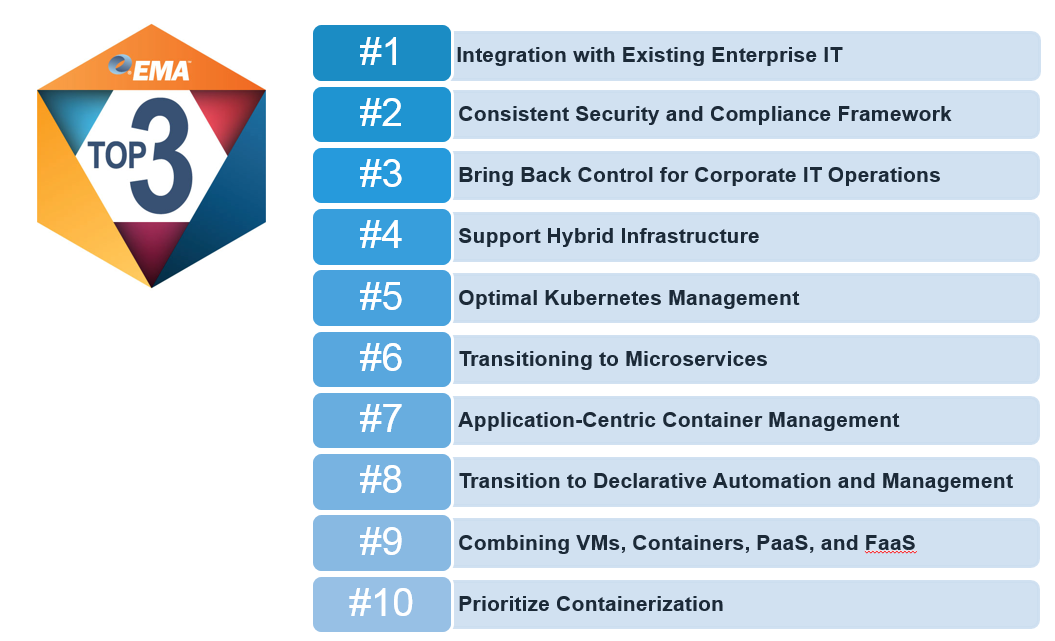
Bitnami named Top 3 Vendor in Application Deployment and Management for DevOps by EMA

Authored by Tom McCafferty, VP of Marketing

The new Enterprise Management Associates report “Ten Priorities for Container Management and DevOps in 2018” was just released and Bitnami is proud to be chosen as a Top 3 vendor for Application Deployment and Management. The report analyzes survey data from 300 enterprise Devops teams to break down industry trends and highlights key products to “recognize a vendor’s excellent alignment with customer challenges.”

Let’s be honest...who doesn’t like a little recognition? At Bitnami we’ve been innovating very rapidly over the past year and it’s nice to be recognized for the work that we are doing. This report highlights three of our key products initiatives that are expanding our product portfolio beyond our core application catalog business. As Bitnami continues to grow, we’re squarely focused on adding value to customers in two ways…

1. Simplifying the journey to the cloud by automating application migration (see Stacksmith)

2. Driving the next generation of application packaging standards and usage around containers and Kubernetes (see Kubeapps) and FaaS (see Kubeless).


While these represent an obvious extension to our company focus on application packaging and management, it’s great to see that they align so nicely with the 10 priorities that the EMA report identified for container management and Devops in the enterprise…


Check out the complete report - Enterprise Management Associates “10 Priorities for Container Management and DevOps in Production and at Scale in 2018 (EMA Top 3)

I’ve been a fan of Enterprise Management Associates and Torsten’s no-nonsense approach to the analyst game for a long time. Briefing him on the work we’re doing related to application packaging, cloud migration and Kubernetes was exactly as expected…conversational, technically deep and ultimately very enjoyable. Seeing that much of our product focus aligned with exactly the feedback he had been getting from the 300 enterprises surveyed for the recent Top 3 report was great validation from a resource I know I can trust and I expect that many enterprises can look to for guidance on 2018 strategies.

Tuesday, February 27, 2018

Bitnami Stacksmith - Cloud Migration Made Simple

Authored by Michael Murphy, Product Marketing Manager

Bitnami is pleased to announce the official release of Stacksmith, our enterprise application migration solution.

Stacksmith has been in the works for the last year or so, but it builds on Bitnami’s extensive experience in application packaging that goes back much further. In fact, Stacksmith is a productization of the tooling and automation that Bitnami uses internally to package and maintain the catalog of about 120 open source applications that it publishes to all the major cloud marketplaces. And just like our application catalog, packaging an application in Stacksmith ensures an easy-to-use, ready-to-run and always up to date application...only in this case, it’s your internal custom application.

Stacksmith let's enterprise companies leverage Bitnami’s application packaging experience and automation when they repackage their custom and legacy applications and move them to a public or private cloud platform. 
There are two key points that I want to focus on in this blog post. Taken together, they significantly differentiate Stacksmith from other application migration solutions. They are:

  • Stacksmith is easy to use
  • Stacksmith gets you all the way there

Let’s look at each in a bit more detail.

Stacksmith is easy to use

Consider the following:
  • You don’t have to have a sophisticated internal software development team in place to use Stacksmith – our step by step approach walks you through the process. 
  • You don’t have to have lots of cloud knowledge or experience to use Stacksmith – Bitnami’s extensive experience packaging for all the major cloud provider platforms means that this knowledge is built in. The Stacksmith templates bring in all the components required by the target platform, as well as best practices. 
  • You don’t have to edit or alter your application source code – you can replatform it as-is with Stacksmith. So even if the original developers of the application have long since moved on, you can still migrate the application with confidence. 
  • Keeping your replatformed application up to date moving forward becomes super easy – Stacksmith automates the ongoing maintenance tasks associated with keeping applications up to date, a challenge many companies face with their legacy applications in the datacenter today.

Replatforming with Stacksmith takes about the same effort as rehosting (aka ‘lifting & shifting’) your application. Yet it delivers on automation and other cloud-native benefits that you will want to utilize on your new cloud platform - rehosting does not. And rehosting solutions deliver as output a VM or container – but you need more than just that to deploy to your new platform. Which brings me nicely to the second point…

Stacksmith gets you all the way there

Stacksmith is designed to deliver a complete application migration experience for enterprises. It doesn’t only deliver part of the migration toolchain experience – Stacksmith gives you everything you need to complete the replatforming process. This is a significant departure from many other solutions in the market that simply build a container or virtual machine - but still require you to create the deployment template needed for the new platform. Creating those templates requires cloud and platform specific knowledge.

Stacksmith takes a running application in the traditional datacenter, repackages it, and delivers a running application in the public or private cloud. Boom - application migrated. And the extensive Bitnami experience means that all the required components for your application to run on its new platform, as well as platform best practices, are built in to the process and get included with your new application package - we know what each platform requires so you don’t have to.

Find out for yourself. We created a host of new assets for this launch, including:

If you have been waiting for a ‘better solution’ to assist with your digital transformation initiative, now you have it! Use Stacksmith to get those legacy applications migrated to cloud, private or public. 

Oh and if you like what you see, help us spread the word!