Showing posts with label tools. Show all posts

Friday, October 12, 2012

BitNami Cloud Tools Now with s3cmd

We are happy to announce a new addition to the lastest BitNami Cloud Tools version (v1.6): s3cmd tool. Thanks to user suggestions, we added this useful tool and its required dependencies to assist with uploading, retrieving and managing data in Amazon S3.

The BitNami Cloud Tools installer packages the Amazon Web Services (AWS) command line tools together with pre-configured Java, Ruby, Python and Perl language runtimes. It is a self-contained, easy to use distribution that makes it simple to get started using AWS services from the command line.

Previous versions already included the following components:
  • EC2 API to register and launch instances, manipulate security groups, and more.
  • EC2 AMI to help bundle an Amazon Machine Images (AMIs).
  • AutoScaling to create auto scaling groups and define triggers to launch and terminate Amazon EC2 instances automatically.
  • CloudWatch to monitor, manage, and publish Amazon CloudWatch metrics, as well as configure alarms.
  • CloudFormation to create and delete stacks and to view resources and events associated with a stack.
  • Simple Notification Service
  • Simple Email Service and more!
You can check the full component list and versions at http://bitnami.org/tools/cloud

With the new s3cmd tool, you can easily manage your data in an Amazon S3 bucket. For example:

Start the Cloud Tools environment on Linux or OS X:

$ cd installation_directory
$ ./aws-shell.sh

Or you can also start the "aws-cmd" command prompt from the Start menu on Windows.

Create a new bucket:

$ s3cmd mb s3://my-new-bucket

Upload a new file to your bucket:

$ s3cmd put example.txt s3://my-new-bucket

List the elements:

$ s3cmd ls s3://my-new-bucket/

Download the file:

$ s3cmd get s3://my-new-bucket/example.txt

In addition to this, s3cmd lets you encrypt your files before sending them to Amazon or use HTTPS for encrypting the communication. Enjoy!
Thursday, August 4, 2011

BitNami Cloud Tools for AWS


Today we are happy to announce a new addition to the BitNami family: BitNami Cloud Tools. Over the years, we have become pretty good at packaging open source web applications and making them easy to install. We started with native installers and virtual machines and lately we have had great success with BitNami Cloud Hosting for launching those same apps in the cloud. Now we want to bring the same ease of use to developer and system administrators of cloud environments, starting with the Amazon Cloud. Our first two projects are the BitNami Cloud Tools installer (available now) and the BitNami Cloud Agent (currently in private beta). Our cloud tools installer is a collection of all the official command line tools available for the Amazon tool: EC2, Beanstalk, ELB, RDS, etc. They come bundled with a JDK and a Ruby 1.9 runtime so, with a single download, you get a fully configured environment to start playing with every Amazon API. We will be keeping it up-to-date and adding new tools as they become available.

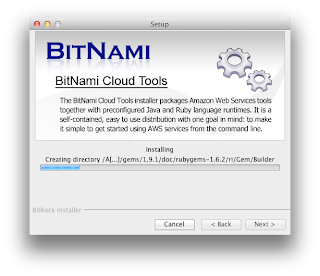
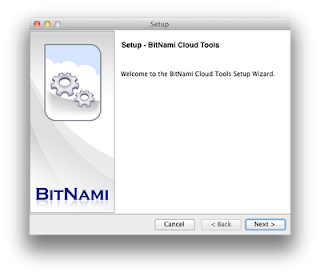
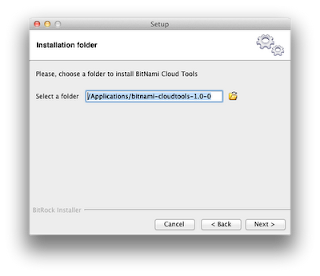
Everybody loves screenshots :)  So we took some to show you what the installation process looks like


Assuming you already have an AWS account, the next step after installation is to configure AWS credentials properly. The BitNami Cloud Tools stack is already configured in such a way that all AWS tools expect the following files to be present: 


 - config/aws-credentials.txt: You need to add there AWS Access Key ID and AWS Secret Access Key.
 - config/ec2.crt: Copy AWS PEM-encoded X.509 certificate to this location. 
 - config/ec2.key: Copy AWS Private key file to this location. 


Please make sure that all those files are readable only by your user id. On Unix systems you may want to execute the following command: 


$ chmod 600 config/* 


Now you can run any of the available commands to interact with the Amazon EC2 web service interface. You can use these tools to register and launch instances, manage security groups, etc.

On Windows, you can see a Start Menu Shortcut where you can find the "aws-cmd" to start working with AWS Tools.

Start Menu
Listing regions
You can list the instances that you have currently running, in this case from OS X.
Listing running servers


The complete set of tools included in this release:

aws-ec2-ami 1.3-66634
aws-ec2-api 1.4.3.0
aws-beanstalk
aws-elb 1.0.12.0
aws-iam 1.2.0
aws-rds 1.4.006
aws-sns 1.0.2.3
aws-auto-scaling 1.0.33.1
aws-cloudformation 1.0.8
aws-cloudwatch 1.0.12.1
It also ships the AWS SDK for Ruby and Java:
aws-sdk-ruby 1.0.3
aws-sdk-java 1.1.7.1