Showing posts with label AWS. Show all posts

Tuesday, November 29, 2022

Sunsetting Bitnami Launchpads

Authored by Alejandro Gómez, R&D Manager at VMware

The Bitnami Launchpad service was released at the beginning of 2013, when the major cloud service providers—AWS, Azure, and Google—were just developing and launching application marketplaces for their platforms. Bitnami Launchpad offered a simpler user experience to deploy applications in the cloud. Providing our own service also allowed us to give users access to the latest, most up-to-date version faster than was available through the cloud vendor marketplaces. Thousands of applications have been deployed through the Bitnami Launchpad.

However, since those early days, cloud service providers have shortened their validation and publishing timelines, and the user experience for deployment from their marketplaces has improved considerably. Through these cloud platform marketplaces, users not only get a simplified process for procuring software, but now they also get faster access to the most recent version of Bitnami solutions as well as a fully integrated deployment experience with the platform of their choice.

In this context, today we are announcing the deprecation of the Bitnami Launchpad service and recommend deploying our solutions directly through the cloud service providers’ marketplaces. Here are answers to a few questions you might have.

Where can I find Bitnami by VMware solutions?
We have worked with the major cloud service providers to make our software available to you:

How does the Bitnami Launchpad deprecation affect my servers?
Your instances will not be stopped or removed because they are running in the platform of your choice under your cloud account. However, you will not be able to launch new servers or manage and access existing servers through the Bitnami Launchpad interface.

December 15, 2022: Launchpads will be accessible, but you will not be able to launch new instances or add new cloud credentials. However, you will still be able to manage your instances from our launchpads as well as from each cloud console.

February 15, 2023: Launchpads will no longer be accessible and you will have to manage your instances from each cloud console.

Which actions do I need to perform?
Option A (recommended): Upgrade your server. Launch a server for the most recent version of the application through one of our partners and migrate your data.

Option B: Ensure access to your existing server through the cloud service provider console. Download your SSH keys from the launchpads to ensure you will be able to access your instances after January 31, 2023. Find information about how to download them for each cloud provider:

Friday, November 19, 2021

Bitnami Cloud Hosting Deprecation – Focus on Extending Bitnami Application Catalog and Services

Since 2011, Bitnami Cloud Hosting (BCH) has provided an easy way for users to deploy and manage Open Source applications on the Amazon EC2 Cloud.  

Thanks to this service, users new to the cloud had the chance to quickly deploy and manage applications on AWS servers through an intuitive and user-friendly interface.  

As new packaging formats and deployment platforms come up, the Bitnami Engineering team has concentrated its efforts in providing multi-cloud cross-platform applications and services to match emerging developers’ needs.  

In the past two years, since the VMware acquisition, we have extended the Bitnami Open Source Catalog for containers and Helm charts, released VMware Application Catalog, a curated and customizable selection of Open Source software from the Bitnami Application Catalog, and improved in number and quality of the templates delivered to the major cloud marketplaces: VMware Marketplace, AWS, Azure, Google Cloud, and IBM.  

Continuing to focus on increasing the investment to help developers adopt Cloud Native solutions and considering that there are multiple products that offer a similar experience as BCH, Bitnami team will discontinue the service for Bitnami Cloud Hosting by February 15th, 2022.  

Can I still launch Bitnami applications on AWS servers? 

The answer is: of course, you can! 

Discover and deploy the Bitnami Application Catalog on AWS Cloud servers using the following platforms:  

We know that some of the concepts and terms used to manage your servers in Bitnami Cloud Hosting are different from the ones used by AWS Cloud services. For that reason, we have created a detailed tutorial on how to manage Bitnami Cloud Hosting servers from the AWS console.  

If you experience any issue migrating your BCH data to the AWS console or you want to provide your feedback please post to our Community forums. We will be happy to help you there! 

Wednesday, April 28, 2021

Spin up your Online Store in Minutes with Bitnami Prestashop and AWS Lightsail

Regardless of whether you are using a cloud provider for the first time or are an experienced user, Amazon Lightsail is a proven choice for running your websites and applications. 

If you are planning to initiate your own e-commerce website, chances are that you will select Prestashop as the solution for launching your online store. We are delighted to announce that Amazon Lightsail just expanded its catalog and included the Prestashop Certified by Bitnami image. 

Follow this guide to get Prestashop set up and running on Amazon Lightsail with just a few clicks.

Now you can get your business running on the cloud within minutes! 

Bitnami Prestashop and Amazon Lightsail: The easiest and most reliable way to build your e-commerce store

Prestashop is unquestionably one of the most popular open-source e-commerce solutions among both developers and merchants. It provides more than 2000 themes and 3500 free and paid modules for you to customise your site. Bitnami has pre-packaged a blueprint image for Amazon Lightsail that bundles the most up to date and secure version of Prestashop and its components. 

It takes just a few clicks to have your site go live online. First, you need to log in to your Amazon Lightsail account and click “Create instance”. Then choose Linux/Unix as a platform and pick Prestashop from the list of available blueprints. Name your instance and click “Create Instance”. 


This will spin up a server with the Bitnami Prestashop image running on it. Getting the application password and the IP address of your Prestashop website is super easy thanks to the intuitive user interface, and you’re done!

To get the best out of Prestashop on your Amazon Lightsail server, check out this get started guide and the documentation for managing your Bitnami Prestashop image on Amazon Lightsail. 


Tuesday, January 21, 2020

Access and Manage Your Servers Remotely with the Bitnami Stack for Apache Guacamole

Want to access your computers from anywhere using just a Web browser? Look no further than Apache Guacamole, a "clientless remote desktop gateway" that supports standard protocols like VNC, SSH, and RDP and requires no plugins or client software.

Apache Guacamole allows users to access their computers from anywhere while also providing administrators with a way to configure, manage and control access to remote desktop connections. You can also combine it with a cloud-hosted desktop operating system to benefit from the flexibility and resilience of cloud computing.

Bitnami has released an up to date and secure image that you can use to launch Apache Guacamole locally or in the cloud. Choose the platform you want to run it on and immediately benefit from having your desktop reachable from any part of the world and from any device.

This blog post shows you how easy it is to deploy the Bitnami Stack for Apache Guacamole on the Microsoft Azure Cloud. It also walks you through the process of creating a remote connection with a Windows machine running on a Microsoft Azure server.
These instructions are for the Microsoft Azure Portal, but you can also run Apache Guacamole on an AWS instance, an Oracle server, and soon on a Google Cloud Platform server. You can also play with it on your local machine by downloading a virtual appliance.

Glyptodon Enterprise also available for Apache Guacamole


For those users and organizations that require enterprise-class scalability and management, Glyptodon Inc. offers a commercial solution powered by Apache Guacamole: Glyptodon Enterprise.

This package includes streamlined installation and maintenance, and timely security updates.
It also offers long-time support for major releases for at least five years and receives regularly scheduled updates. Updates to new releases ensure compatibility, facilitating administrators to keep their installations always up to date.

Glyptodon Enterprise is packaged in RPM repositories and compatible with any Red Hat Enterprise Linux or CentOS release.


Deploy the Bitnami Stack for Apache Guacamole 


Deploying Apache Guacamole from the Bitnami Launchpad for Microsoft Azure is easy; everything is included in the image that Bitnami provides for Apache Guacamole. Thus, the application will run on an Azure server without issues. This image uses the latest version of Apache and it includes SSL auto-configuration with Let's Encrypt certificates.

Let's take a quick look at the Bitnami Stack for Apache Guacamole default configuration.  There are three major components included in the image:

  • Apache Guacamole Server 
  • Apache Guacamole Client 
  • Database

Apache Guacamole Server
It is a daemon server (guacd) that talks to the remote desktops and accepts connections from the users logged in to the Web application.

Apache Guacamole Client
It is the frontend of Guacamole, implemented as a Java application that runs on top of Apache Tomcat.

Database
The user authentication for Apache Guacamole is configured to work with PostgreSQL.

Launch the Apache Guacamole image


To launch Apache Guacamole, follow these steps:

1. In the Apache Guacamole deployment offering page, click the “Single-Tier” button to display the deployment options for the cloud.


2. Select the cloud where you want to deploy the application. This post uses Microsoft Azure, but the deployment process is similar in other clouds.

Make sure that your Microsoft Azure and Bitnami accounts are connected. Check the Get Started with the Bitnami Launchpad for Microsoft Azure guide for more information on this.


You will be redirected to the Bitnami launchpad to create a new virtual machine on Azure.

3. Enter a name for your server, select the server size, and the region where you want to deploy the solution. As you can see in the image below, the image type is selected by default:


4. Confirm your selection by hitting the “Create” button at the end of the page. The Bitnami Launchpad will now begin spinning up the new server. The process usually takes a few minutes, and a status indicator on the page provides a progress update.

Access the client


Once the cloud server has been provisioned, the status indicator will show that it is “running”, and the Bitnami Launchpad page will display the server details, application credentials, IP address, and the SSH keys and command for connecting to the server remotely.

You can manage your application from the Bitnami Launchpad user interface or by accessing the Azure Console through the “Manage in the Azure Console” button.

To access the Apache Guacamole Client:

1. Click the “Go to the application” button.


2. Log in to the client by using the credentials provided in the “Application Info” section.

Use Apache Guacamole


To start managing users and connections, navigate to the user profile and select the “Settings” option from the drop-down menu.

Create a new connection


To enable a new remote connection, follow these instructions:

1. Navigate to the “Settings -> Connections” tab.  Click the “New Connection” button.


2. In the resulting form, enter a name to identify the connection, location, and protocol.

3. Select “ROOT” as location. Then select the protocol you want to use to connect to the machine.

In general, the protocol used for connecting with a Windows machine is RDP. In case you want to connect to a Linux server, then use the VNC protocol.

4. Fill the rest of the required values such as the connection limit, load balancing details, or the Guacamole proxy parameters.

5. In the “PARAMETERS -> Network” section, enter the public IP address of your machine in the “Hostname” field and the port. In the “Authentication” section, enter the username and password associated with your machine.


NOTE: Make sure that the server where the Windows machine is running. It should be publicly accessible to ensure that Apache Guacamole is able to connect remotely to it.

6. Click “Save” to create this new connection.

Create a user 


Once the connection is created, you need to create a user and associate the connection with it. 
1. Navigate to the “Settings -> Users” tab. You will see the admin user in the list of enabled users. To add a new user, click the “New users” button.

2. In the resulting form, enter the username, password, and personal info. Define the account restrictions and permissions and click “Save” to make the changes take effect.

3. In the “CONNECTIONS” section, you will find the connection you have created. Activate the checkbox to associate the user with that connection. Click “Save” to make the changes take effect.


Connect remotely to your machine


To start using the new connection, back to the “Home” page and click the RDP connection.
Apache Guacamole will connect you directly to your machine:


Learn more about how to use the Bitnami Stack for Apache Guacamole in the Bitnami documentation page or the Apache Guacamole official manual. Remember that if you need enterprise-class scalability and management, Glyptodon Enterprise is the best choice for you. Start working remotely!

Wednesday, November 27, 2019

AWS re:Invent 2019 Is Coming!


Join the Bitnami team at AWS re:Invent 2019, December 2-5, in Las Vegas and learn more about how Bitnami’s range of offerings can help you accelerate software development and delivery.

You can find us at VMware booth #2108 (pod 12) in the Venetian / Sands Expo Hall. Our experts will be able to show you how to leverage our open-source application catalog available on the AWS Marketplace, in a hybrid cloud model on VMC on AWS, and more.

Bitnami will also be sharing more about our recent announcement, Project Galleon - a new enterprise offering focused on delivering a superior developer self-service experience, while simultaneously helping IT enforce security and compliance standards. The focus of this offering is to help development teams go from ideation to production easier, faster, and with best practices built-in from the ground up.

We’ll also be highlighting Bitnami solutions for building modern apps during sessions at the VMware Code booth. Check out all our sessions and presentations below, and remember to add them to your re:Invent agenda today!

{CODE} Sessions 


VMware Booth #309, Aria / Pinyon Ballroom

Wednesday, 1:30 PM

Shortcut and Better Secure Modern App Development with Bitnami Containers and Chart Foundations

Thursday, 12.30 PM

Continuously Refresh and Secure Software Catalogs, Providing Simple and Secure Access

Presentations


VMware booth #2108 Theatre area, Venetian / Sands Expo Hall

Tuesday, 1.30 PM | Wednesday, 9.30 AM | Thursday, 11 AM

Managing Software Supply Chains with Bitnami and Project Galleon

We’re looking forward to seeing you in Las Vegas!

Monday, September 9, 2019

Start Deploying your PHP Applications to Production with Bitnami LAMP Production-Ready


LAMP is one of the most popular open source web service stacks used for developing dynamic websites and web applications. It is comprised of a set of well-known components that help developers create their applications quickly. LAMP is so prominent in the community because it provides a complete framework for creating high-performance web applications that saves you hours of coding.
Its components include a Linux operating system, an Apache HTTP Server, a MySQL relational database, and PHP as the programming language. When launching the Bitnami LAMP stack, you will get a ready-to-run package that includes all of the components above. 
LAMP is an essential component of every developer’s tool kit.  But what happens when you need to move your applications from development to production environments? This is where Bitnami can help. Bitnami has recently released the LAMP Production-Ready stack, which provides both high-availability and security for mission-critical use cases.  
In this blog post, you will learn about the main features of this production-ready stack and the most common use cases that this stack should be used for. 

Take the Performance and Security of Your PHP-based Applications to the Next Level

The LAMP Production-Ready architecture was designed to address your production needs. It adds an extra layer of security and ensures high-availability for your PHP applications even in the most traffic demanding environments.  The following are the features that you will benefit from when deploying this solution: 
  • High-Availability architecture with two availability zones in the AWS regions to ensure that your cluster can continue working if a node (or a whole AWS zone) goes down.
  • Replication model designed to distribute workloads across multiple application services.  
  • Elastic Load Balancer (ELB) is added to distribute HTTP and HTTPS requests across the application instances, ensuring the maximum performance with a high number of connections.
  • Virtual Private Cloud (VPC)with public and private subnets. In both public and private subnets, an Auto Scaling Group is configured in each node to ensure dynamic, on-demand horizontal scaling. In addition to this, the EC2  instances that host the application servers are isolated in private subnets. Inbound traffic is allowed via Elastic Load Balancer (ELB)  while outbound traffic is managed through a NAT Gateway. This configuration increases the security of the cluster dramatically.
  • Data and code (Aurora MySQL database and application servers) are separated in different instances improving the safety and access control. 
  • Database cache performance is enhanced with an ElastiCache cluster, boosting the performance of the entire deployment. Also, Amazon Aurora provides auto-backup, geographic redundancy, and automatic replication, making it perfect for production environments. 


As you can see in the diagram below, the load balancer manages all user’s requests. It distributes the workload through the different application instances hosted in a private subnet. This configuration makes your application adaptable to the most demanding scenarios, even when a node is down, or if there are concurrent connections at any one time.

LAMP Production-Ready architecture diagram

When should you be using the Bitnami LAMP production-ready stack? 

As a developer, you probably have been in multiple situations where your applications required high-availability and automatic horizontal scaling. These are some examples of websites or applications that the Bitnami LAMP Production-Ready stack addresses perfectly: 


  • PHP-based news or social sites: In this case, your application has high traffic and requires both high-availability, distributed workloads, and scalability. This is the typical scenario of WordPress and Drupal websites or social networks such as Diaspora. 
  • PHP-based e-commerce, shopping, or ticketing web applications: This kind of applications usually require reliability, geographic redundancy, failover, and data backups. That happens, for example, to shops based on Magento, Prestashop, or Woocommerce. 
  • Custom web application and REST/HTTP/SOAP API that needs an extra layer of security, access control, availability, and scalability. 

What’s next?


Try the LAMP Production-Ready Cloud Formation Template (CFT) directly from the AWS Marketplace to see how it can help you face the most critical and high-demanding environments. 
Once you click  “Launch” in the AWS Marketplace listing, you will be redirected to the CloudFormation Management Console. From there, you only need to configure some parameters of the template such as the network,  Linux bastion, and ElastiCache configuration. Then, click “Create” and wait for the template to deploy all the required resources in the AWS servers. In less than an hour, your LAMP Production-Ready stack will be available and ready to use.
Follow this detailed get-started guide to complete the process. Once you have the solution deployed, you will be able to install your custom application and run it directly into a production environment! 


Thursday, August 1, 2019

Take Your Website to the Next Level with WordPress Production-Ready from Bitnami and Automattic - Now Available on the AWS Marketplace


Webinar - " Achieve Your Website Goals with the Official WordPress Image for the Cloud" - August 14th at 10 am PST - Register Now
_________________________________________________________________________________

On January 16, 2019, we announced our partnership with Automattic, the company behind WordPress.com, to create an official WordPress image for the AWS cloud.

Today, all of the different flavors of Bitnami WordPress images in the AWS Marketplace have been re-published as official images certified by Bitnami and Automattic.

Along with updating our images, we have also released a new Production-Ready WordPress image that is designed to handle all of your production environment needs.

WordPress Production-Ready is a pre-configured CloudFormation template designed for production environments. Its architecture spans two availability zones in the AWS region and auto-scaling group configured in each node to ensure high-availability and horizontal scaling.

Maximum performance is maintained by a replication model for distributing workloads across multiple WordPress instances, Elastic Load Balancing to distribute requests across the nodes, EFS for persisting files and ElastiCache cluster with Memcached for caching database queries to Amazon Aurora.

With WordPress Production-Ready Certified by Bitnami and Automattic, your company can rest assured that the application will withstand the traffic and scaling required for your popular site with the following features:

  • High-availability architecture with two availability zones and auto-scaling group configured in each node to ensure dynamic horizontal scaling.
  • Public subnets configured to allow EC2 Instances to act as bastion hosts for inbound traffic and Managed NAT Gateways allow outbound traffic to WordPress instances, following the AWS security guidelines.
  • Always up-to-date and secure; includes the latest available version of WordPress, PHP, and Apache.

Get started with the WordPress Production-Ready Certified by Bitnami and Automattic today!

Is there anything else new in the updated WordPress listings by Bitnami and Automattic?

Yes, there is!

All of our WordPress images for AWS now include the Automattic Jetpack plugin by default.

Jetpack, one of the most popular plugins for WordPress, is the most powerful way to design, protect, and manage multiple WordPress websites. Jetpack is powered by the folks behind WordPress.com, which means you’ve got the infrastructure to handle billions of pageviews behind your sites, plus world-class 24/7 support.

Pick the WordPress image that works for you:

We offer many different WordPress images to suit the many different needs of our users. Pick the one that works best for you, and get started today.


Unsure of which image to choose for your WordPress use case? Reach out to our support team through our community support forum with the details of what you are trying to accomplish. Our team will be happy to guide you in the right direction!

Want to learn more about how you can use the WordPress Production-Ready Certified by Bitnami and Automattic to create the website of your dreams on AWS? Join us for a live webinar with the Automattic and AWS teams on August 14th at 10 am PST. Register now! 

Wednesday, January 16, 2019

Automattic, the Expert Behind WordPress, Partners with Bitnami to Bring the Official WordPress Image to AWS Marketplace

Authored by Kevin Franklin, Director of Business Development

WordPress powers 33% of the internet. With over 45,000 themes and plugins, it is the world’s most popular content management system.

Every month, WordPress certified and published by Bitnami on AWS is launched tens of thousands of times. When a user launches an application certified by Bitnami, they are confidently launching the most up-to-date and secure version of the application. Bitnami’s expertise in packaging reliable, secure solutions means they will have the best possible WordPress user experience available on any cloud marketplace.

We are delighted to announce that Automattic, the expert in WordPress and creator of WordPress.com, has partnered with Bitnami to provide the official WordPress image to the AWS Marketplace. The Official WordPress image, “WordPress Certified by Bitnami and Automattic,” is now available on AWS Marketplace.

This new marketplace listing includes the Jetpack plugin giving users access to additional professional themes, performance improvements, scanning, site activity and marketing tools. The listing also includes the new Gutenberg editor.

WordPress Certified by Bitnami and Automattic is the first step in supporting WordPress in the AWS Marketplace. Soon, you’ll see tutorials, webinars and other materials to help you get even more out of your WordPress implementation.

Stay tuned for more updates about this partnership by following us on twitter or LinkedIn!

Official WordPress listing on AWS Marketplace

Tuesday, January 8, 2019

How Stacksmith helps to package, optimize and maintain your application in a consistent way

Authored by Jota Martos, Engineer 

Building an application from scratch requires a huge effort from the developers of the application. Apart from defining the pre-requisites (language, runtime to use...), it is the time you spend in writing the code and building, packaging and deploying the solution. If your application will support different platforms, you will also need to spend time building a system that meets these additional needs, and that requires knowledge and time to integrate into your system. 

On the other hand, there are cases in which you will use a commercial or Open Source application that does not require code changes but does require changes in the way it’s deployed and configured. In these cases, automating the process to package and deploy the application so it meets your needs can deliver key benefits to your business. 

These benefits include time saving from the reduced effort it takes to incorporate your changes (and not just once, but every time the application package needs updating), and it improves the consistency and quality of what you produce by minimizing human intervention and the possibility of human errors. That’s why you need to put a system in place to automatically package and deploy it every time you integrate a new change in your application.

Many organizations that are evaluating what this means look to Continuous Integration and Continuous Deployment tools (CI/CD) to solve the problem. These tools are often either overly prescriptive - they only work with particular application runtimes or cloud targets, for example - or overly flexible, requiring substantial customization for them to work in your specific environment. 

While these tools are right for many situations, they won’t be right for all. For those situations that don’t require a fully automated CI/CD software delivery process, there is still an opportunity to gain many of the benefits they can deliver without having to implement a full CI/CD strategy. By packaging the application code and configuration as deploy-ready artifacts, images, and associated deployment templates, and delivering that application in an automated, repeatable way, you can obtain the transformational effect and long-term maintenance benefits typically only achieved with CI/CD tools. Here is how it can be done.


The importance of automating the application packaging and delivery process


The process of packaging and deploying your application is time-consuming so increasing productivity when performing these tasks is always a good idea. Automating these tasks allows teams to focus more on the development of applications and less on the system details of delivering it to computing environments.

Some of the benefits are: 


  • Teams can test the changes easily and frequently, which leads to a better performance. Because the process is automated, it is easy to validate even a small change in the application by packaging and testing your solution with the changes. 
  • Automating the delivery provides a repeatable and reliable way to promote application changes - not only for the production environment, but also for the development, test or any other environment that the team uses when deploying an application.


Bitnami Stacksmith is a tool that automates and optimizes the packaging of your applications for deployment to cloud and container platforms. It also includes many more features such as multi-platform support, security checks or methods to upgrade or downgrade and maintain your application.

Stacksmith only needs the files of your already-built application (for example a .tar.gz file or your Node.js application) and it will package it for the cloud or container platform you select. Stacksmith provides a consistent, reproducible, and automated way to package your applications. 

In addition, Stacksmith can be integrated with your CI/CD pipeline. After the application itself has been built and tested, the build output can be passed to your CD tool for the deployment of the updated version of the application to the staging environment. This Bitnami blog post has some examples on how to integrate Stacksmith with other services.


Not only packaging automation: Other benefits of Stacksmith


Target different platforms in a single process

Stacksmith lets you package your applications for multiple platforms. This means you can package your software for AWS and Azure with just a few clicks. When you package for AWS, Stacksmith creates an AWS CloudFormation template for you, along with an Amazon Machine Image (AMI) that contains all the necessary dependencies for your application. When packaging for Azure, Stacksmith creates an Azure Resource Manager template for you and a managed virtual machine image. If your focus is Kubernetes / containers, Stacksmith also lets you create container images and Helm Chart that can be deployed to the container services of those platforms.  

Stacksmith also allows you to create different applications depending on the target and the files and scripts you want to package. For example, you can configure the AWS solution to use the “Java Tomcat Application with DB (MySQL)” architecture, yet configure Stacksmith to use PostgreSQL when packaging for other platforms.


Security

One of the goals of Stacksmith is to maintain your application by keeping it secure and up-to-date. To accomplish this, Stacksmith documents the components that were installed when packaging your application, then continuously checks for updates and known security vulnerabilities for any of these components. All this information is shown in the “System Packages” section of the build you select.


Here you will also find alerts about security issues affecting these components and information on how to repackage the application.

This ensures a smooth process for upgrading your application, making it easy to repackage a fixed version of the application and update existing deployments to fix any security issues.

Upgrades, downgrades, and maintenance

Stacksmith allows you to update your application at any time by uploading new files, and it also supports downgrades for when you wish to return an application to a previous state. To illustrate this, I am going to update the application by providing new files and packaging a new version of it:  


  1. From the “Applications” dashboard of your project, select the application you want to update. 
  2. Click “Edit configuration”.
  3. Provide the new files of the application and add a version number for the new build. 


This feature is extremely useful for those users who don’t have any automation in place because it gives them the opportunity to easily package any other version of the application in just a few clicks. Stacksmith will save the information about all the packages it has been generating, all the previous versions, and the new ones that will be accessible through its dashboard. 

When editing the configuration, you can also perform other tasks, such as changing the template you wish to use (in case you want to change the database the application uses, for example) or the target platforms (you can add or remove support for AWS or Kubernetes in the different versions you build).

Once Stacksmith has built an updated version of your application, it can be used  to update the existing out-of-date one.

Stacksmith's built-in stack templates are designed to make it easy to update the application in mind. In most cases, the upgrade or downgrade can be done with zero downtime for your application. This is because Stacksmith lets you use the cloud-native load balancing and other mechanisms available on each platform. In the case of AWS, Stacksmith leverages Elastic Load Balancers and Auto-Scaling Groups to achieve this goal.

In order to update an existing deployment, you only need to copy the CloudFormation template HTTPS URL, go to AWS CloudFormation console, choose the ‘Update Stack’ option, and provide the new template URL.


Automation is the key


This article explains how Bitnami Stacksmith is a really useful tool to package your application, regardless of the source of your application files or how automated your current process to package your application is. It will provide a consistent and reproducible way to package your applications, and  leads to better quality and reliability of your application.

With Stacksmith, your application can be packaged for multiple platforms in just a few clicks. Once you provide your application files, the system will package the application and make it accessible in the platforms you select. Stacksmith automates ongoing maintenance, keeping your applications secure and up-to-date by applying the latest security patches as well as the latest configuration and other internal updates you integrated into the application. 

Try Stacksmith Public for free now for your Open Source projects, or enroll into one of the other Stacksmith plans to experience all the benefits of Stacksmith.


Have questions about how Stacksmith can fit with the CI/CD tools you currently use? Contact us at enterprise@bitnami.com.


Wednesday, November 28, 2018

Working with AWS Marketplace to Bring Bitnami Container Images to You

Written by Rick Spencer, VP of Engineering at Bitnami

For the last few months, my team and I have had the pleasure of working with the AWS Marketplace team to provide a set of enterprise-grade container images for their recently announced container marketplace. We are seeing a trend towards Cloud Service Providers becoming not only the preferred container hosting infrastructure but the preferred supplier of container images for enterprises.

While the Docker Hub is still popular with developers, its importance as the authoritative source for containers has faded with the rise of Kubernetes and higher-level, application-centric packaging formats such as Helm charts. Even more important, as organizations adopt containers in production, they have a need for trusted containers that they can use as the building blocks of their own applications.

The collaboration between AWS and Bitnami ensures that developers have access to vetted, secure and up-to-date containers that are guaranteed to work with AWS container offerings. This is possible because of the certification process on the AWS side previous to publishing as well as the extensive automation on the Bitnami side for creating, testing and updating the containers.

If you enjoy the Bitnami container images in the AWS Marketplace and you need to create your own container images (or cloud images), we also have you covered: Stacksmith is an online tool that enables you to start building and, more importantly, automatically maintaining, your bespoke container images in just a few hours.

Tuesday, November 27, 2018

Bitnami EKS Runtime Containers Now Available in the AWS Marketplace

Amazon Web Services (AWS) provides a number of different cloud and container services, including the Amazon Elastic Container Service for Kubernetes (EKS), which allows users to quickly and easily create Kubernetes clusters in the cloud. Having an EKS cluster is great, but it isn’t very helpful if the cluster is empty. This is where Amazon’s partnership with Bitnami comes in!

Today, AWS announced the AWS Marketplace for Containers. Bitnami is a proud to be an official launch partner of this new AWS offering. As part of the launch, Bitnami has provided over 70 Bitnami Certified EKS containers in the AWS Marketplace. As of today, the Bitnami containers that you love can easily be launched from the AWS Marketplace and directly into to your EKS Cluster.

AWS Marketplace for Containers announcement at AWS re:Invent

Some Bitnami Applications in the AWS Marketplace for Containers include:
  • WordPress
  • Drupal
  • Parse Server
  • Node.js
  • Jenkins
By expanding the availability of Bitnami containers to the the AWS Marketplace, Bitnami can provide its same ease-of-use experience, while helping to advance the needs of the AWS users who are moving to the increasingly popular container-focused ecosystem.

To get started with Bitnami Containers on AWS Marketplace for Containers, follow our how-to guide!

If you like what you see, be sure to leave us a review on the container listing of your choice or reach out to us with your questions on the community support forum. We look forward to getting your feedback. 

Wednesday, September 12, 2018

Deprecation of AWS Paravirtual Images

Nine years ago Bitnami started providing cloud images for open source software. The first cloud supported by Bitnami was AWS.

A lot has changed since then, including the virtualisation technology used to provide AMIs. AWS started using a technology called paravirtual (PV) images, but later moved to a  new virtualization type, hardware virtual machine (HVM).

Today, HVM is the recommended solution for virtualization due to its superior performance. Also, after recent security vulnerabilities in the Linux Kernel, AWS has published a security bulletin recommending users to migrate to HVM instances due to insufficient system protection to address process-to-process risks in PV images.

For these reasons and because we are committed to provide optimized and secure images, Bitnami has decided to stop providing updates for PV images after October 1st. Existing images will continue to be available, however they will no longer be updated with security fixes.

Affected Servers


Deprecating PV images does not impact running servers, however we strongly recommend you  move your applications to an instance based on a HVM image.

In order to check if you are running a paravirtual server, you can look for the “Virtualization” property in the EC2 console description tab for your instance. In the official AWS documentation you can find the recommended upgrade path when moving from PV to HVM machines.

Affected Accounts and Next Steps


New regions and current instance types only support HVM. Please note that some of instance types can only be launched in a VPC.

If your EC2 account was created before 2013-12-04, you might need to configure your account to support VPC. If that is the case, we advise that you:

  • Create a new AWS account. This will create an EC2-VPC account which comes with a default VPC in each region.
  • Select a region that you haven’t used before to launch your servers. When using a new region a VPC will be created by default.
  • Contact AWS support to migrate your EC2-Classic account to EC2-VPC. This may require removing old resources in your account.

You can find more information about enabling VPC support in your account and how to migrate a linux instance from EC2-Classic to a VPC in the official AWS documentation.
Questions

For questions relating to your account, we recommend to contact AWS directly.Bitnami does not have access to your EC2 account details.

For any questions about PV support, please don’t hesitate to contact us in our community forum.

Thursday, July 5, 2018

Make Existing Apps Faster, More Scalable, And Cost Effective To Operate With Stacksmith, Kubernetes & Spotinst

Written by Ido Bar Oz, Director Strategic Partnerships at Spotinst

Kubernetes is one of the hottest topics in the IT industry at the moment. As you have learned in Spotinst’s previous blog post about the state of the Kubernetes ecosystem, many companies offer solutions around container-orchestration. In this blog post you will learn how to use Bitnami Stacksmith to package an application for Kubernetes, then leverage Spotinst’s Elastigroup to reduce compute costs, while maintaining high availability of that application as it runs on your Kubernetes cluster.

What is Kubernetes?

Kubernetes is an open-source container orchestration system for automating deployment, scaling and management of containerized applications. Originally designed by Google, Kubernetes was born from a need to run cloud-native applications on a massively scaled network, and that’s exactly what it enables its growing user base to do. The demand for platforms that can run web-scalable workloads means Kubernetes is increasingly under consideration by IT engineering teams, and many are choosing to adopt it.

Bitnami Stacksmith – Automating Application Packaging and Simplifying DevOps

Bitnami Stacksmith removes the complexity associated with packaging and maintaining your applications for today’s cloud and container platforms. Stacksmith does this by utilizing sophisticated tooling and automation that Bitnami has developed over its many years packaging open-source applications and run time environments for all the major cloud providers.   Supply your application code and scripts, select the appropriate template and a few parameters, and hit create. Stacksmith then automates the packaging of your application, optimizes it for your target, and delivers everything you will need to deploy it.

But the benefits of Stacksmith don’t stop when the application is deployed. During the packaging process, Stacksmith documents the components and dependencies that go into your application.  Armed with this, Stacksmith continuously monitors trusted sites for new releases and security updates to these components, and alerts you when they become available. It also provides a simple way to re-package your application to incorporate the updates, to ensure your applications stay up-to-date and secure. 

Stacksmith is an end-to-end tool that automates and simplifies development and IT operations tasks associated with packaging and maintaining your applications for the cloud. 

Kubernetes and Stacksmith

Bitnami Stacksmith works by providing a set of pre-defined application architectures using “templates”. When packaging applications for Kubernetes, Stacksmith will create a Helm chart and a container with all the necessary dependencies for that application. This means that customers can deploy Kubernetes applications in a matter of minutes, and are able to enjoy all the benefits of Kubernetes without having to go through the complex task of containerizing their environment themselves.


Containerization Simplified – What’s the Next Step?

Using Stacksmith can help to alleviate the complexities surround creating a Kubernetes environment, but once the environment is created, what comes next? Often, managing the underlying infrastructure of Kubernetes workloads can be an unwelcome, complex and time-consuming task. Spotinst Managed Container Service (MCS) can remove this unnecessary demand on developer teams.

Spotinst MCS allows customers to run their containerized environments without having to think about the infrastructure layer of servers their containers are running on. MCS provisions, manages and scales infrastructure underneath various containerized environments, including Kubernetes. With Spotinst MCS’s simple import process, all that is needed to migrate Kubernetes workloads to the Spotinst platform is to import the ASG that was created by Stacksmith into Spotinst Elastigroup.

Through dynamically scaling infrastructure and smart container packing to fit the need of customer workloads, MCS doesn’t only automate the infrastructure management but also considerably improve the efficiency of the environments.
Spotinst MCS smart scaling activities:

  • Headroom – a buffer of spare capacity (in terms of memory and CPU) will be provisioned to make sure that there is no need to wait for new instances when scaling up whilst simultaneously ensuring instances won’t become over-utilized.
  • Smart Scaling Down – Spotinst Elastigroup will monitor the cluster for idle instances which remain underutilized for a specified amount of consecutive periods. Once identified, MCS will find spare capacity in other instances, drain those instance tasks and reschedule those on other instances before terminating the idle instance.
  • Tetris Scaling – Elastigroup records the events written when an Kubernetes task is pending and analyzes why they are yet to be started (i.e. Insufficient Memory / CPU, No Ports Available, etc.). It will then spin up instances inside the customer’s cluster to accommodate for the incoming tasks.

Cost Reduction for Spotinst MCS

Spotinst MCS doesn’t only fully automate the provisioning and managing of the underlying infrastructure for Kubernetes environments, it also significantly reduces their costs – by as much as 80%. Spotinst MCS utilizes Spotinst Elastigroup technology to spin up the infrastructure on Spot Instances instead of On-Demand Instances, reducing costs by as much as 80% whilst utilizing predictive analytics to ensure availability.

Spotinst Elasitgroup uses both real-time and historical data to predict Spot Instance terminations or price increases and, once these events are predicted, Elastigroup will preemptively and seamlessly migrate customer workloads to a different Spot Instance of either another instance type or across AZs. If no suitable Spot Instance is found, Elastigroup will automatically fall-back to On-Demand Instances, meaning that customers can enjoy a 70-80% cost reduction whilst still enjoying a 99.99% SLA – the same SLA as provided by AWS.

Through using Bitnami Stacksmith to deploy containerized environments and Spotinst MCS to handle the instance management for the containers, you can spin-up containers and have them running with significant cost reductions all without increasing demand on your developer teams. To see this process in action, you can register for Bitnami and Spotinst’s joint webinar here!

Original post located here.

Thursday, November 2, 2017

Introducing Bitnami Kubernetes Sandbox- A Complete Kubernetes Environment - Prepackaged and Ready-to-Run in the Cloud

At Bitnami, some of the most popular applications we package are developer tools and infrastructure tools. And if you follow Bitnami at all you are aware of the investments we’re making in Kubernetes, from the acquisition of Skippbox to developing and launching our own projects and our ongoing collaborations with other Kubernetes thought leaders. (We’re even doing joint Kubernetes training sessions with the team from Google.)

Put those two together and you’ll see why the most recent addition to our application catalog is a pre-packaged Kubernetes cluster that delivers the same simple, ready-to-run, click-to-deploy, always-secure-and-up-to-date goodness you’ve come to expect from every other Bitnami application you are using today.

Introducing – Bitnami Kubernetes Sandbox!


One package and you get everything you need to quickly launch a Kubernetes cluster in AWS, Oracle Cloud, or Google Cloud. Bitnami Kubernetes Sandbox is designed to be the easiest way to deploy a Kubernetes cluster in the cloud to give users as close to a production workflow as possible.

If you are looking for the perfect environment to learn Kubernetes and to test your containerized applications, this is it!

The Bitnami Kubernetes Sandbox includes:

  • Heapster and Grafana for performance monitoring and visualization.
  • Ingress Controller for making your applications accessible using port 80 and 443.
  • Helm for deploying charts in your cluster.
  • Dynamic Local Volume provisioning so you can work with persistence.
  • Kubernetes Dashboard for easy cluster management. 
  • RBAC authorization enabled by default.

Are you ready to launch your Kubernetes Sandbox? 

Deploy to Amazon, Google or Oracle from the Bitnami Launchpad.

Check out the documentation for AWS, Oracle Cloud and Google Cloud here.

And be sure to let us know what you think at https://bitnami.com/stack/kubernetes-sandbox.

Tweet, like, write a review…whatever you prefer! 

Tuesday, November 29, 2016

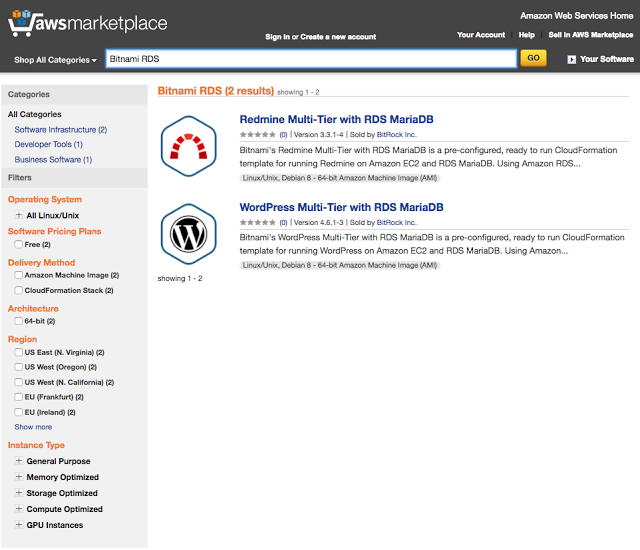
Bitnami Releases Two Amazon RDS Offerings!

Bitnami, one of the leading providers of open source software in the AWS Marketplace, is excited to announce two new offerings using Amazon Relational Database Service (RDS), Wordpress Multi-Tier with Amazon RDS for MariaDB and Redmine Multi-Tier with Amazon RDS for MariaDB. Wordpress, a popular Content Management System (CMS) and Redmine, a flexible and richly configurable project management platform, are excellent additions to any business’ needs in the cloud. 

Amazon Relational Database Service (Amazon RDS) makes it easy to set up, operate, and scale a relational database in the cloud. It provides cost-efficient and resizable capacity while managing time-consuming database administration tasks, freeing you up to focus on your applications and business.  With Amazon RDS, you can deploy a scalable MariaDB database, a popular open source relational database created by the original developers of MySQL.


Tighter integration with Amazon’s managed database offering in the cloud allows customers to take advantage of that same value with the expertise of Amazon Web Services managing the infrastructure for critical data in the cloud. These two new offerings use Amazon CloudFormation Templates created by Bitnami to orchestrate the application’s resources for the deployment. Users will be able to configure architecture suited to their needs and launch an environment into their AWS Account. All of the data required to get up and running will be pre-populated and ready for use upon deployment. 

Bitnami’s applications are trusted for their ability to provide the most up-to-date and patched versions of popular open source applications, consistently and expediently after release.  Using Bitnami’s Cloud Formation Templates allows customers to receive all of these Bitnami benefits while also being able to have an environment that incorporates the scalability and ease of use of Cloud Formation Templates.

Bitnami is excited to deepen our partnership with Amazon Web Services and our customers through the AWS Marketplace. We look forward to continuing to provide more value for our users and receiving your feedback on these applications. Please reach out to us directly if you have any requests or would like to see your applications available with Amazon RDS. You can reach out to us at enterprise@bitnami.com.

Tuesday, February 9, 2016

Need a Parse Service Alternative? Try the New Bitnami Parse Self-hosted Server


If you’re one of the many affected by the recent announcement that Facebook’s Parse service is being discontinued, Bitnami is happy to offer an alternative.

In collaboration with our cloud partners, Bitnami is providing an open source Parse Server, ready to be deployed, either in the cloud or locally, with a single click.

Key Features: 
  • Bitnami Parse Server images are one-click to deploy and get you up and running immediately on Amazon AWS, Microsoft Azure, Oracle Cloud Platform, Digital Ocean, and the Google Cloud Platform launchpad. 
  • They’re also available as Linux installers or virtual machine images for local installation. Local images have parity with those hosted on cloud environments.
  • Bitnami images are consistent, kept up to date, and patched for security vulnerabilities that may arise. 
  • Bitnami Parse Server stack is based on MEAN: Node.js 4.1.2, MongoDB 3.0.9, Express 4.2.0, and Parse Server 2.0.6.
We’ve also created a great guide to Bitnami Parse Server, covering such critical topics as:


Monday, October 5, 2015

Drop by and Visit the Bitnami Team at AWS re:Invent 2015!


Our team is incredibly excited to sponsor the AWS re:Invent 2015! For those of you unfamiliar with the event, AWS re:invent started in 2012 as a way to bring together AWS customers and partners to collaborate and learn about new cloud computing strategies in a series of hands-on workshops, sessions and technical deep-dives. Amazon has been a valuable partner of Bitnami for many years starting with the launch of Bitnami Cloud Hosting in 2011.

Members of our team (from our software engineers to our marketing reps) will represent Bitnami in the Expo Hall (booth 533) in The Venetian this week in Las Vegas. Drop by to discuss anything and everything cloud hosting and, of course, grab some free swag.

We love hearing from our users, so find us this week and meet the team!

Wednesday, July 22, 2015

Introducing Bitnami's Power User: Ahmed Haque

We have an incredible community of developers that continue to support our mission of making awesome software available to everyone. In addition to our popular community forum, Bitnami receives valuable user experience feedback everyday. Some community members even go so far as to include our application and deployment stacks on their blogs as deployment best practices.

Ahmed Haque, Lead Software Engineer at SensoDx Inc., impressed us with an awesome two-part tutorial about how to deploy a MEAN application on Amazon's EC2. Read more about Ahmed’s Bitnami user journey, and check out his articles.

What projects are you currently working on? 

Right now, I've got two major projects taking up my time. The first is one I'm working on as part of my dissertation. In this project, I'm creating a web and mobile interface that collects biomarker information from blood analysis, information from consumer health devices, and self-reported data -- to provide patients with a comprehensive perspective on their overall risk of disease. The idea is that by aggregating information from both laboratories and mobile health applications, we can offer patients a better snapshot of their overall health and hopefully motivate them towards wellness. The second project is more of a side-gig. Having worked with many of the non-profit organizations in my city, I've come to realize that information regarding services for the homeless are often disparate, disorganized, and extremely hard to find. Even if there are dozens of groups offering to help those-in-need -- comprehensive information about schedules, locations, and the range of services provided is heavily lacking. I'm currently developing an interactive web application that intuitively consolidates information on every nonprofit in the city, so folks can get the information they need quickly. For both these projects, having the Bitnami MEAN stack means I can focus more on the actual applications and less on the process of setting up servers.

Why use Bitnami? 

I first stumbled into the Bitnami MEAN stack in the AWS Marketplace about six months ago, while working on a demo app for my PhD. At the time, I was fairly new to the idea of deploying web applications as a whole, but needed a solution quickly. Though I had completed many tutorials on the MEAN stack, read my share of Javascript books, and had spent hours on Stack Overflow -- the process of getting my app onto a server still seemed completely mysterious to me. The Bitnami MEAN stack came super handy, because it offered a one-stop solution for deploying my app onto Amazon EC2.

Do you have any favorite stacks/apps? 

So far, I've had great success with the Bitnami MEAN stack in AWS. I'm also looking forward to branching out and trying the Wordpress, Ghost, and Magento stacks as well.


We love to hear hear from our users, and would love to hear about your personal experience with Bitnami as well. Feel free to reach out to us, and you might just be the next Bitnami Power User!