Showing posts with label docker. Show all posts

Friday, February 24, 2023

Bitnami ARM containers available at Docker Hub

VMware’s Bitnami team has achieved another big step in moving further its commitment to the development ecosystem:

🎉🎉 Bitnami containers have support for ARM and they are available at Docker Hub! 🎉🎉

Our Catalog has more than 200 million monthly pulls of our containers just from Docker Hub (and growing), so we had to do this effort thinking about our users. On the other hand, the team did its best to support the current catalog but in some cases, for example MongoDB, wasn’t able because there are no ARM binaries available for Debian 11.

More than a year and a half ago (mid 2021), Bitnami users started requesting us to provide support for ARM because Apple started with their M1 and also in the Hyperscalers the ARM adoption was planned to be done. So, after analyzing the needed efforts and seeing how important this feature was for our end users, we proceed to implement this.

Hyperscalers in 2022 provided their customers ARM architecture support (Google Cloud, AWS, and Azure) and there is also a great article written by Percona’s team doing an economical comparison of using different EC2 types in AWS, in the end, we can see how in terms of costs, Graviton (EC2 with ARM support) is a good choice in terms of pricing vs performance for database usage.

From VMware’s Bitnami team, we are happy to face this challenge and keep our aim committed to our users’ needs. We will keep working, as usual, thinking about end users' needs and, for sure, being vigilant to ensure the quality of our products become better.

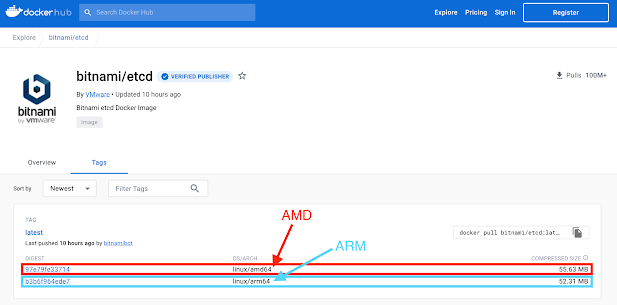
From a technical point of view, the Bitnami container images are built as multi-arch images:

Bitnami etc Docker Hub view

This means users don’t need to specify anything when pulling the container images from Docker Hub, Docker (or any other software) will automatically pull the container image matching the host platform from which the pull command was issued.

Thanks for keeping your trust in us. Enjoy the ARM support!


Thursday, October 13, 2022

Bitnami Improves Container Catalog Size

Authored by Alejandro Gómez, R&D Manager at VMware

Introduction

In a previous post, we shared details of an analysis we conducted to optimize our container’s image sizes in order to improve our end users' experience. After some work, on September 9, 2022, we enabled the --squash option when building the container’s images, and we are already seeing some improvements.

Changes at DockerHub

After enabling the --squash option, we are seeing an important change on DockerHub repositories. For example, for Pytorch and Magento, before enabling the --squash option, the compressed size was 616.64MB (2.14GB decompressed) and 391.61 MB (1.35GB decompressed) respectively.


On the other hand, checking the squashed images, we can observe how the container’s image sizes are lower for those products: Pytorch with a compressed size of 327.58MB (1.12GB decompressed) and Magento with a compressed size of 269.51MB (906MB decompressed).


Here are the size reductions we observed for both assets:
  • Pytorch: 46.9% reduction for the compressed size and 47.7% for the decompressed size
  • Magento: 32.2% reduction for the compressed size and 34.64% for the decompressed size


How will end users see the benefits of this change?

End users can easily check the benefits of the improvements when they try to use the container’s images. We did a quick test by pulling the mentioned non-squashed and the squashed ones to see how much time the test needed. The script used for the test was this simple one:

#!/bin/bash


docker system prune -a -f

start_time=$SECONDS

non_squashed_images=(bitnami/magento:2.4.5-debian-11-r9 bitnami/pytorch:1.12.1-debian-11-r10)

for image in "${non_squashed_images[@]}"

do

    docker pull $image

done

non_squashed_elapsed=$(( SECONDS - start_time ))


docker system prune -a -f

start_time=$SECONDS

squashed_images=(bitnami/magento:2.4.5-debian-11-r10 bitnami/pytorch:1.12.1-debian-11-r11)

for image in "${squashed_images[@]}"

do

    docker pull $image

done

squashed_elapsed=$(( SECONDS - start_time ))


echo "Time pulling non-squashed images: $non_squashed_elapsed s"

echo "Time pulling squashed images: $squashed_elapsed s"


After running the script, the output was really interesting, not only in terms of time, but also important things about cached base image layer:

Total reclaimed space: 0B

2.4.5-debian-11-r9: Pulling from bitnami/magento

3b5e91f25ce6: Pulling fs layer

… … …

… … …

Digest: sha256:bbdde3cea27eaec4264f0464d8491600e24d5b726365d63c24a92ba156344024

Status: Downloaded newer image for bitnami/magento:2.4.5-debian-11-r9

docker.io/bitnami/magento:2.4.5-debian-11-r9

1.12.1-debian-11-r10: Pulling from bitnami/pytorch

3b5e91f25ce6: Already exists


Digest: sha256:1a238c5f74fe29afb77a08b5fa3aefd8d22c3ca065bbd1d8a278baf93585814d

Status: Downloaded newer image for bitnami/pytorch:1.12.1-debian-11-r10

docker.io/bitnami/pytorch:1.12.1-debian-11-r10

Deleted Images:

untagged: bitnami/magento:2.4.5-debian-11-r9

untagged: bitnami/magento@sha256:bbdde3cea27eaec4264f0464d8491600e24d5b726365d63c24a92ba156344024

… … …

… … …

deleted: sha256:7ec26d70ae9c46517aedc0931c2952ea9e5f30a50405f9466cb1f614d52bbff7

deleted: sha256:d745f418fc70bf8570f4b4ebefbd27fb868cda7d46deed2278b9749349b00ce2


Total reclaimed space: 3.415GB

2.4.5-debian-11-r10: Pulling from bitnami/magento

3b5e91f25ce6: Pulling fs layer

Digest: sha256:7775f3bc1cfb81c0b39597a044d28602734bf0e04697353117f7973739314b9c

Status: Downloaded newer image for bitnami/magento:2.4.5-debian-11-r10

docker.io/bitnami/magento:2.4.5-debian-11-r10

1.12.1-debian-11-r11: Pulling from bitnami/pytorch

3b5e91f25ce6: Already exists

Digest: sha256:3273861a829d49e560396aa5d935476ab6131dc4080b4f9f6544ff1053a36035

Status: Downloaded newer image for bitnami/pytorch:1.12.1-debian-11-r11

docker.io/bitnami/pytorch:1.12.1-debian-11-r11


Total reclaimed space: 1.947GB


Time pulling non-squashed images: 165 seconds

Time pulling squashed images: 91 seconds


As we can observe in the script output:
  • The uncompressed size dropped from 3.415GB to 1.947GB (43% less).
  • Squashed images pulling was 45% faster than the normal ones.
  • The base image layer with digest 3b5e91f25ce6 used always from the cache in the second pull (for non-squashed and squashed ones).
So, an end user who uses, for example, Magento or Pytorch would see those savings. The previous test was using one of the biggest images and decreased like Pytorch, but what about other solutions and with normal end users’ products? We will do another test with a product like, for example, WordPress (that uses WordPress and MariaDB). For this test, we will use the WordPress docker-compose.yml that exists in the Bitnami containers repository. We modified the existent MariaDB and WordPress images for:
  • Non-squashed:
    • bitnami/wordpress:6.0.2-debian-11-r2
    • bitnami/mariadb:10.6.9-debian-11-r7
  • Squashed:
    • bitnami/wordpress:6.0.2-debian-11-r3
    • bitnami/mariadb:10.6.9-debian-11-r8

For this test, we used the following script (that uses two docker-compose files created with the mentioned images before):

#!/bin/bash


docker system prune -a -f

start_time=$SECONDS

docker-compose -f wordpress-docker-compose-non-squashed.yml up -d

non_squashed_elapsed=$(( SECONDS - start_time ))

docker-compose -f wordpress-docker-compose-non-squashed.yml down


docker system prune -a -f

start_time=$SECONDS

docker-compose -f wordpress-docker-compose-squashed.yml up -d

squashed_elapsed=$(( SECONDS - start_time ))

docker-compose -f wordpress-docker-compose-squashed.yml down

docker system prune -a -f

echo "Time pulling and starting non-squashed WordPress: $non_squashed_elapsed s"

echo "Time pulling and starting squashed WordPress: $squashed_elapsed s"


With this test, the squashed solution used 974MB compared to the 1.161GB (16.11% of savings) that the non-squashed one used and, in terms of time, used 52 seconds for the squashed solution compared to 60 seconds (14.43% of savings) used by the non-squashed one. Also, in this final basic test, the improvement is useful (the major benefits come for data solutions like Pytorch or Spark, for example). When we analyzed the main use cases, we could see that users mainly enjoy benefits from this improvement, though we are aware that in some use cases, the container layers would make sense to be preserved. However, based on our research, it’s beneficial for the majority of the users.

Will it be the last thing we will do to improve the catalog? Definitely not! We have some things "in the oven" that we are cooking up in order to keep pushing the catalog improvements forward. And—remember!—our catalog is open source, so you can feel free to contribute in our containers repository too, as explained in our previous post.

Tuesday, October 4, 2022

Analyzing the Bitnami Container Catalog Size: Findings and Next Steps

Authored by Alejandro Gómez, R&D Manager at VMware


Introduction

At Bitnami, we are always thinking of new ways to improve our catalog and provide the best experience to our users. An example of this is the creation of a new source of truth for Bitnami containers, which you can read about in this blog post. These are some of the actions we on the Bitnami engineering team have taken to enhance the current size of the Bitnami container catalog:
  • Analyze distroless and docker-slim as options to decrease containers’ base image size
  • Getting insights from Dive and considering the use of multi-stage builds to increase the performance of the image
  • Test docker-build –squash as an option to reduce the container image size
In this post, we share our findings as well as the option the team finally adopted to boost the performance of our containers by reducing the image size.

Distroless and docker-slim

With the aim of improving the catalog, our team ran an analysis to determine the best option for reducing the size of container images nowadays. We considered either moving into distroless as the base image for our containers or using docker-slim as a tool to shrink the container images.

We found it very difficult to embrace the distroless approach since some applications, like Apache, required more dependencies to be compiled, which would add more complexity to the catalog.

On the other hand, the analysis of docker-slim wasn’t good for some assets, like PostgreSQL 14, because it didn’t produce good results in the tests—as a result of lack of configuration from our side—as shown below:

docker-slim build --compose-file docker-compose.yml --target-compose-svc postgresql --include-path /opt/bitnami --http-probe-off --include-shell --include-bin /bin/sh --include-bin /usr/lib/x86_64-linux-gnu/libedit.so.2 --include-bin /usr/bin/touch  --include-bin /bin/mktemp --exclude-pattern "/bitnami/postgresql/**" --exclude-pattern "/opt/bitnami/postgresql/tmp/**" --exclude-pattern "/tmp/**" --pull  --path-perms "/opt/bitnami/postgresql/tmp:775#0#0"

We got a container image reduction of 33.4%:

bitnami/postgresql.slim   14       0ce6542042ff   1 second ago   181MB
bitnami/postgresql        14        0336c8e4fba4   23 hours ago   272MB
The container worked without issue with the default helm install values. But it failed in the architecture=replication configuration because some binaries were missing. Based on the usage of docker-slim, we couldn’t calculate it properly because we were using a basic configuration without tuning it. Even though we have seen significant reductions in the applied cases—some of them worked perfectly, like Pytorch or Apache—we also have found that they failed in the detection phase in most cases, which requires a substantial amount of case-by-case manual configuration. This would mean spending a lot of work tuning all our containers to make sure they are properly configured to pass all these tests.

Dive and multi-stage builds

To test how to shrink the size of a Docker image, we have used dive, a tool for exploring a Docker image, layer contents, and discovering ways to shrink the size of your Docker/OCI image by calculating the efficiency ratio of a Docker image. This is calculated by checking the number of files that have been repeated between layers (for example, by doing chmod operations). For this reason, we decided to run this analysis on the heaviest assets we have in the catalog, such as Pytorch. In the case of Pytorch, we achieved an efficiency of 51.13% because of a chmod operation we are running in a different layer that duplicates one of the layers.

The Bitnami engineering team also analyzed the usage of multi-stage builds to check whether the steps above could help. First, we ran a basic test using the WordPress container and its whole Dockerfile as reference and converted both in a wordpress-builder step. Then, we built the final Dockerfile by installing only the dependencies and copying from the wordpress-builder the result of the /opt/bitnami folder, where all the binaries are installed. The result of that test wasn’t as good as expected because, when running the WordPress container, an error occurred:

wordpress_1  | cp: cannot create regular file '/bitnami/wordpress/wp-config.php': Permission denied

COPY --from" does not preserve the permissions in our test:

Although there was a previous work at Multi-stage COPY --from should preserve ownership/permissions, that option was not working as expected and extra execution steps were needed to, again, adjust the file permissions, which could lead to the same problem we had before running the tool.

You might wonder, “Why not optimize the Dockerfile directly?” The answer is not easy. At Bitnami, we don’t create the Dockerfile files manually; we have a system through which each asset is modeled and generates the files automatically. This is why we shouldn’t tune each Dockerfile asset, because we must think about the future maintenance and ensure that if an update of the asset comes, it will work.

docker build --squash analysis

The last option we evaluated was to add the --squash flag when running the docker build phase. This would squash newly built layers into a single new layer, preserving the base image layer. Thus, we shouldn’t change the container nor remove files. It would only squash all the layers into a single one, which sounds reasonable, but we had to make sure if that made sense or not.

For this analysis, we built the whole catalog with and without the --squash option, then we checked the container image sizes again. This was the output data we got:
  • 312 container images built (remember some products have different versions like, for example, MariaDB)
  • 36 container images (11.54%) of BAC had a size reduction of at least 20%:
    • 3 of them, more than 50%
    • 9 of them, between 40% and 50%
    • 6 of them, between 30% and 40%
    • 18 of them, between 20% and 30%
  • 135 container images (43.27%) had a size reduction minor than 20% but major than 1%
  • The rest (141 container images, 45.19%) had a reduction minor than 1% (most of them are built from scratch, so it makes sense not to see any benefit)
For the entire Bitnami Application Catalog, we got a benefit of 25,219 MB (25,219 GB saved) in raw mode; remember that when we push the container images into a registry, they are usually compressed. This first output meant we were going to save an important amount of traffic and storage size per container release.

Bitnami builds their containers using VMware Image Builder, so we needed to check whether the vulnerability scan would keep working. We did this by using some non-squashed and squashed container images. The Aqua Trivy scanner worked as expected (VMware Image Builder uses both Trivy and Anchore Grype as the vulnerability scans), throwing the same output in the tests.

After confirming that the container images worked as expected, we checked the repository storage impact too by testing whether or not performing all steps mentioned above was worthwhile for end users. To confirm that point, we did a test pushing the most reduced container images in both flavors (squashed and non-squashed). After pushing squashed and non-squashed container images, we confirmed a storage reduction of more than 40% (when an image is pushed, it’s compressed first, but we also observed benefits after compressing the container image).

On the other hand, we also discovered that squashing container images was worthwhile, and that also improves the speed when an end user pulls more than one Bitnami Docker image. Based on several tests and use cases, the download of the squashed images was 32% faster than the regular ones. This can be explained because the base image is the only shared layer due to the cadence. Although the download of layers can be done in parallel, docker doesn’t extract images in parallel.

Conclusions and next steps

After doing the analysis and seeing the pros and cons of each option, preserving layers is not so critical for the main use case of Bitnami users. The possibility to reuse layers is really low and also the base OS that comes in the base image—that is cached—has the new OS changes. We have decided to implement the docker --squash option in our catalog to reduce the container’s images size and to help our end users, reducing the time you have to wait to get the container image ready to be used and alleviating the repositories storage in case someone wants to use our images as a base image on their own containers.

We are aware there could be other use cases where preserving the container layers could be required or beneficial, but based on our data, the approach that we have adopted would be beneficial in the majority of cases.

This will not be our only action to improve the catalog. We will keep working hard to improve it, and we will share the numbers of the usage of this implementation with the community. Read about how we implemented changes based on this analysis to improve the Bitnami end user experience in our followup post.

Support and resources

Looking to learn more or have more questions? Check out the new Bitnami GitHub repository for containers, and if you need to get a resolution on issues or want to send us your feedback, please open an issue. A markdown template is provided by default to open new issues, with certain information requested to help us prioritize and respond as soon as possible.

And if you want to contribute to the project, feel free to send us a pull request, and the team will check it and guide you in the process for a successful merge.

Boost your knowledge about Bitnami containers and Helm charts by checking our latest tutorials.

Thursday, September 30, 2021

The Bitnami Helm charts and Containers Catalog is Growing!

The Bitnami Application Catalog grows every month to offer to both our catalog users and our enterprise users new Helm charts and containers to help shorten the builder’s journey for running applications in production. 

In the last 4 months, we have added more than 15 new solutions to our catalog. Additionally, delivering on our community promise, the Bitnami content team has merged more than 300 pull requests (approximately 60% of them from external contributors) and closed almost the same number of user issues.   

As always, community feedback and external contributions are essential for us to improve our solutions based on the user experience. 

Along with these new additions, we have also incorporated in the catalog two Data Platform blueprints implemented via Helm charts. 

Find in the list below the new Helm charts and containers available for you to discover. 

Bitnami Helm charts Releases (Jun - Sep 2021) 

Bitnami Containers Releases (Jun - Sep 2021) 

Data Platform Blueprints for Deployment Automation

Bitnami has added to its catalogs two data platform blueprints in the form of Helm charts specifically designed for enabling enterprise development teams to automate the deployment of multi-stacks data platforms on Kubernetes:  

Data Platform Blueprint 1 with Kafka-Spark-Solr  

Data Platform Blueprint 2 with Kafka-Spark-Elasticsearch  

The use of blueprints reduces the need for reconfigurations after initial data platform deployments. These Helm charts have pre-defined parameters to automate the deployment lifecycle. This default configuration covers:  

  • Pod placement rules 
  • Pod resource sizing rules 
  • Default settings to ensure Pod access security 
  • Optional Tanzu Observability framework configuration 

To learn how to use Bitnami deployment blueprints to simplify the complexity of new data analytics platform deployment, check out this series of tutorials.  

Support and Resources 

Refer to the Bitnami documentation and our Tutorials site to learn more about Kubernetes and Bitnami Helm charts and containers. 

For solving the problems you may have (including deployment support, operational support, and bug fixes), please open an issue in the Bitnami Helm chart GitHub repository.  Also, if you want to contribute to the catalog, feel free to send us a pull request, and the team will check it and guide you in the process for a successful merge.   

Visit the Bitnami Helm chart repository in GitHub for more information about our charts’ latest releases and improvements or navigate to the Bitnami Application Catalog and VMware Marketplace for deploying the solution of your choice in any Kubernetes platform. 

Bitnami Helm charts are also available for deployment via Kubeapps installation. 


Wednesday, July 28, 2021

VMware Joins Docker Verified Publisher Program with its Bitnami, Tanzu and Spring Cloud Products

“VMware is pleased to join the Docker Verified Publisher’s program. This provides developers unrestricted access to our artifacts and allows them to safely adopt the popular open-source technologies we’ve made available. We are excited that VMware Tanzu customers, in particular, will benefit from a wider range of complementary services they can leverage as they quickly get apps to market.” - Ashok Aletty, VP Engineering, VMware

In May 2021, Docker, IncTM announced the launch of its Docker Verified Publisher Program which helps developers recognize trusted publisher software. For development teams, this is huge, since this program simplifies the consumption of secure and verified components for them, as they build their applications.  

What is the Docker Verified Publisher Program? 

When building container-based applications or deployment templates such as Helm charts, it is a frequent practice to grab pre-built building blocks to quickly create application images. A common concern among developers is to make sure that the pieces being used to build their applications are secure, reliable, maintained and up to date. Nobody wants to spend time fixing security issues or exposing their software supply chain to malicious content.  

To make it easier to select robust, trusted, and reliable software when navigating through Docker Hub, Docker has launched the Docker Verified Publisher Program. With more than 200 ISVs and thousands of individual contributors delivering software through Docker Hub, the creation of a “Verified Publisher” badge enables development teams to quickly recognize trustworthy containerized images. Docker’s differentiated and trusted content can be used as reliable building blocks for quickly building, sharing, and running applications with complete confidence.  

In addition, developers will benefit from being exempt from rates limiting. This means that regardless of the Docker Hub subscription they opted for, they will have unlimited container image requests for Bitnami, Tanzu, and Spring cloud repositories.  


How can I find VMware Images Labelled “Verified Publisher”? 

VMware with its Bitnami, Tanzu, and Spring Cloud products has joined the Docker Verified Publisher program to enable developers to find trusted content for use in their application delivery pipeline.  

This will allow developers to have unlimited access to VMware’s robust and secure components.

From now on, all users, especially VMware Tanzu customers, will be able to accelerate time to market for their applications by accessing an extended offering of complementary services.  

As a part of VMware’s open-source offerings, Bitnami delivers more than 250 images labelled as “Verified Publisher” in Docker Hub. To discover them, navigate to Docker Hub and enable the “Verified Publisher” filter. You will see the “Verified Publisher” badge in the upper right corner of each image.  

Support and Resources 


Both the Tanzu Developer Center and the Bitnami Documentation Tutorials site are full of handy resources that will enable you to benefit from using VMware’s Docker Verified Publisher images when building your applications.  

Also, check out the VMware and Bitnami GitHub official repositories to contribute to these projects and to solve the problems you may have by opening an issue. Our support teams will be happy to help you there! 


Wednesday, May 13, 2020

Kubeapps Now Supports Private Helm and Docker Registries

The Kubeapps team has released a new version that provides support for private Helm repositories with private Docker images. This is the second release in a month, since last April, Kubeapps also extended its catalog with support for operators. 

From now on, Kubeapps users can include private Docker images in their customized Helm charts and deploy them directly from a private Helm repository.  This support is aligned with the Kubernetes RBAC authentication model with private credentials available only in the configured namespace. Users can only add private repositories in those namespaces in which they have the required permissions.  Similarly, only those users with access to that namespace have access to deploy the charts with private images.

Kubeapps officially supports the following private Helm repositories:


Chose the option that better suits your team and start deploying custom applications from your private repositories from the Kubeapps user interface.

Kubeapps simplifies the deployment from private registries within the Kubernetes security model 


To enable the full support for private repositories, Kubeapps introduced the option of associating Docker credentials to an application repository so that Kubeapps can ensure they are used to pull any matching private images within a chart.

This eliminates the manual configuration you would otherwise need to be able to deploy charts with private Docker images, without which Kubernetes is unable to find Docker images requiring credentials, resulting in a failed deployment.

Without this feature, the user has two options: either create manually an image pull secret in the Kubernetes namespace or ask the cluster operator to make the secret available, and then update the chart values to reference the created secret.

Both situations require that you or the people that will use the application know how to manually add the specific pull secret and reference it in the chart values at deployment time.

Here is where Kubeapps simplify things! How? By associating Docker image pull secrets to an application repository (only available for Helm 3).

From the Kubeapps user interface, create an application repository and after entering the normal URL of the private repository where the app is and basic authentication of the chart:


  • Create the credentials for the image pull secret so that Kubernetes can pull the images from the Docker registry.  
  • Then ensure the newly created image pull secret is selected for the application repository.  


This information tells Kubeapps that whenever deploying any chart from this application repository, if an image matching any associated pull secret is referenced in any pod, then Kubeapps will automatically add an image pull secret to that pod.

Watch the following video to learn step-by-step how to create an application repository to deploy a custom application from external private repositories:


Or check out the documentation for private application repositories to learn more.

Deploy the latest Kubeapps release now!

Tuesday, April 30, 2019

Trusting Images from Docker Hub

On April 25th, Docker Hub reported a security breach that exposes credentials of 190,000 users. Bitnami has followed the security recommendations from Docker and immediately reset the credentials for all Bitnami developers and bots with access to the Bitnami Container Images.

We have verified that the public Bitnami Container Images available in Docker Hub have not been corrupted or modified. Lastly, we have validated the digest of all the container images that we build and test in our pipeline and compared them with the public ones in Docker Hub.

Bitnami signs all the containers in Docker Hub using Docker Content Trust (DCT). Content Trust gives you the ability to verify the integrity and the publisher of the container images from a registry and provides the ability to use digital signatures for data to send and receive from remote Docker registries.

Bitnami strongly recommends enabling Docker Content Trust to pull only signed container images from Docker Hub. To do so, use the command below:

$ export DOCKER_CONTENT_TRUST=1

This prevents the ability to pull container images that do not contain a valid signature.

You can also find Bitnami Container Images in alternative registries As with all of our images, these are maintained and up-to-date with all the available versions and tags. You can pull from these private and public registries:

- AWS Marketplace
- Azure Marketplace
- Red Hat Container Catalog
- Google Container Registry
- Quay.io

You can also find links to the different registries per container at https://bitnami.com/stacks/containers

Bitnami Container Images in the different registries

If you have further questions about Bitnami Container Images or this security issue, please create an issue in any of our GitHub repositories (example) and we will be happy to help you.

Thursday, March 7, 2019

Bitnami's 5th Edition Bootcamp a Big Success


Over a five day period that wrapped up last Friday, Bitnami delivered a fast-paced course about managing cloud-native applications using Docker and Kubernetes. This event has served as a recruiting tool since 2014. Now it is the time for evaluating attendees’ projects and for identifying potential members of the Bitnami team! Read on to find out the highlights of the latest Bitnami Bootcamp. 

Why Kubernetes was the main topic of this Bootcamp? 


Since 2015, Bitnami has published and maintained a catalog of more than 130 containerized applications and has promoted Kubernetes as the preferred way to manage container workloads in production.

In addition, Bitnami has created or contributed to key projects in the Kubernetes landscape:


  • Helm: The most popular package manager for Kubernetes. Bitnami is one of its contributors and maintains its own application repository. 
  • Kubeapps: A web-based user interface used to deploy, monitor, upgrade or delete charts on Kubernetes.
  • Bitnami Kubernetes Production Runtime (BKPR): A collection of production-level infrastructure services for Kubernetes clusters. 
  • Kubeless: A Kubernetes native serverless framework. 
  • Kubecfg: A tool for managing complex enterprise Kubernetes environments as code. 
  • Sealed Secrets: A tool for safely storing and managing Kubernetes secrets in a public repository. 


Consistent with this view, last year we decided to move all our projects from dedicated servers to a centralized one that runs several Kubernetes clusters. We embraced the technology we promote to deliver our services and improve our internal operations. 

Bitnami Bootcamp is always oriented to the technology that Bitnami is using internally at the time, so it was no surprise that Kubernetes was the centerpiece of this edition.

Bitnami Bootcamps: sharing knowledge and recruiting talent


At Bitnami, we continuously share our knowledge by contributing to numerous  Kubernetes projects and by attending and speaking at prominent events such as KubeCon and Docker Summit. You can visit our Newsroom to see all the events that Bitnami has participated in.

As part of this collaborative philosophy, our bootcamps are designed as a way to share Bitnami’s know-how with the next generation of software developers. Since the first bootcamp in 2014, these courses have covered several areas related to system administration that range from cloud deployment on the main cloud providers platforms to server application deployment.


We are very happy with the success of this edition: we received more than 50 applications,  interviewed almost all candidates, and 16 were selected to participate. Their profile was a mixture of recent graduates and engineers with more than five years of experience working in software companies.

During this five day training, Bitnami engineers, Javier Salmerón, Juan Ariza, and Juan José Martos taught participants the most advanced practices for writing Dockerfiles, deploying containers, and managing a Kubernetes production cluster.

For their part, the bootcampers had to deliver four assessments and one final project. Once evaluated, we will be able to select the most skilled engineers to hire.  We are currently in the evaluation process, so stay tuned: the Bitnami team is about to grow!

5th Edition Bitnami Bootcamp attendees

Bootcamps are a good way to find new candidates, but not the only way that Bitnami recruits talent. If you are interested in joining a diverse and globally distributed team, check out our open positions and apply!


Wednesday, November 28, 2018

Working with AWS Marketplace to Bring Bitnami Container Images to You

Written by Rick Spencer, VP of Engineering at Bitnami

For the last few months, my team and I have had the pleasure of working with the AWS Marketplace team to provide a set of enterprise-grade container images for their recently announced container marketplace. We are seeing a trend towards Cloud Service Providers becoming not only the preferred container hosting infrastructure but the preferred supplier of container images for enterprises.

While the Docker Hub is still popular with developers, its importance as the authoritative source for containers has faded with the rise of Kubernetes and higher-level, application-centric packaging formats such as Helm charts. Even more important, as organizations adopt containers in production, they have a need for trusted containers that they can use as the building blocks of their own applications.

The collaboration between AWS and Bitnami ensures that developers have access to vetted, secure and up-to-date containers that are guaranteed to work with AWS container offerings. This is possible because of the certification process on the AWS side previous to publishing as well as the extensive automation on the Bitnami side for creating, testing and updating the containers.

If you enjoy the Bitnami container images in the AWS Marketplace and you need to create your own container images (or cloud images), we also have you covered: Stacksmith is an online tool that enables you to start building and, more importantly, automatically maintaining, your bespoke container images in just a few hours.

Monday, October 2, 2017

Bitnami User Survey Part 3: Containers Orchestration War or Peace?


We’ve all seen the many articles and blogs about container orchestration wars. Is that a vendor war? a user war? or not a war at all? I’m always interested in a good fight but I’m not sure there is one here. Our data seems to show there might not be a skirmish or even a scuffle, in fact it looks more like a peace treaty with the happy coexistence of multiple container orchestration services and solutions.

In part 3 of our user survey blog series, I wanted to expand on something we discovered in reviewing the results related to container orchestration adoption…that in over 40% of cases, container users reported using more than one orchestration solution, with some users reportedly using as many as 5. (two people actually reported using 7 !!!)

Figure 1. Number of Container Orchestrators Used


There are several logical explanation for this: 1. they are being used to manage workloads in different clouds 2. users are evaluating multiple solutions side-by-side to determine which will best fit their need 3. they're using different solutions to solve different use-cases.

To understand this better, we broke down the data even further to look at the number of orchestration solutions reportedly being used within each of the container services from the big public cloud providers.

Figure 2. Container Orchestration by Cloud Container Service


Key Data:

1. Amazon ECS uses are the most likely to have standardized on a single orchestrator.

2. Azure Container Service users are slightly more likely to be using more than one orchestrator

(this is perhaps reflecting the fact that ACS supports Kubernetes, Mesosphere or Swarm.)

Another interesting way to look at these results is by evaluating how orchestration solution adoption is distributed from single solution to multi-solution environments. Of course, the single solution leader will be some indication of a selection of a preferred platform but more interesting should be the distribution among users claiming multiple platforms. We know that from pure number of users that Kubernetes is the leading container orchestration tool (See Container Trends - Bitnami User Survey Part 2). What is interesting is that it is not the most widely chosen solution among those only using one, that position belongs to Docker Swarm.

Figure 3. Container Orchestration Usage by Solution


Key Data:

1. Amongst the container orchestration projects Swarm seems to have “platform loyalty” in the same way ECS does

2. People who are using Kubernetes are also using Swarm and AWS ECS, perhaps to cover different use-cases inside their organizations.

While not explicitly covered in the survey we can connect anecdotal data from customer conversations that suggests that Docker-compose/Swarm is more commonly used for development whereas Kubernetes or ECS is used more frequently in production.

If you are making a decision on where to invest as you build out a container strategy or you’re looking for tools that can help you manage your Kubernetes environment, you’ve come to the right place. Bitnami can get you started on your journey with pre-packaged container images from our vast catalog of ready-to-run applications and we’re actively developing a contributing to a number of leading edge Kubernetes projects.

Stay tuned for more from our 2017 Bitnami user survey. 

Tuesday, June 6, 2017

PostgreSQL supports for Bitnami Docker Redmine


We are thrilled to announce that the Bitnami Docker Redmine container has been recently released with support for PostgreSQL databases. 

Selecting between MariaDB or PostgreSQL is now possible via the following environment variables:

- REDMINE_DB_MYSQL
- REDMINE_DB_POSTGRES

You can use the following docker-compose.yml file to deploy our Bitnami Redmine container using a PostgreSQL database:

version: '2'
services:
  postgresql:
    image: 'bitnami/postgresql:latest'
    volumes:
      - 'postgresql_data:/bitnami/postgresql'
  redmine:
    image: 'bitnami/redmine:latest'
    ports:
      - '80:3000'
    environment:
      - REDMINE_DB_POSTGRES=postgresql
    volumes:
      - 'redmine_data:/bitnami/redmine'
    depends_on:
      - postgresql
volumes:
  postgresql_data:
    driver: local
  redmine_data:
    driver: local

Test it by running the following commands:

$ git clone https://github.com/bitnami/bitnami-docker-redmine
$ cd bitnami-docker-redmine
$ docker-compose -f docker-compose-postgresql.yml up

If you'd like to find the Redmine Docker Compose files for both MariaDB and PostgreSQL databases, please check the Bitnami Docker Redmine repository.

In addition, the stable Redmine Helm chart has also been updated to support this new feature. You can read more on how to deploy your Redmine application on top of a Kubernetes cluster using Helm in the Kubernetes Charts repository.

If you have any other questions in regards to Bitnami containers, Kubernetes, or Helm Charts, feel free to check out or documention at docs.bitnami.com or ask one of our engineers at community.bitnami.com!