
Showing posts with label redmine. Show all posts

Tuesday, June 6, 2017

PostgreSQL supports for Bitnami Docker Redmine


We are thrilled to announce that the Bitnami Docker Redmine container has been recently released with support for PostgreSQL databases. 

Selecting between MariaDB or PostgreSQL is now possible via the following environment variables:

- REDMINE_DB_MYSQL
- REDMINE_DB_POSTGRES

You can use the following docker-compose.yml file to deploy our Bitnami Redmine container using a PostgreSQL database:

version: '2'
services:
  postgresql:
    image: 'bitnami/postgresql:latest'
    volumes:
      - 'postgresql_data:/bitnami/postgresql'
  redmine:
    image: 'bitnami/redmine:latest'
    ports:
      - '80:3000'
    environment:
      - REDMINE_DB_POSTGRES=postgresql
    volumes:
      - 'redmine_data:/bitnami/redmine'
    depends_on:
      - postgresql
volumes:
  postgresql_data:
    driver: local
  redmine_data:
    driver: local

Test it by running the following commands:

$ git clone https://github.com/bitnami/bitnami-docker-redmine
$ cd bitnami-docker-redmine
$ docker-compose -f docker-compose-postgresql.yml up

If you'd like to find the Redmine Docker Compose files for both MariaDB and PostgreSQL databases, please check the Bitnami Docker Redmine repository.

In addition, the stable Redmine Helm chart has also been updated to support this new feature. You can read more on how to deploy your Redmine application on top of a Kubernetes cluster using Helm in the Kubernetes Charts repository.

If you have any other questions in regards to Bitnami containers, Kubernetes, or Helm Charts, feel free to check out or documention at docs.bitnami.com or ask one of our engineers at community.bitnami.com!
Tuesday, November 29, 2016

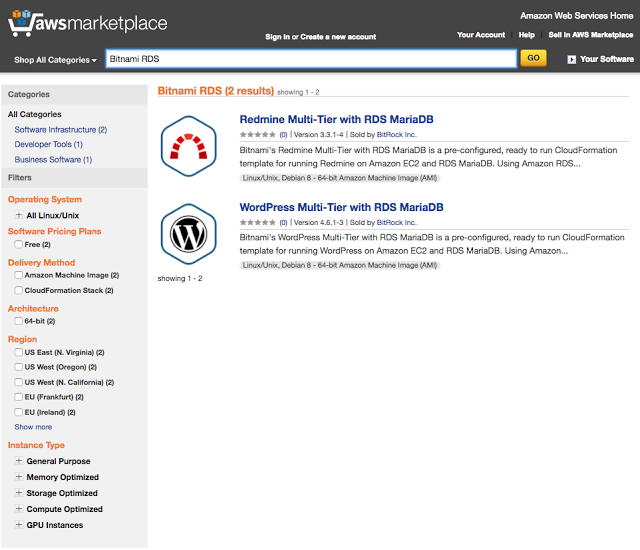
Bitnami Releases Two Amazon RDS Offerings!

Bitnami, one of the leading providers of open source software in the AWS Marketplace, is excited to announce two new offerings using Amazon Relational Database Service (RDS), Wordpress Multi-Tier with Amazon RDS for MariaDB and Redmine Multi-Tier with Amazon RDS for MariaDB. Wordpress, a popular Content Management System (CMS) and Redmine, a flexible and richly configurable project management platform, are excellent additions to any business’ needs in the cloud. 

Amazon Relational Database Service (Amazon RDS) makes it easy to set up, operate, and scale a relational database in the cloud. It provides cost-efficient and resizable capacity while managing time-consuming database administration tasks, freeing you up to focus on your applications and business.  With Amazon RDS, you can deploy a scalable MariaDB database, a popular open source relational database created by the original developers of MySQL.


Tighter integration with Amazon’s managed database offering in the cloud allows customers to take advantage of that same value with the expertise of Amazon Web Services managing the infrastructure for critical data in the cloud. These two new offerings use Amazon CloudFormation Templates created by Bitnami to orchestrate the application’s resources for the deployment. Users will be able to configure architecture suited to their needs and launch an environment into their AWS Account. All of the data required to get up and running will be pre-populated and ready for use upon deployment. 

Bitnami’s applications are trusted for their ability to provide the most up-to-date and patched versions of popular open source applications, consistently and expediently after release.  Using Bitnami’s Cloud Formation Templates allows customers to receive all of these Bitnami benefits while also being able to have an environment that incorporates the scalability and ease of use of Cloud Formation Templates.

Bitnami is excited to deepen our partnership with Amazon Web Services and our customers through the AWS Marketplace. We look forward to continuing to provide more value for our users and receiving your feedback on these applications. Please reach out to us directly if you have any requests or would like to see your applications available with Amazon RDS. You can reach out to us at enterprise@bitnami.com.

Thursday, December 18, 2014

Bitnami Open Source Leaders Interview Series: Jan Niggemann from Redmine

If you're tired of sifting through email threads to surface information on project updates, then you'll love the game-changing project management features provided by Redmine. As a continuation of our Open Source Leaders Interview series, we interviewed Redmine Community Relationship Officer, Jan Niggeman, to learn more about the app. The bottom line? Redmine's solution is not only for software development teams, but for any group that needs a way to collaborate for projects both big or small.

In the interview you'll learn:
  • What Redmine is and how it's different from other project management tools
  • Who should use Redmine and suggested use cases
  • Where to find Redmine support 
  • What to expect from Redmine in the future 
Known for bug tracking management, Redmine has become a popular option for managing both issues and tasks for multiple projects. The application gives you one central place to create, maintain, and successfully follow all of your projects. Multiple project support, flexible roles, and based access control are among the many tools that will make your team's collaboration efforts easier.

Learn more about the project from Jan Niggeman and then try it for yourself. Launch Redmine to the cloud or deploy it locally with free installers, virtual machines and cloud templates from Bitnami. Get started in the cloud for free with a $200 credit from Microsoft Azure.


Read the full transcript here: 

Stuart Langridge:       These are the Bitnami Open Source Leaders interviews. I'm Stuart Langridge, and I'm talking to Jan Niggemann of Redmine. Jan is the Community Relations Officer for the Redmine project.

Jan Niggemann:          Hi, Stuart.

Stuart Langridge:       So tell us a little bit about what Redmine is.

Jan Niggemann:          Redmine is a web application that may be used for project management and online collaboration. We have focused on integrating different areas of project management to provide a platform that's easy to use for project managers as well as the project staff, so everybody can get together online.

Stuart Langridge:       Which types of organizations are currently using Redmine?

Jan Niggemann:          There are several well-known companies around the world. For example, Citrix, Seagate, and Qualcomm. Of course, there are minor organization and lots of universities around the world, and virtually countless open source projects using it. The projects range from everything in-between software development, like the Audacious Media Player, to manufacturing.  For example, there's a project called LAOS laser that tried to program free software for laser cutting machines.

Stuart Langridge:       Are there particular types of organizations that you would like to see using Redmine, or is the answer everyone in the whole world?

Tuesday, May 6, 2014

How to run Redmine open source project management software in Azure

In March, we announced the Bitnami Launchpad for Microsoft Azure — the easiest way to deploy images in the Azure cloud. Sure, you could go through VM Depot where you can find all of our stacks, but our new Azure Launchpad is an even faster way to get up and running.

Redmine is a popular open source project manager that can be used to track many kinds of issues. Redmine is a Rails based project management application that has flexible role-based access control, feed and email notifications (and there’s even a free plugin for getting HipChat notifications), time tracking and more. It has a very simple interface and, having used it ourselves for years, we can say that it’s an easy tool to fall in love with. It’s very flexible and can be easily customized.

Give Redmine a spin with a free 1-hour demo, or launch a persistent server and try Redmine on Microsoft Azure with your team. Microsoft provides $200 credit for one month of evaluating Azure — more than enough to give you and your team completely free usage of Redmine (and more than a few other apps) for a month.

Thursday, May 16, 2013

Security fix for Ruby 1.9 applications

A new Ruby version was released recently to address a security issue.  There is a vulnerability in DL and Fiddle in Ruby where tainted strings can be used by system calls regardless of the $SAFE level set in Ruby.

We want to let BitNami users know that most popular Rails-based application installers, virtual machines and cloud images have been already updated and released to include a fixed Ruby version. We continue working on upgrading all of them for all platforms.

Ruby stack, Redmine, GitLab, Discourse, Tracks and Spree with Ruby version 1.9.3-p429 have been already released.

We have also taken this chance to upgrade several core components to their latest version, which we were already were in the process of releasing:
  • Apache version 2.4.4
  • Passenger version 4.0.2 
  • phpMyAdmin version 4.0.0
  • Perl version 5.16.3
  • Mod_perl version 2.0.8 for Apache 2.4.4

We updated Ruby-based stacks for Linux and OS X platforms. We will update the Windows-based stacks soon. If you already have installed a version of these applications please make sure that you update your environment or apply the appropriate patch.

Monday, March 4, 2013

Introducing BitNami Cloud Launchpad: Demo Your Favorite Apps in the Cloud for Free


We started BitNami with the goal of making open source server software easier to discover and install. Many BitNami users come to our website to test and compare different projects: wikis, content management systems, bug trackers and so on. We help them select the best one for them because our stacks make it easy to install and run multiple applications side by side. For others, BitNami is a great way to test the very latest release of their favorite application or language framework . Our stacks are self-contained, so they can be installed and removed without interfering with their existing setups.

Today, we are happy to announce the BitNami Cloud Launchpad, a service that allows you to test BitNami applications in the Cloud, for free.

To launch a server, just select an application from our library and click on the 'launch server now' button, as shown below:


After logging in to BitNami, you will be able to launch up to 10 apps with the click of a button. After you click to launch an app, it takes just a couple of minutes to get your server up and running. When the process is complete, you will receive an email with information on how to access the application. Each server will stay up for one hour so you have plenty of time to experiment and play with it.

We have been beta-testing this functionality for the past week and the feedback has been extremely positive. We hope that you will find the BitNami Cloud Launchpad useful for quickly testing new versions of your favorite apps or for exploring new applications.

We have plans to extend and improve this new service, so stay tuned! In the mean time, if you are looking to host your BitNami applications in the cloud, consider BitNami Cloud Hosting.  It provides the same ease of deployment as the Cloud Launchpad but adds monitoring, automatic backups and the ability to resize servers as needed.

Thursday, January 31, 2013

New security fix for Rails 2.3.x. Applications updated on BitNami

A new Rails security issue that affects older versions of Rails (2.3.x and 3.0.x) was recently announced. This is a vulnerability related to the JSON parser code for Ruby on Rails with allows attackers to bypass authentication systems, inject arbitrary SQL or inject and execute arbitrary code.

We have released RubyStack 1.8, Redmine 1.4.x, Radiant, Gitorious and Tracks with the latest Rails v2.3.16 that fixes this issue. Note that if you are using an application that ships Rails 3.2.11, it is not affected by this issue.

We are also removing older versions of BitNami Rails apps published on the Windows Azure and Amazon Cloud catalog and marketplace and that may be vulnerable to these security issues.

For more details about these security issues please check the information provided in the official Ruby On Rails blog. If you already have installed a version of these applications please make sure that you update your environment or apply the appropriate patches.


Thursday, December 20, 2012

New BitNami Redmine 2.2.0 released!

We are happy to announce that you can now download a new BitNami Redmine stack for the just-released Redmine 2.2.0 version. In case you are not familiar with the Redmine project, it is a flexible, web-based project management application.

This version of Redmine adds support for the latest Rails release: Rails 3.2.9. We also upgraded PHP to the latest stable version: 5.4.9.

New features in this version:
  • Private comments in issues.
  • Ability to allow subtasks in subprojects or other projects (can be turned on/off with a configurable scope).
  • Issue relations improvements:
    • Precedes/Follows relations take care of non working days when rescheduling issues (non working days can be configured in the application settings).
    • Precedes/Follows relations now also move following issues when rescheduling an issue earlier.
    • A new relation "Copied from/to" is automatically added when copying issues.
    • You can now filter issues against their relations.
    • Relations can be displayed on the issue list.
  • Issue list improvements:
    • The order of the group column can now be set.
    • An option lets you display the full issue descriptions on the issue list.
  • REST API additions: wiki pages, roles, priorities, user Impersonation.
Download the free native installer or virtual machine or deploy the new Redmine 2.2.0 version to the Amazon cloud in one click from the BitNami Redmine page. Enjoy!


Tuesday, November 20, 2012

Updated Redmine stack and upgrade instructions

We are happy to announce new BitNami Redmine stacks for the 2.1.3 and 1.4.5 versions of the popular project management tool. Both versions are running now the latest stable version of Ruby, 1.9.3-p327 and the latest passenger 4 beta which significantly improve the performance of the application. Check our previous post for more details of the enhancements we have been implementing for all Ruby-based apps in the BitNami library.

If you are an existing Redmine user, the rest of the article explains step-by-step instructions on how to upgrade to the latest version using the BitNami stack. 

First, check the plugins that you are currently using and make sure that they support the latest 2.1.x version. If your plugins are not compatible with the 2.x releases, you may want to upgrade to the latest BitNami Redmine 1.4.5 version instead.

Next, create a backup of your previous installation. It is necessary to create a database backup and make a copy of your uploaded files. The steps below are valid to upgrade from a previous BitNami Redmine installation, in a non-BitNami installation the process should be similar.

$ /installdir/mysql/bin/mysqldump -u root -p bitnami_redmine > redmine_backup.sql
$ tar -czvf redmine-files.tar.gz /installdir/apps/redmine/htdocs/files

The next step is to install the new BitNami Redmine version. You can download a native installer, the virtual machine or start a new instance in the Amazon cloud. You can use the same machine or you can consider migrating your servers to the cloud (heck out some reasons why you may want to move your infrastructure to the cloud)

Once you have the new Redmine version running, install the plugins that you need. Then copy the database backup and the files directory backup to the machine and restore them. Check that you are running these command from the BitNami Redmine console, so the appropriate environment variables are preloaded.

$ /installdir/mysql/bin/mysql -u root -p bitnami_redmine < redmine_backup.sql
$ tar -xzvf redmine-files.tar.gz /installdir/apps/redmine/htdocs/

Next, migrate the database to the new version.

$ cd /installdir/apps/redmine/htdocs
$ rake db:migrate RAILS_ENV=production

If you have installed plugins, you should run the following command:

$ rake redmine:plugins:migrate RAILS_ENV=production

Alternativelt, if you are using the 1.4.x version, the migration command is the following:

$ rake db:migrate_plugins RAILS_ENV=production

If you find any issue during the migration, check our Wiki or post in our forum. Now you can start Redmine again and access it via the web. You will probably want to configure the email settings in the new Redmine installation in the "/installdir/apps/redmine/htdocs/config/configuration.yml" file. You can find here an example using a GMail account.

Finally, some users also want to change the URL to access the app from the root of the domain name (http://example.com instead of http://example.com/redmine). The below provides sample configuration changes.

DocumentRoot /installdir/apps/redmine/htdocs/public
#Alias /redmine /installdir/apps/redmine/htdocs/public
<Directory "/installdir/apps/redmine/htdocs/public">
  Options -MultiViews
  allow from all
</Directory>
#<Location /redmine>
#  SetEnv RAILS_RELATIVE_URL_ROOT "/redmine"
#  RackBaseURI /redmine
#</Location>
PassengerPreStart http://example.com/

That's all! Enjoy your new, faster than ever Redmine, powered by BitNami.

Monday, November 19, 2012

Updated BitNami Redmine stacks (Ruby 1.9, Passenger 4)


We are happy to announce that BitNami Redmine, BitNami RubyStack and other Ruby-based stacks have been updated to include Ruby 1.9 and Passenger 4 beta with one goal in mind: improving performance. There are benchmarks that prove Ruby 1.9 is almost 2x faster than 1.8 version, and it feels even faster in the real world. 

The following are several BitNami applications that have been re-released with Ruby 1.9 support:

Redmine, project management tool.
Spree, an e-commerce platform.
Tracks, a web-based application to help you implement the GTD methodology.
Radiant, a Ruby On Rails CMS. We have upgraded it to 1.1.0 version.
- In addition to that, all of the BitNami PHP-based modules like WordPress, Drupal, Joomla!, SugarCRM and others will run well on top of RubyStack.


The default configuration for production environments for Linux and OS X is now Apache running with the Passenger module. However, if you prefer to use Nginx with Passenger, BitNami RubyStack ships the Nginx server and the Passenger extension already compiled and ready-to-use! Please see below for how easy it is to enable Nginx server with Passenger.

$ cd /opt/bitnami (or your installation directory)
$ ./ctlscript.sh stop apache

Edit the "nginx/conf/nginx.conf" and add the public path to your application. For example, Redmine application:

 server {
    listen 80; (or a different port)
    root /opt/bitnami/apps/redmine/htdocs/public;
    passenger_enabled on;
    rails_env production;
    passenger_base_uri /redmine;
 }

Disable Apache server and enable Nginx.

$ mv apache2/scripts/ctl.sh apache2/scripts/ctl.sh.disable
$ mv nginx/scripts/ctl.sh.disable nginx/scripts/ctl.sh
$ ./ctlscript.sh start nginx

On Windows, all BitNami Ruby-based stacks ship DevKit, a development tool kit for adding gems that require C/C++ extensions easily. Now it is even easier to customize your applications or extend their functionality adding plugins.

Monday, June 11, 2012

BitNami module for Redmine 2.0 already available for new Rubystack

Last week we released the new BitNami Redmine 2.0 Stack with several configuration improvements:

      • On Linux and OS X, the default configuration now uses Passenger (a.k.a mod_rails) instead of Mongrel Cluster servers. This configuration improves the Redmine application performance for these platforms.
      • On Windows, the BitNami Redmine Stack uses Thin servers instead of Mongrel to deploy the Redmine application. Different benchmark tests show that Thin performance is also better than Mongrel.
Now, we are happy to announce two new versions of BitNami RubyStack:

- Version 2.3.14-2: Which supports the new Redmine module version in addition to other  PHP  BitNami modules like WordPress, Drupal, Joomla!, SugarCRM, etc. These modules are installed on top of this RubyStack and they share the same Apache server and the MySQL database.

- Version 3.2.5-0: Which ships the latest version of Rails and Ruby 1.9.

Both RubyStack versions include RVM 1.13.6 for OS X and Linux. On Windows they ship the DevKit to install gems that require to be compiled for this system easily.

As usual, RubyStack and Redmine are now available in the form of ready-to-run installers, virtual machine images (VMs) and Amazon Machine Images (AMIs) for the Amazon Cloud. 

Thursday, May 24, 2012

BitNami Redmine 2.0 Released!

We are happy to announce that we have released a new version of the BitNami Redmine Stack that includes the just-released Redmine 2.0.0. This new version of Redmine adds support for the latest Rails 3 release.

In addition to this, we have improved the deployment configuration so it can benefit from the latest improvements in Rails 3.

On Linux and OS X, the default configuration now uses Passenger (a.k.a mod_rails) instead of Mongrel Cluster servers. This configuration improves the Redmine application performance for these platforms (according to these tests).

Unfortunately, Passenger is not available for Windows, so the BitNami Redmine Stack uses Thin servers instead of Mongrel to deploy the Redmine application. Different benchmark tests show that Thin performance is also better than Mongrel.

Download the free native installer or virtual machine or deploy the new Redmine 2.0.0 version to the Amazon cloud in one click from the BitNami Redmine page. Enjoy!

Tuesday, August 2, 2011

BitNami Redmine Stack now available in Spanish and Japanese!

Hello! ¡Hola! こんにちは!

We have been working on a lot of exciting new features and improvements for BitNami and BitNami Cloud Hosting that we will be releasing over the next few weeks. Today we are really happy to announce support for Japanese and Spanish for one of our most popular stacks: Redmine is a great project management tool that is both flexible and easy to use. The new language support means that the whole installation process and application setup have been localized, making Redmine more accessible than ever for users that are not fluent in English. This is the first of many stacks to be localized. If you are interested in helping with the effort, or would like to see a specific stack localized, please let us know.  We want to thank Sakai Kei for his help with the Japanese translation.

Screen capture of the installer running in Japanese mode
Redmine habla español!