Showing posts with label elasticsearch. Show all posts

Thursday, May 27, 2021

Collecting Community Feedback: New Improvements and Features in Bitnami Helm Charts

So far this year, the Bitnami Content team has merged more than 700 Pull Requests (PR) in our Helm charts GitHub repository. About half of those PRs are mainly external contributions to the most popular solution, the Bitnami WordPress Helm chart.  

The community actively contributes to the Bitnami’s Helm chart catalog improvement by suggesting new features and reporting issues. This is not the first time that we can say how proud we are of our community, since some of our users also contributed in the past by submitting their own Helm charts.   

Meanwhile, the Bitnami Content Team continuing checking both the PRs and issues submitted by users to identify which are the problems they are dealing with and how we can enhance the user experience and providing the most up to date and secure versions of the community’s favorite applications.  

Find below the list of the latest improvements done in our Helm charts catalog. And don’t forget to check Bitnami documentation and visit our Tutorials site to boost your Kubernetes skills! 


Latest Bitnami Helm Charts New Features and Improvements 


WordPress 


Elasticsearch and Kibana

  • New feature: Both Elasticsearch and Kibana license changes. Both are now licensed under the Elastic License. X-Pack is also now included by default on both Elasticsearch and Kibana 
  • Chart version: 15.0.0 (Elasticsearch) and 8.0.0 (Kibana) 
  • More info: Elasticsearch / Kibana 
  • Deployment offering


MinIO 


Etcd 

InfluxDB 

Visit the Bitnami Helm chart repository in GitHub for more information about our charts’ latest versions and improvements or navigate to the Bitnami Application Catalog for deploying the solution of your choice in any Kubernetes platform.  

Wednesday, February 20, 2019

Arbitrary code execution vulnerabilities in Kibana (CVE-2019-7609 and CVE-2019-7609)

Some security vulnerabilities in Kibana have been reported recently. Two of these vulnerabilities allow arbitrary code execution in the application.

Apart from these arbitrary code execution vulnerabilities in Kibana, the official announcement also mentions other security improvements in the Elasticsearch, Logstash and Kibana components. Versions prior to 6.6.1 are affected by these vulnerabilities. You can learn more about them in the official announcements.

We recommend that you upgrade your ELK deployments to the latest version. You can follow our documentation to learn how to upgrade your deployment to strengthen its security. We highly recommend creating a backup before performing the upgrade.

For new application deployments, including those made from the Bitnami Launchpad, we have updated and released the containers, installers, virtual machines, cloud images, and Multi-Tier solutions that contain any of the affected versions.

If you have further questions about this security issue, please post to our community forum, where we will be happy to help.

Tuesday, November 28, 2017

Elasticsearch and ELK 6.0

We are happy to announce a new version of the Bitnami Elasticsearch and ELK Stacks:

Elasticsearch is a popular open source, distributed, enterprise-quality search and analytics engine. Accessible through a REST API, it sifts through large amounts of data extremely quickly. ELK also includes Logstash (centralized logging, log enrichment, and parsing) and Kibana (powerful and beautiful data visualizations).


Here are some of the most remarkable new features and enhancements included in Elasticsearch 6:
  • Rolling Restart feature negates the need for a full cluster restart, minimizing downtime.
  • Sorting at indexing time.
  • New indices will be restricted to a single type (first step to remove mapping types).
  • Based on Lucene 7, it supports Sparse Doc Values.
  • More successful and efficient shard recovery.

To learn more information about this release, visit the ELK Stack upgrade page.

Do you want to try these new features? Deploy the Bitnami Elasticsearch and ELK Stack in just one click. To get started, you can choose to run them on any of our all-in-one free native installers (for Linux, Windows and OS X) and virtual machines, or launch them in the cloud.

And for the most demanding environments, you can also try Bitnami Elasticsearch Multi-Tier, already available on Google Cloud Platform or Azure.


Friday, January 13, 2017

Elasticsearch Installation Security Incident

As of today, attackers have been reportedly scanning for and vandalizing unsecured Elasticsearch installations over the Internet. (See: http://www.pcworld.com/article/3157417/security/after-mongodb-ransomware-groups-hit-exposed-elasticsearch-clusters.html)

Bitnami's security team has reviewed our image library. As a result, we have confirmed that Bitnami virtual machines and single-VM cloud images are not vulnerable to this attack because they do not expose Elasticsearch publicly by default; Elasticsearch is proxied through Apache with authentication.

One Bitnami listing, "Elasticsearch Cluster" on Microsoft Azure, was found to be vulnerable. This listing was removed earlier this week and we are notifying the small number of users who may have installations based on the affected template.

Since the scale of the attack appears to be growing, we recommend that all users of Bitnami Elasticsearch on all cloud platforms check that their installations are secure. Deployments that were secure at launch may have been accidentally opened to the Internet by changing the default configuration. 

We recommend that you immediately ensure that your Elasticsearch is not exposed to the public internet by reviewing:

a) Inbound firewall rules prevent traffic to ports 9200-9300 from the Internet

or

b) Moving any Elasticsearch deployments to private networks

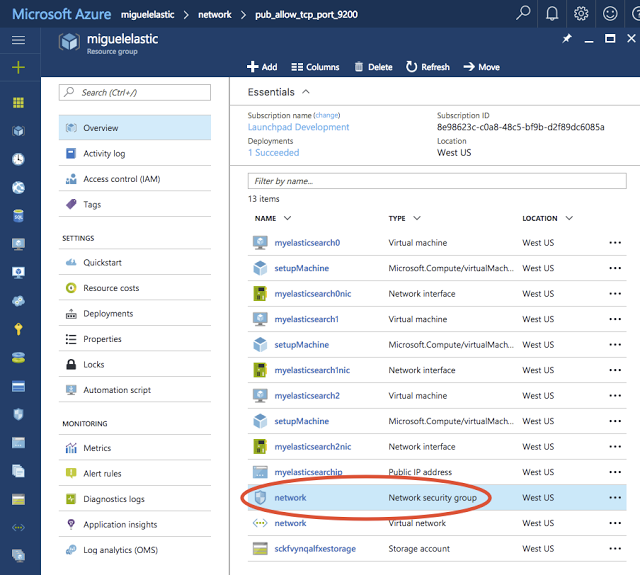
How to restrict access to port 9200 on Microsoft Azure:
1. Login to Microsoft Azure Portal.
2. Using the left hand navigation bar, go to “Resource groups”.
3. Select the resource group your Elasticsearch Cluster application is located in.
4. Select the "Network Security Group" to edit the properties.


5. Select the "Inbound security rules" to close the port 9200 by changing the Action from “Allow” to “Deny”.
6. Click the blue “Save” button at the top of the window.


Additional practices for securing Elasticsearch can be found here: http://code972.com/blog/2017/01/107-dont-be-ransacked-securing-your-elasticsearch-cluster-properly

If you have been affected by this attack or need additional help updating your Bitnami Elasticsearch, please contact us directly through our Helpdesk and we will do our best to assist you. https://bitnami.zendesk.com/hc/en-us.

Friday, January 9, 2015

Elasticsearch added to Bitnami Library!

We are happy to announce that Elasticsearch is now available on the Bitnami library!

Elasticsearch is an open source real-time search and analytics engine. It is intended for use in distributed environments where reliability and scalability are critical. Almost any action can be performed using a simple RESTful API using JSON over HTTP. 


Elasticsearch is now ready to install in a few clicks with the Bitnami Elasticsearch Installers (available for Linux, Windows and Mac OS X), Virtual Machine images(VMs), cloud images for Amazon EC2, Azure and Google Cloud Platform. 

We also ship Elasticsearch-head, which is an open source plugin that provides a web front-end for managing your Elasticsearch cluster.

If you want to quickly check out Elasticsearch, you can launch a free cloud demo server. By clicking the button below, you will have your own Elasticsearch instance running for 1 hour, for free!


Don't forget to visit our wiki to learn how to manage your installation. Still have questions? We would be happy to answer them on our community forum.

Would you like your favorite app to be part of Bitnami? Be sure to suggest and vote for it in our monthly contest!