Showing posts with label nginx. Show all posts

Wednesday, July 20, 2016

Security notification: httpoxy A CGI application vulnerability (CVE-2016-5385, CVE-2016-5387, CVE-2016-1000110)


On July 18th, a vulnerability named ‘HTTPoxy’ was announced, affecting some server-side web applications that run in CGI or CGI-like environments, such as some FastCGI configurations.

A number of CVEs have been assigned, covering specific languages and CGI implementations:
  • CVE-2016-5385: PHP
  • CVE-2016-5386: Go
  • CVE-2016-5387: Apache HTTP Server
  • CVE-2016-5388: Apache Tomcat
  • CVE-2016-1000109: HHVM
  • CVE-2016-1000110: Python
More information about the vulnerability can be found on the httpoxy website.

Any PHP-based, Python-based or Tomcat-based Bitnami application is affected by this security issue.

We believe it is of the utmost importance to quickly address any security issues in applications distributed by Bitnami and our team is working to update all of the affected Cloud Images, Virtual Machines and Native Installers available through Bitnami.

Please take a moment to check if your image is vulnerable by following the instructions in the security section of our wiki.

You can mitigate the issue by blocking the Proxy request headers as early as possible, and before they hit your application. This is easy and safe.

Apache


  • Modify the <IfModule headers_module> in the /opt/bitnami/apache2/conf/httpd.conf file of Apache to unset the Proxy header. It will look like this:
...
<IfModule headers_module>
    RequestHeader unset Proxy
    ...
</IfModule>
... 

  •  Save the file and restart the service of Apache
sudo /opt/bitnami/ctlscript.sh restart apache 

Nginx


  • Add this line at the end of the file at /opt/bitnami/nginx/conf/fastcgi_params.
fastcgi_param  HTTP_PROXY "";

  • Save the file and restart the service of Nginx
sudo /opt/bitnami/ctlscript.sh restart nginx 


If you have any questions about this process, please post to our community support forum and we will be happy to help!

Update: 2016-07-22


The Bitnami Team has been working on releasing all the affected stacks in the different cloud vendors and we have to announce that the images of Google, Azure, 1&1 and GoDaddy have been updated properly. 

We continue working on releasing pending cloud platforms, virtual machines and the native installers. 

Update: 2016-07-26


All the cloud images, virtual machines and native installers that were affected by this security issue have been successfully patched and they are already available through Bitnami and our cloud partners. 

If you are using a Bitnami Cloud Hosting instance, you can easily patch it following the guide above while we upgrade the base image. 

Update: 2016-07-29


We patched the base images of Bitnami Cloud Hosting successfully and you can now launch a non-affected instance using Bitnami. You can also check the bundled components of the new images using this link


Tuesday, June 23, 2015

Bitnami Container Images for Docker - Now in Beta

We’re very happy to announce availability of the first set of Bitnami container images focused on the needs of application developers. We’ve been using containers internally for close to a year and have found them useful, both for local and cloud-based development and testing.

Bitnami container images can help you:
  • Reduce the time it takes to setup a developer on a new project
  • Reduce friction when sharing environments - experience less “but it worked on my machine?” 
  • Mix and match languages for specific projects - with consistency, regardless of the components you select
As with any rapidly evolving technology, we’ve run into a few bumps along the way, but believe that containers offer an interesting way to collaborate on your next software project and that they are complementary to our existing installers, virtual machines, and cloud images.

We’re starting small and initially focused on the needs of Web developers. Today we’re announcing beta Bitnami container images for nginx, php-fpm, mariadb, memcached, node, redis, apache, and ruby.

Our container images have been built around some key ideas we wanted, but found lacking, in other publicly available container images. Bitnami containers for Docker:
  • Share a common base OS (initially Ubuntu 14.04) to minimize time-to-get-started
  • Are kept up-to-date with consistent version tagging
  • Are easy to combine into a multi-tier application because they are consistently documented and take a standardized approach to configuration, bootstrapping, and logging
  • Separate data from code to enable upgrading of individual components
  • Include run-time notification of new versions
Bitnami container images are available now on the Docker Hub Registry and on GitHub. A walk-through of  how to use these container images to package a real-world application is also available.

We’re very interested in feedback from you on how these container images could be improved. Please open issues with ideas for enhancements or use cases on GitHub. We welcome contributions to the code, so please open a pull request if you have code to share.

Click here to get Bitnami container images for Docker.

Friday, May 22, 2015

Bitnami Nginx v1.8.0 now available


Nginx, the web server and mail proxy, released version 1.8.0 and we are happy to announce this version is already available in Bitnami.

In case you are not familiar with Nginx, it is a small but very powerful and efficient web server and mail proxy. It is trusted by many of the busiest sites on Internet, and its main advantage is scalability.

Nginx 1.8.0 stable version incorporates many new features such as hash load balancing method, backend, SSL certificate verification, experimental thread pools support, proxy_request_buffering and more. You can find the complete list of its features here.

Bitnami Nginx is available as native installers (available for Linux, Windows and Mac OS),virtual machines and cloud images for Amazon EC2, Azure and Google Cloud Platform. Bitnami Nginx ships Nginx web server, MySQL database server, PHP and phpMyAdmin right out of the box.

You can find more information about how to manage your installation on our wiki. Still have questions? We would be happy to answer them on our community forum.

Thursday, September 18, 2014

New RubyStack version in Bitnami Library

We are happy to announce that we have updated our Bitnami RubyStacks (2.0.0-20 and 2.1.2-3) to the latest versions of Passenger, Node.js, PHP and Nginx, among others.

If you are not familiar with it, Bitnami RubyStack provides a fully-configured and ready to run Ruby on Rails development environment. You can download or deploy it to the cloud free of charge with our ready-to-run installers, virtual machine images (VMs), Amazon Machine Images (AMIs) or Azure Images

In addition to the base Ruby runtime and libraries, the stack includes the most popular gems for building Rails applications: Passenger, Nokogiri, Rake, RMagick, Mongrel, Thin and more. It also includes the latest stable release of Ruby, RVM, Rails, Apache, NGinx, MySQL, SQLite, Git, Varnish, Sphinx, PHP and phpMyAdmin.

All updates to this development stack are listed in it's changelog, but below are the main components:
  • Updated Passenger to 4.0.50
  • Updated Node.js to 0.10.31
  • Updated PHP to 5.4.32
  • Updated Nginx to 1.6.1
If you have any question about Bitnami RubyStack you can check our quick start guide or you can create a new thread in our community forums .

Tuesday, August 26, 2014

New Nginx stack with PHP and MySQL (LEMP)


We are happy to announce that the Bitnami Nginx Stack has been released. Also known as LEMP, WEMP and MEMP for Linux, Windows and OSX respectively, it provides a ready to run environment with the Nginx Web Server, PHP and MySQL.


The stack includes the following primary components:
  • Nginx Web server (1.6.1)
  • MySQL database server (5.5.38)
  • PHP-FPM (5.4.31)
  • phpMyAdmin web application management tool for the MySQL database (4.2.7.1)

In addition to these components, it includes:
  • Varnish proxy cache server (optional)
  • ImageMagick tool
  • SQLite database
  • XDebug module
  • Memcache module
  • APC module
  • GD library
  • OpenSSL library
  • CURL library
  • OpenLDAP library
  • PEAR and PECL package manager tools

Nginx is a small but very powerful and efficient web server and mail proxy. It is trusted but many of the busiest sites on internet, such as WordPress, Facebook and Dropbox. It is an asynchronous server and its main advantage is scalability. In a process-based server, each simultaneous connection requires a thread. This incurs significant overhead. An asynchronous server, on the other hand, is event-driven and handles requests in a single (or at least, very few) threads, consuming less RAM in busy environments.

The Bitnami Nginx Stack is also configured with PHP-FPM (FastCGI Process Manager), an alternative PHP FastCGI implementation with some additional features useful for sites of any size, especially busier sites.

The Bitnami Nginx Stack is available for free from the Bitnami app store as a native installer or virtual machine for local development, or as a cloud template for the Amazon and Windows Azure cloud computing platforms.

Once the installation process has been completed, you can access the welcome page from your browser at http://localhost on Windows or http://localhost:8080 on OS X or Linux.

We documented more details and more features of the Bitnami Nginx Stack in our Quick Start Guide. You can also check here how to install WordPress on an Nginx Cloud Image.

Do you have questions? We will be happy to help you at our community forum!


Friday, May 31, 2013

Ruby 2.0 development environment for Windows

We are glad to announce a new release of BitNami Ruby 2.0 Stack, which is focused on improved Windows support.  

BitNami Ruby Stack provides a complete, self-contained development environment for Ruby on Rails for Linux, Windows and Mac OS X. We offer one-click packages for each Ruby 1.8, Ruby 1.9 and Ruby 2.0.

BitNami Ruby 2.0 for Windows

With the latest version of Ruby in this package you can find the latest version of Rails. In order to avoid frustration when installing gems that require compilation,  we also include pre-compiled version of the most common gems like thin, eventmachine, mysql2, sqlite3 and rmagick. This is specially interesting on Windows when you don't always have a compilation environment set up. In any case, we also include DevKit on Windows in case you want to use other gems that need to be compiled.

Together with the minimum Ruby on Rails environment we include other components that you will likely use when developing a RoR application. On our Windows version you can find:
  • Apache HTTP Server and thin and eventmachine pre-compiled gems for web deployment. 
  • Databases: Sqlite3 and MySQL databases together with sqlite3 and mysql2 pre-compiled gems. 
  • phpMyAdmin for MySQL administration.
  • A graphical manager tool for managing the servers.
  • ImageMagick and rmagick gem for image conversion.
  • Source version control systems: Subversion and Git
In Linux version you also find NGINX web server and Varnish a web application accelerator. Apache is working with Pushion Passenger by default in this flavor.

You can take a look at our documentation to learn more about how to use BitNami Ruby Stack.

Wednesday, October 3, 2012

New RubyStack for Ruby On Rails Developers

We are happy to announce a new version of BitNami RubyStack. If you are not familiar with RubyStack, it is a self-contained, easy to use distribution with one goal in mind: to make it simple to get started developing Ruby On Rails applications. BitNami RubyStack is available in the form of free, ready-to-run installers, virtual machine images (VMs) and Amazon Machine Images (AMIs) for the Amazon Cloud.

The following versions of BitNami RubyStack are now available on the RubyStack download page:
  • 1.8.7-0:  It ships Ruby 1.8.7 and Rails 2.3.14
  • 1.9.3-0:  with Ruby 1.9.3 and Rails 3.2.8
These Stacks also include RVM, so it is possible to install any Ruby version on top of any of the Stacks. Check our RVM quick guide to know how to install more Ruby versions. In addition to the Ruby runtime and its dependencies, BitNami RubyStack ships the components listed below:

- Apache 2.2.22 with Passenger module
- NGinx 1.3.4 with Passenger module
- MySQL 5.5.21
- Git 1.7.11.3
- Subversion 1.7.5
- Sphinx 2.0.4
- SQLite 3.7.10
- Memcached 1.4.13
- Varnish 3.0.1
- DevKit for Windows
- PHP and phpMyAdmin (optional)

To simplify the process even more, RubyStack also installs and configures most popular Ruby gems:

- Bundler
- MySQL
- SQLite
- Nokogiri
- Passenger
- RMagick
- Mongrel and Thin
- and more.

One of the improvements in this version of RubyStack is that the dependencies for gems that require compilation are already bundled and pre-configured so they will run out of the box. If you need a different version of one of the gems, you can run the "bundle install" command and it will be automatically download, compile and install the gem in your RubyStack.

In addition, we have also been working on improving our documentation. There is a new Quick Start Guide that addresses the most common questions that we get about BitNami RubyStack. You will also find a step-by-step guide on how to create your first Ruby On Rails project on top of RubyStack. For more advanced users, you can will also find information on how to deploy your application with Passenger in production environments.

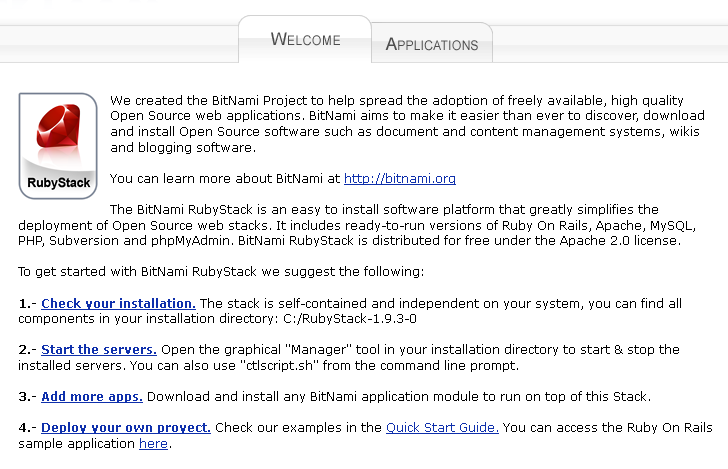
Welcome page


In addition to BitNami Stacks, we provide simplified deployment and management of Ruby on Rails development environments in the cloud with BitNami Cloud Hosting. Sign up for our free developer plan to check it out!