Tuesday, August 9, 2011

New Features in BitNami Cloud Hosting

We are excited to share some new features we have rolled out in BitNami Cloud Hosting! If you log in to your BitNami Cloud Hosting account (or sign up for a new one), you will see the following improvements:


  • OpenID: You can now setup and sign in to your BitNami Cloud Hosting account using OpenID. This means that you can log in with your Facebook, Google, Yahoo or GitHub account. One less password to remember!   

    Log into BitNami Cloud Hosting with OpenID.
  • Password Reset: Forgot your password? Well, that's embarrassing! But don't worry - we have implemented new functionality that will allow you to reset your password if you have forgotten it. Just click on the 'forgot password' link on the login screen and follow the steps to recover your password.

  • Free Tier Eligibility: We frequently receive questions regarding what is covered by the Amazon free tier of service. BitNami Cloud Hosting now provides visual feedback as to whether or not the server you are launching may qualify for the Amazon free tier. Please note that we will still provide cost estimates that do not take the Amazon free tier into account, as we are not currently able to pull this information from your Amazon account. 


    BitNami Cloud Hosting now indicates if your server may be
    eligible for the Amazon free tier of service.

  • Random Passwords: If you do not specify a password when you launch a new server, one will be created randomly so that you are never using a default password. To view the generated password, click on the 'manage' button after selecting the appropriate server and then click 'show' next to the password entry, as shown below.   


    A random password will be auto-generated if you
    do not specify one during the server setup process.

  • Email Notifications:  You will now receive a notification email every time that you launch a new server that includes details such as the server specifications and estimated cost, as shown below. At the beginning of each week, you will also receive an email summary that lists the servers that you are currently running.  

New email notifications let you know when your server is ready.
We hope you enjoy these new features in BitNami Cloud Hosting. We have several others in the works, so stay tuned! If there are specific features that you would like to see in BitNami Cloud Hosting, let us know by opening a ticket in through our helpdesk

Friday, August 5, 2011

New BitNami Q&A Site


As we mentioned in a previous post, we built a BitNami Stack for OSQA, the open source question and answer platform, because we intended to use it ourselves. We're happy to announce that the new BitNami Q&A site is now live! We believe that the Q&A format makes it easier to find the best answers to your questions and engage with the rest of the BitNami user community. Over time, we'll be migrating users and content from the BitNami forums over to the new Q&A site. If you have any new questions for the BitNami team or community, please make sure you post them to the new site!

Thursday, August 4, 2011

BitNami Cloud Tools for AWS


Today we are happy to announce a new addition to the BitNami family: BitNami Cloud Tools. Over the years, we have become pretty good at packaging open source web applications and making them easy to install. We started with native installers and virtual machines and lately we have had great success with BitNami Cloud Hosting for launching those same apps in the cloud. Now we want to bring the same ease of use to developer and system administrators of cloud environments, starting with the Amazon Cloud. Our first two projects are the BitNami Cloud Tools installer (available now) and the BitNami Cloud Agent (currently in private beta). Our cloud tools installer is a collection of all the official command line tools available for the Amazon tool: EC2, Beanstalk, ELB, RDS, etc. They come bundled with a JDK and a Ruby 1.9 runtime so, with a single download, you get a fully configured environment to start playing with every Amazon API. We will be keeping it up-to-date and adding new tools as they become available.

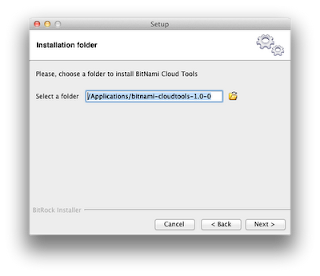
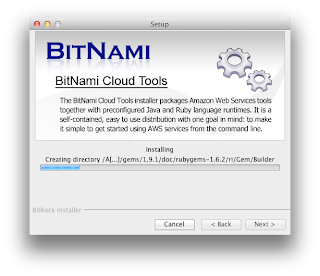
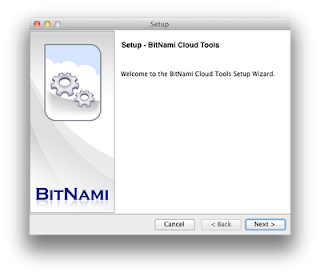
Everybody loves screenshots :)  So we took some to show you what the installation process looks like

Assuming you already have an AWS account, the next step after installation is to configure AWS credentials properly. The BitNami Cloud Tools stack is already configured in such a way that all AWS tools expect the following files to be present: 


 - config/aws-credentials.txt: You need to add there AWS Access Key ID and AWS Secret Access Key.
 - config/ec2.crt: Copy AWS PEM-encoded X.509 certificate to this location. 
 - config/ec2.key: Copy AWS Private key file to this location. 


Please make sure that all those files are readable only by your user id. On Unix systems you may want to execute the following command: 


$ chmod 600 config/* 


Now you can run any of the available commands to interact with the Amazon EC2 web service interface. You can use these tools to register and launch instances, manage security groups, etc.

On Windows, you can see a Start Menu Shortcut where you can find the "aws-cmd" to start working with AWS Tools.

Start Menu
Listing regions
You can list the instances that you have currently running, in this case from OS X.
Listing running servers


The complete set of tools included in this release:

aws-ec2-ami 1.3-66634
aws-ec2-api 1.4.3.0
aws-beanstalk
aws-elb 1.0.12.0
aws-iam 1.2.0
aws-rds 1.4.006
aws-sns 1.0.2.3
aws-auto-scaling 1.0.33.1
aws-cloudformation 1.0.8
aws-cloudwatch 1.0.12.1
It also ships the AWS SDK for Ruby and Java:
aws-sdk-ruby 1.0.3
aws-sdk-java 1.1.7.1